Guide ·
WoW Forever First Settings to Change: 10-Point Checklist
The first settings to change in World of Warcraft: Forever (WoW Forever) are camera follow, auto loot, self-cast, Target of Target, keybindings, chat, sound and nameplates, all found by pressing Escape and choosing Options. Blizzard's starter guide says to start with the defaults, so treat this as a checklist from guides, not a requirement. The game launched on November 4, 2026.
Quick answer: Press Esc, then Options. Several guides name three changes: set camera following to Never, turn Target of Target on if you tank or heal, and turn Error Speech off. They disagree on auto loot. Menu names below come from outlets; check Esc > Options.
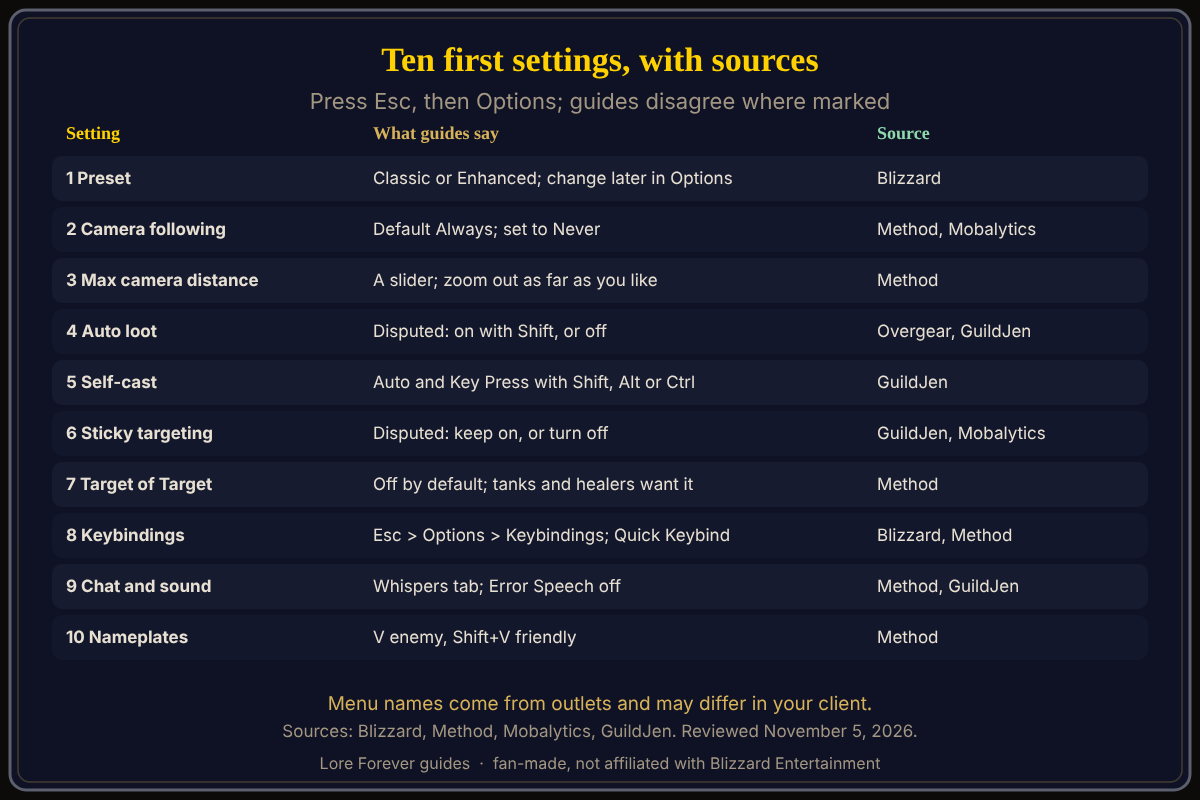
Key facts
- Open Options: Esc > Options; categories include controls and key bindings, action bars, nameplates, chat, audio, graphics and accessibility (Blizzard Starter Guide, October 28)
- Search: a search bar at the top right of Options (Method)
- If a change sticks: Mobalytics (November 3) says to type /reload in chat
- Reset: the Battle.net cogwheel next to Play, Game Settings, Reset In-Game Options (LepreStore, November 2)
What are the ten settings?
- Experience preset. Blizzard says you choose Classic or Enhanced at first login and can change individual preset settings later under Game Menu > Options.
- Camera following. Method says it defaults to Always and recommends Never; Mobalytics and GuildJen agree. See camera controls.
- Max camera distance. Method calls it a slider and suggests zooming out as far as you like. See max camera distance.
- Auto loot. Disputed. Overgear lists it enabled with Shift as the key and Mobalytics describes using it; GuildJen says turn it off to manage bag space and hold Shift when you want it.
- Self-cast. GuildJen says to choose Auto and Key Press with Shift, Alt or Ctrl as the key, kept apart from mouseover keys. Method mentions separate self-cast and mouseover keybinds.
- Sticky targeting. GuildJen says keep it on; Mobalytics notes that turning it off lets you deselect by clicking the ground.
- Target of Target. Off by default (Method); tanks and healers especially want it.
- Keybindings. Esc > Options > Keybindings (Blizzard). Method and GuildJen describe Quick Keybind: hover an action bar slot, then press the key. See how to change keybinds.
- Chat and sound. Method says whispers open a new tab by default; GuildJen says disable Error Speech and enable Sound in Background. See chat settings and sound and audio settings.
- Nameplates. V toggles enemy and Shift+V friendly nameplates (Method). See nameplates and target settings.
Where do graphics, interface and accessibility fit?
Pick graphics for your machine in best graphics settings for low-end PC and Mac, then arrange bars in Edit Mode. GuildJen lists Increase text scale under Vision, in its accessibility section; see accessibility settings. Then follow the first hour guide.
What is not confirmed yet
- Every menu name above comes from outlets, not a Blizzard settings page; names and positions can differ.
- Auto loot and sticky targeting advice conflicts between guides; that is preference, not a rule.
- Values were written for the beta and launch builds and Blizzard may change them.
- I found no Blizzard list of recommended first settings beyond the starter guide's "start with the defaults".
How can the Lore Forever add-on and Willo help with this?
When the menu is confusing, ask Willo out loud, such as "where do I change the camera distance"; she can answer from what she knows and can be wrong, so the in-game menu is the source of truth. She does not change settings for you, and is free to start with 50 answers a day. She is a separate companion app: her page lists a Windows 10 or 11 download and an Apple Silicon Mac download (macOS 12 or later), and her FAQ and the Lore Forever FAQ now say Windows and Mac, though CurseForge still describes her as a Windows app. For the quest story behind your first zone, the free Lore Forever add-on adds readable and recorded stories; it is fan-made, not affiliated with Blizzard, and has no internet access.
Frequently asked questions
What settings should I change first in WoW Forever?
Camera following, auto loot, self-cast, Target of Target and keybindings, from guides; Blizzard says to start with the defaults.
Should I turn auto loot on or off?
Guides disagree; Overgear lists it on, GuildJen says off.
Where are the settings?
Press Esc, then Options.
How do I reset all my settings?
LepreStore names the Battle.net cogwheel route: Game Settings, then Reset In-Game Options.
Are there Classic UI options?
Warcraft Tavern's headline says Classic UI options will be left to addons; Lead Classic Designer Tim Jones said the team wants the UI unique from both Classic and modern WoW.
Sources
Reviewed November 5, 2026. Lore Forever and Willo are fan-made and are not affiliated with Blizzard Entertainment.
- Blizzard: Starter Guide
- Method, Mobalytics, GuildJen, Overgear, LepreStore, Warcraft Tavern
- Willo