Guide ·
WoW Forever Sound and Audio Settings: Volume, Music, Voices
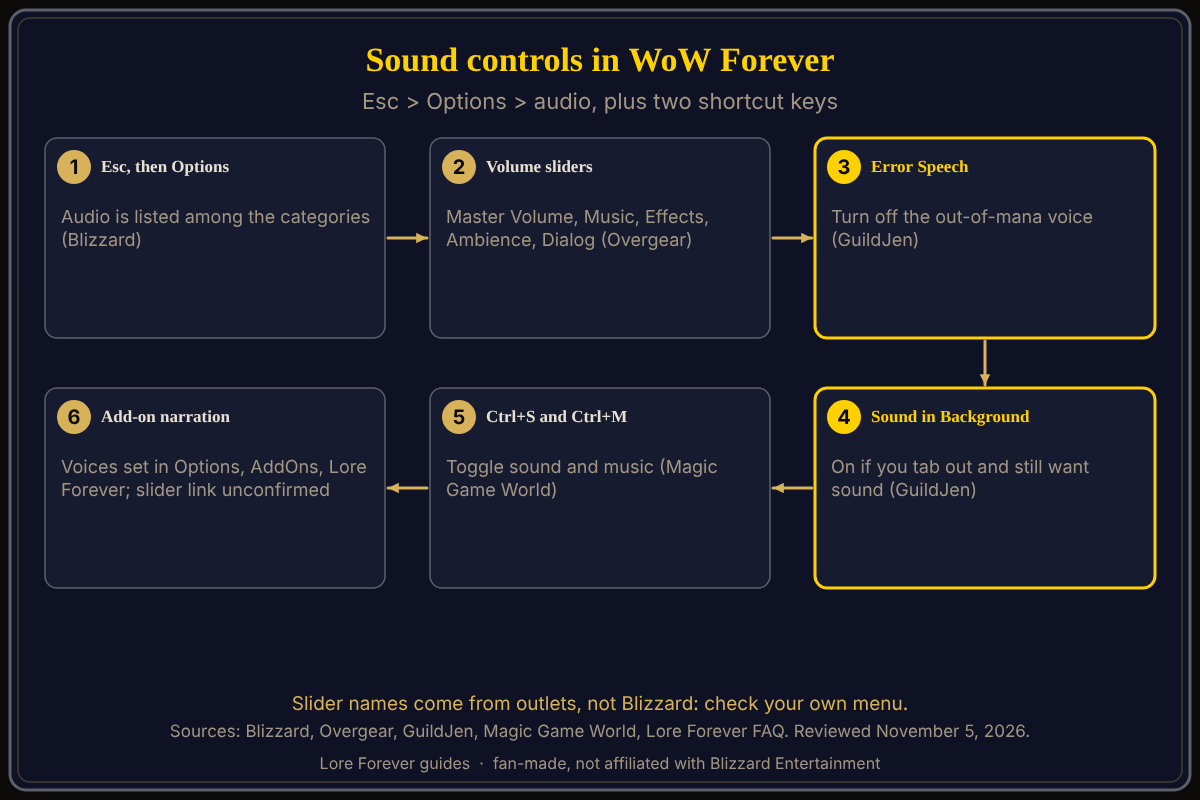
WoW Forever sound settings are in Esc, then Options, in the audio section, where Blizzard's starter guide says you can adjust audio; Magic Game World lists Ctrl+S to toggle sound and Ctrl+M to toggle music. The game launched on November 4, 2026. Slider names below come from outlets, not from Blizzard, so check them in your own menu.
Quick answer: Press Esc, then Options, then the audio section. Outlets name sliders for Master Volume, Music, Effects, Ambience and Dialog. Two changes two guides agree on: turn Error Speech off and Sound in Background on if you tab out. Ctrl+S mutes sound and Ctrl+M mutes music.
Key facts
- Where: Esc > Options; audio is listed among the categories (Blizzard Starter Guide, October 28)
- Sliders named by Overgear: Master Volume, Music, Effects, Ambience, Dialog, Gameplay Sound Effects
- Other audio lines (Overgear): Error Speech, Sound in Background, Enable Reverb, Distance Filtering, Audio Channels, Audio Cache Size
- Keys: Ctrl+S toggle sound, Ctrl+M toggle music (Magic Game World, November 4)
- Ping and boss warning sounds: GuildJen says to lower them but keep them on
How do I change the volume in WoW Forever?
Open Esc, then Options, and go to the audio section. Overgear's best-settings guide lists a table with Master Volume, Music, Effects, Ambience and Dialog and suggests values; the numbers are that outlet's taste, not a rule, so start with your own ears. Blizzard's general support article on sound issues names Enable Sound, Enable Music, Master Volume and Output Device for its games; it does not say which game or menu path, so treat it as background. It also says to check your operating system's sound settings.
What should I change first in the audio menu?
Two guides agree on a pair. GuildJen says to disable Error Speech, the character telling you when you are out of mana, and to enable Sound in Background if you tab out often but still want sound. Overgear lists both in its table too. GuildJen adds that ping sounds and boss warning sounds are loud, and suggests turning them down rather than off. See first settings to change for the rest.
How do I mute sound or music quickly?
Magic Game World's Forever keybinding list gives Ctrl+S for Toggle Sound and Ctrl+M for Toggle Music, Ctrl+= and Ctrl+- for Master Volume Up and Down, and a voice chat push-to-talk key (backtick). This is a third-party list, and keys can be rebound; see how to change keybinds. The ForeverVoice add-on page says Blizzard voice chat must be enabled in the game settings for that add-on to work.
Does narrator audio from an add-on use these sliders?
Not confirmed. The Lore Forever FAQ says its narration is all recordings, so it never needs your system's text-to-speech voices, and that the included male narrator and optional female narrator are generated voices. You pick voices under Options > AddOns > Lore Forever > Narration voices or with /lore voice. No source says which game slider controls add-on playback, so test it with one story and adjust.
What is not confirmed yet
- Whether the audio menu names match the outlets' tables; none is a Blizzard page.
- Any Blizzard page that explains Forever's sound options in detail.
- Which slider governs add-on narration.
- Sound values are taste; only Overgear gives numbers, and I do not repeat them.
How can the Lore Forever add-on and Willo help with this?
The free Lore Forever add-on plays recorded narration for zones, cities and dungeons; see the downloads page for the packs and their sizes. It has no internet access and is fan-made, not affiliated with Blizzard. Voice setup is in how to install the Lore Forever add-on and narrator voices explained. If a menu is confusing, ask Willo out loud, such as "where do I turn off error speech"; she is free to start with 50 answers a day and can be wrong, and the in-game menu is the source of truth. She does not change settings for you. She is a separate companion app: her page lists a Windows 10 or 11 download and an Apple Silicon Mac download (macOS 12 or later), and her FAQ and the Lore Forever FAQ now say Windows and Mac, though CurseForge still describes her as a Windows app.
Frequently asked questions
Where are the sound settings in WoW Forever?
Esc, then Options, then the audio section, per Blizzard's starter guide.
How do I turn off the out-of-mana voice?
GuildJen says to disable Error Speech.
How do I keep sound when I tab out?
GuildJen and Overgear both name Sound in Background.
Is there a shortcut to mute the game?
Magic Game World lists Ctrl+S for sound and Ctrl+M for music.
Why can I hear the game but not the add-on?
Not covered by any source; check the add-on's Narration voices setting and whether a voice is installed.
Sources
Reviewed November 5, 2026. Lore Forever and Willo are fan-made and are not affiliated with Blizzard Entertainment.