Guide ·
How to Install the Lore Forever Add-on: CurseForge, ZIP, Setup
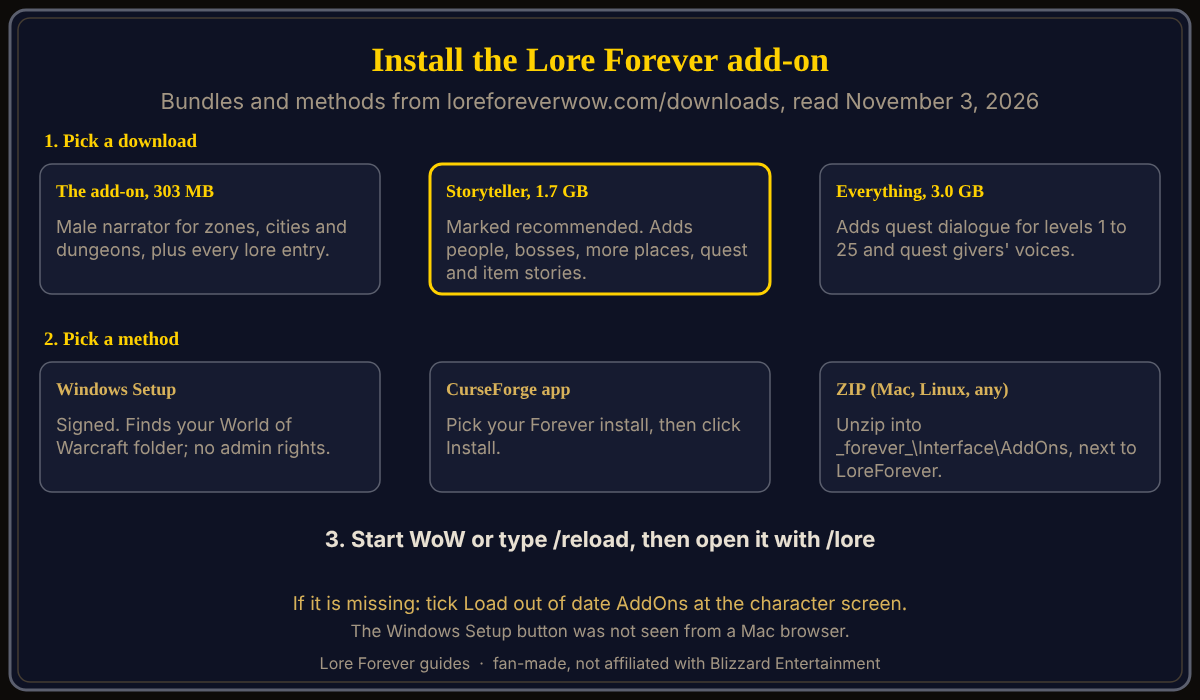
To install the Lore Forever add-on for World of Warcraft: Forever (WoW Forever), run the Windows Setup, use the CurseForge app, or unzip the ZIP into World of Warcraft\_forever_\Interface\AddOns, then start the game or type /reload. As of November 3, 2026 the downloads page offers three bundles: The add-on (303 MB), Storyteller (1.7 GB) and Everything (3.0 GB). The add-on is free.
Quick answer: Pick a bundle, pick a method, then check the add-on in the game's AddOns list and open it with /lore. Only the Setup file is Windows-only, per the Lore Forever FAQ.
Key facts
- Bundles: The add-on 303 MB; Storyteller 1.7 GB in 7 ZIPs, marked recommended; Everything 3.0 GB in 11 ZIPs (downloads page, English, male narrator, November 3, 2026)
- Folder: World of Warcraft\_forever_\Interface\AddOns; on a Mac /Applications/World of Warcraft/_forever_/Interface/AddOns (downloads page)
- Version: 0.37.0, November 3, 2026, for the Forever flavor (CurseForge)
What are the three downloads, and which should you pick?
The add-on (303 MB) has the male narrator reading zones, cities and dungeons, plus every lore entry. Storyteller adds people and bosses, more places, quest stories and item stories. Everything adds quest dialogue for levels 1 to 25 and quest givers' voices for all levels. Each language and narrator has its own sizes.
How do you install it with Setup, CurseForge or a ZIP?
- Setup (Windows): run it. It is signed, finds your World of Warcraft folder, installs into _forever_\Interface\AddOns and needs no admin rights.
- CurseForge app: open World of Warcraft, pick your Forever install (add your _forever_ folder if it is not listed) and click Install on the project's page.
- ZIP: unzip into World of Warcraft\_forever_\Interface\AddOns so each folder sits next to LoreForever, not inside it. Mac and Linux players use this or CurseForge; the FAQ says the add-on works anywhere the game runs. See Mac, Steam Deck and Linux.
In a Mac browser, the downloads page showed "Get it on CurseForge" and "Other ways: ZIP", with the Setup described but not shown. To update, delete the old LoreForever folders first, says the page.
How do you turn it on and open it in game?
Start WoW, or type /reload. If it does not show up, click AddOns on the character screen and tick "Load out of date AddOns", says the page. To install the game itself, see how to download and install WoW Forever. Open the add-on with the key you picked on first login, the minimap book or /lore; CurseForge adds /lf, and /lore key to change the key.
How do narration voices and languages work?
The male narrator comes with the add-on; CurseForge lists the female narrator and each language as separate projects. The FAQ says the included narrators are generated voices, not voice actors. Pick one under Options > AddOns > Lore Forever > Narration voices, or type /lore voice; a voice that has not recorded a story hands it to the next voice in your order. See narrator voices explained.
CurseForge says the language follows your game client or /lore lang, with recorded packs in German and French and text for Spanish and Portuguese. Its install table also lists Italian and Ukrainian projects, which its coverage paragraph does not name. Quest dialogue is a separate pack, off by default; the FAQ says Lore Forever steps aside for the Spoken add-on's quest voices. See quest voice add-ons.
Does the add-on need the internet, and is it free?
No internet. The FAQ says WoW does not let add-ons reach the internet, so it can only tell what it brought with it. It is free and fan-made, and covers every zone, city and dungeon up to level 30, says CurseForge.
What is not confirmed yet
- The Windows Setup button, which I did not see.
- Whether Blizzard has an add-on rule page for Forever; the FAQ says Forever loads add-ons like any WoW client, and I opened no Blizzard page confirming it.
- Sizes and versions, which change almost daily.
- The language list: five languages or seven.
How can the Lore Forever add-on and Willo help with this?
Once installed, the add-on adds a one-line story to NPC and mob tooltips and a Lore button on quest dialogs. Willo, the optional companion app, answers by voice and works without the add-on, which lets her see your quests and location. Both are fan-made, not affiliated with Blizzard, and Willo can be wrong. See the add-on guide, how to install Willo and the all-in-one install guide.
Frequently asked questions
How do I install the Lore Forever add-on for WoW Forever?
Run the Windows Setup, use the CurseForge app, or unzip the ZIP into the AddOns folder, then type /reload.
Where does the Lore Forever add-on folder go?
World of Warcraft\_forever_\Interface\AddOns; on a Mac, /Applications/World of Warcraft/_forever_/Interface/AddOns.
How big is the Lore Forever download?
As of November 3, 2026: 303 MB, 1.7 GB or 3.0 GB, in English with the male narrator.
What opens the Lore Forever add-on in game?
The key you pick on first login, the minimap book, or /lore.
Does Lore Forever work on Classic or modern WoW?
No; the FAQ says it is made for WoW Forever only.
Sources
Reviewed November 3, 2026. Features may change. Lore Forever and Willo are fan-made and are not affiliated with Blizzard Entertainment.