Guide ·
How to Download and Install WoW Forever: Steps and Specs
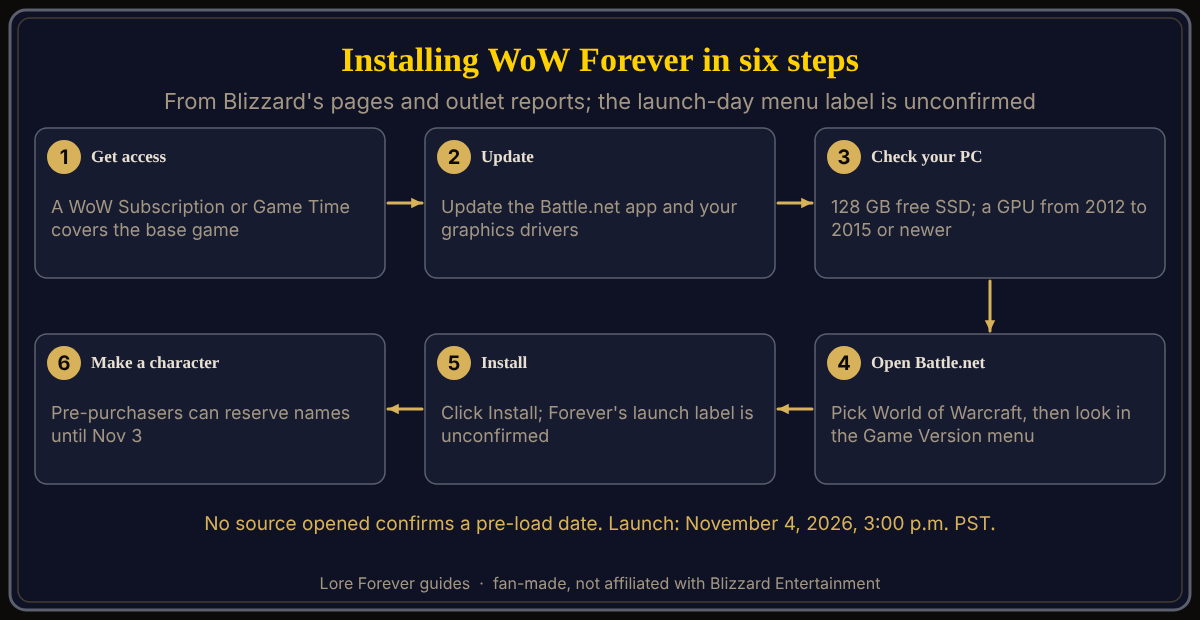
You install World of Warcraft: Forever (WoW Forever) through the Battle.net desktop app on a Windows or Mac computer, and you need a World of Warcraft Subscription or Game Time to play it; the outlets that list requirements say to leave 128 GB of free SSD space. Launch is November 4, 2026, at 3:00 p.m. PST. No source I opened gives install steps for the launch build, so the steps below combine Blizzard's beta instructions, its general install page and outlet reports.
Quick answer: Put a subscription or Game Time on your Battle.net account, update the app and graphics drivers, then open World of Warcraft in Battle.net and check its Game Version menu for Forever, as the beta did. Pre-load, the launch menu label and download size are unconfirmed.
Every journey into Azeroth begins with a download bar. This one is short on official detail.
Key facts
- Launch: November 4, 2026, 3:00 p.m. PST (Blizzard)
- Access: included with a World of Warcraft Subscription or Game Time (Blizzard); packs are optional
- Where to install: the Battle.net desktop app (Gfinity, September 14; Blizzard's beta steps)
- Platforms: Windows and macOS (Gfinity; Warcraft Wiki)
- Storage: 128 GB of free SSD space (mein-mmo, TimeSaver, Gfinity); hard drives not supported (TimeSaver, HostedGG)
- Pre-load: no date announced in any source opened (HostedGG, October 3)
What do you need before you download WoW Forever?
A way to pay for access. Blizzard's launch article says access will be included with a World of Warcraft Subscription or Game Time, and a footnote says it requires one of the two. The packs are optional; Early Name Reservation, October 27 to November 3, comes with any upgrade purchase. An Invite-A-Friend code gives an invitee access without a subscription or Game Time from November 4 through 11. See is WoW Forever free and how to reserve your name.
How do you install WoW Forever in the Battle.net app?
Blizzard's general install page says to open the Battle.net desktop app, click the World of Warcraft icon (or pick it from All Games), choose a game version above the Install button and click Install; each version installs separately. That page, last updated four months ago, does not mention Forever. For the beta, Blizzard had players update their graphics drivers, open Battle.net (which may update itself), select World of Warcraft and choose "World of Warcraft: Forever Beta" in the Game Version menu under "In Development". No source I opened shows how the launch build will be labelled.
What are the WoW Forever system requirements?
Sources disagree on whether Blizzard has posted a full list. Blizzard's GPU post says older architectures will no longer be supported: the card must be AMD Graphics Core Next 1 (2012), NVIDIA Maxwell (2014) or Intel Skylake (2015) or newer, and it names the Radeon HD 6950 and GeForce GTX 760, 770 and 780 as unsupported. It links the Battle.net Shop for full minimums; I could not open that page.
mein-mmo (September 18), whose listed source is that Blizzard post, gives these Windows figures, and TimeSaver (September 28) lists the same minimums. Minimum: Windows 10 64-bit, a 4-core 3.0 GHz processor, DirectX 12, a 4 GB card (GeForce GTX 10 series, AMD RDNA 1 or Intel Iris Xe), 8 GB of RAM and a 128 GB SSD. Recommended: Windows 11, an 8-core 5.2 GHz boost processor, an 8 GB card (RTX 40 series or equivalent) and 16 GB of RAM. HostedGG (October 3) says Blizzard has not published a requirements page, treats only the 128 GB SSD as reliable and notes the processor line conflicts with Midnight's published minimum; TimeSaver cites the Shop page as its source. Mac figures are in WoW Forever on Mac, Steam Deck and Linux; see also what you need to play.
Can you pre-load WoW Forever before launch?
Not confirmed. HostedGG (October 3) says no pre-load date has been announced, TimeSaver's launch-day checklist (October 7) mentions none, and the Blizzard pages I opened say nothing. HostedGG adds that the circulating 85 to 95 GB download and 120 GB installed figures have no Blizzard source. For the beta, OS X Daily (September 20) said to leave 70 GB free. After the install, see which ruleset to pick and the first hour guide.
What is not confirmed yet
- Whether pre-loading opens, the final download size and how Forever is labelled in Battle.net at launch.
- Blizzard's full requirements, which I could not open; the figures above are outlet reports, with the GPU rule from Blizzard.
Once you are in, the free Lore Forever add-on, which also works on Mac, adds readable quest stories; it is fan-made.
Frequently asked questions
How do I download WoW Forever?
Through the Battle.net desktop app, per Gfinity, with a World of Warcraft Subscription or Game Time on the account.
Do I have to buy a pack to play WoW Forever?
No. The Warcraft Wiki says only the Skyborne race requires a pack.
How much disk space does WoW Forever need?
128 GB of free SSD space, according to mein-mmo, TimeSaver and Gfinity. No installed size is confirmed.
Can I pre-load WoW Forever?
No pre-load date has been announced in any source I opened as of October 30, 2026.
Which graphics cards can run WoW Forever?
Blizzard says AMD GCN 1, NVIDIA Maxwell, Intel Skylake or newer; the GeForce GTX 760 is unsupported.
Sources
Reviewed October 30, 2026. Requirements can change before launch. Lore Forever is fan-made and is not affiliated with Blizzard Entertainment.