Guide ·
10 Things to Do Before WoW Forever Launches on Nov 4
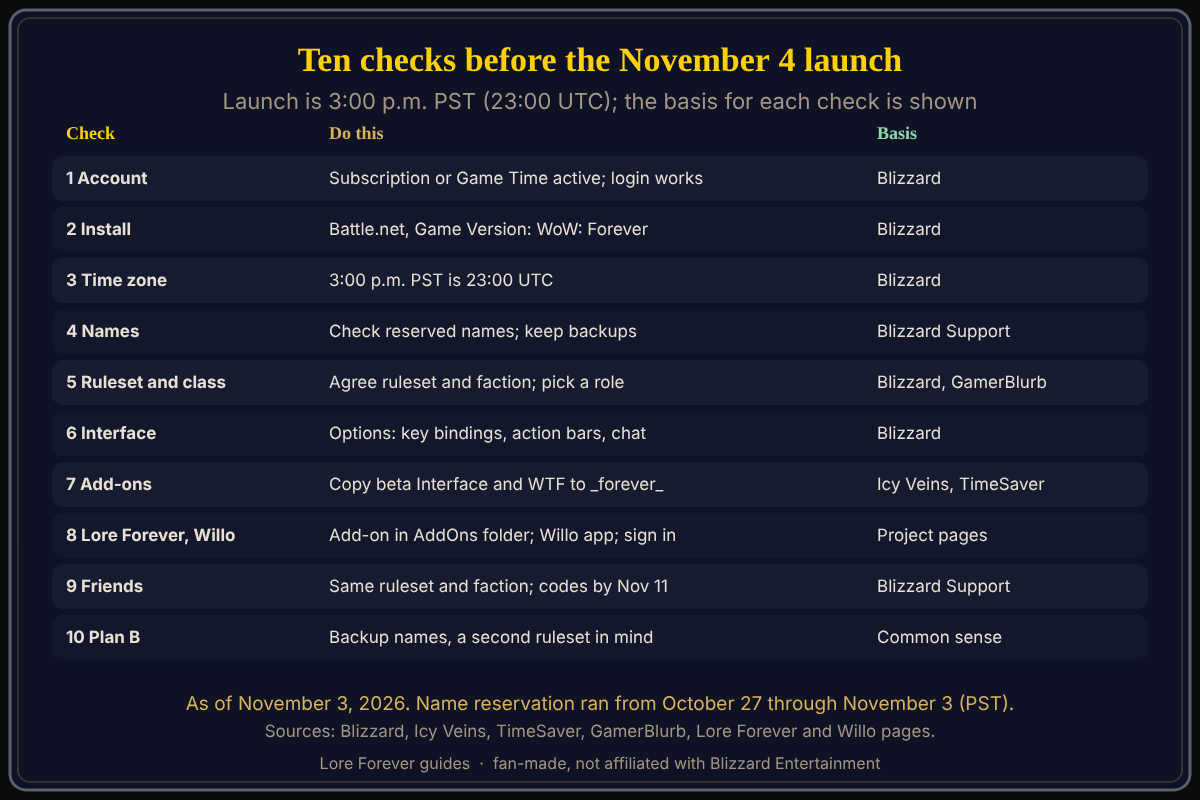
Before World of Warcraft: Forever (WoW Forever) launches on November 4, 2026 at 3:00 p.m. PST (23:00 UTC), ten things are worth doing: check your account and install, convert the time, review your names, choose ruleset and class, set up your interface and add-ons, and line up friends. Each item below says whether Blizzard or a named outlet is the source, or whether it is common-sense advice.
Quick answer: Install tonight, since TimeSaver quotes a Battle.net notice of maintenance from 10:00 a.m. PST on November 4. Agree ruleset and faction with friends and keep backup names. Name reservation ran from October 27 through November 3 (PST).
A good camp is packed the night before.
Key facts
- Launch: November 4, 2026, 3:00 p.m. PST, 23:00 UTC (Blizzard)
- Maintenance: 10:00 a.m. PST to about 3:00 p.m. per a Battle.net notice (TimeSaver; Wowhead says about five hours)
- Name reservation (pre-purchasers): ran October 27 through November 3 (PST), up to three characters per WoW account (Blizzard Support)
- Invite-A-Friend codes: redeem by November 11 (Blizzard Support)
What are the ten things?
- Confirm your account (Blizzard). Access is included with an active subscription or Game Time. If you cannot sign in, Blizzard points to its "Can't Log In?" account recovery page. Enabling two-factor authentication is Blizzard's suggestion in its starter guide.
- Install now (Blizzard). Open Battle.net, choose WoW: Forever under Game Version and click Install; TimeSaver, Gfinity and mein-mmo give 128 GB of free SSD as the Windows minimum, but I did not find Blizzard's Forever requirements page, so check it. Preload sources conflict: Icy Veins and Wowhead say it is open, TimeSaver says no date was announced for subscription-only players. See how to download and install.
- Convert the time (Blizzard). 3:00 p.m. PST is 6:00 p.m. EST, 11:00 p.m. UK and midnight CET on November 5. See launch time by time zone.
- Check your reserved names (Blizzard Support). Reservation covered up to three characters per WoW account from October 27 through November 3 (PST); Blizzard's pages give no closing hour. After launch, check whether your characters appear before creating new ones (common sense).
- Pick ruleset, faction and class (Blizzard, GamerBlurb). Grouping works only inside a ruleset and faction. GamerBlurb names Hunter its easiest recommendation for a first-timer and says to start from the role you want. See which ruleset to pick.
- Set up your interface (Blizzard). Blizzard's starter guide sends you to Game Menu > Options for key bindings, action bars, chat and audio. Its November 2 notes say new spells no longer land on your bars automatically. See UI edit mode setup and macros and keybinds.
- Prepare add-ons (Icy Veins, TimeSaver). Icy Veins says to copy the Interface and WTF folders from the beta's _classic_beta_ folder into _forever_; TimeSaver adds backing up first and using files tagged for Forever. Neither is Blizzard's advice.
- Install the Lore Forever add-on and Willo (project pages). The add-on goes in _forever_/Interface/AddOns, or use CurseForge; Willo is a separate app. Steps: install the add-on, install Willo and all three together.
- Line up friends (Blizzard Support). Agree ruleset and faction. Invite-A-Friend codes give access from November 4 to 11; they do not unlock the Skyborne.
- Keep a plan B (common sense). Have two backup names and a second ruleset in mind, since Blizzard Support says creation for a dominant PvP faction can be temporarily restricted.
What is not confirmed yet
- Queue length on launch evening and where Blizzard posts Forever status.
- The closing hour of name reservation on November 3 (Blizzard does not state it).
- Whether the add-on folder settings from the beta carry over cleanly; the advice comes from outlets, not Blizzard.
How can the Lore Forever add-on and Willo help with this?
The free Lore Forever add-on is fan-made, works on Windows and Mac, and gives readable and recorded stories for zones, cities and dungeons, so it can be installed tonight. Willo is a separate companion app: sign in with a Lore Forever account, then hold her talk key and ask. She runs on Windows 10 or 11 and, per her page, Apple Silicon Macs (her FAQ still says Windows; Mac features unconfirmed). Free to start with 50 answers a day; she can be wrong, is not official, and sees your quests only with Live game info on in both (Hero and up after the first days, per her Plans page).
Frequently asked questions
What should I do before WoW Forever launches?
Confirm your subscription, install in Battle.net, convert the launch time and agree ruleset and faction with friends.
When should I install WoW Forever?
Tonight if you can. TimeSaver advises finishing before the 10:00 a.m. PST maintenance in a Battle.net notice; the notice, as TimeSaver quotes it, says the game is unavailable, not that downloads stop.
Can I still reserve a name?
Early reservation, for pre-purchasers only, ran from October 27 through November 3 (PST); Blizzard gives no closing hour. Without one you create characters at launch.
Do I need the add-on and Willo to play?
No. Both are optional and fan-made; Willo works without the add-on.
Do my beta add-on settings work?
Icy Veins says copy them into _forever_; TimeSaver says update to Forever versions.
Sources
Reviewed November 3, 2026. Lore Forever and Willo are fan-made and are not affiliated with Blizzard Entertainment.