Guide ·
How to Install Willo for WoW Forever (Windows and Mac)
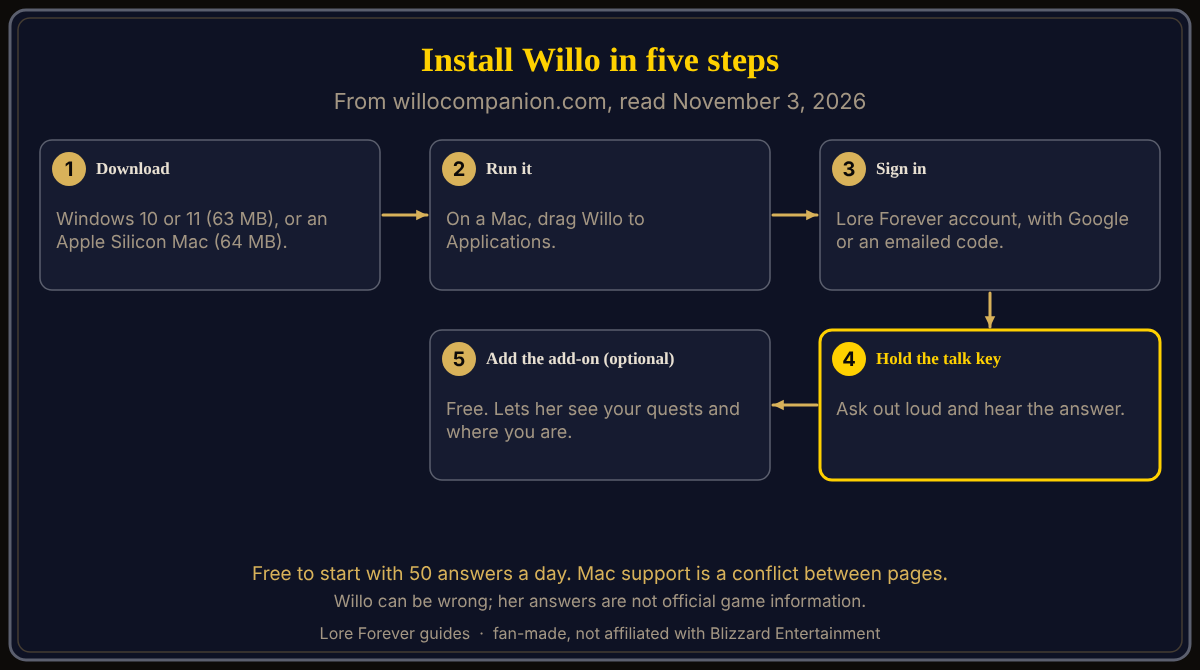
To install Willo, the voice companion for World of Warcraft: Forever (WoW Forever), download Willo-Setup.exe (63 MB, Windows 10 or 11) or Willo-mac.dmg (64 MB, Apple Silicon Mac, macOS 12 or later) from willocompanion.com/willo, run it, and sign in with a Lore Forever account. Both showed version 1.0.0 on her page on November 3, 2026, the day before WoW Forever launches at 3:00 p.m. PST on November 4.
Quick answer: Download, run (on a Mac, drag Willo to Applications), sign in, then hold your talk key and ask. She is free to start and works without the add-on. Mac support is a labelled conflict below.
Key facts
- Windows: Willo-Setup.exe, 63 MB, Windows 10 or 11, version 1.0.0 (Willo page, November 3, 2026)
- Mac: Willo-mac.dmg, 64 MB, Apple Silicon (M1 or later), macOS 12 or later (Willo page)
- Cost: free to start, 50 answers a day (Plans page)
- Account: Lore Forever account, via Google or an emailed code (privacy page)
How do you download and run the installer?
- Open willocompanion.com/willo and pick the Windows or Mac download.
- On Windows, run it. The page says only that Willo finds your game by herself.
- On a Mac, open the file and drag Willo to Applications.
The page does not say what the Windows installer shows, where Willo installs, or whether your system shows a security prompt.
How do you sign in and start free?
Sign in with your Lore Forever account. The privacy page (updated November 3) says downloading and playing need no account, but Willo needs you signed in and does nothing while signed out; you sign in with Google or a code emailed to you. The Plans page says free means 50 answers a day, spoken answers when you ask out loud, and your first 7 days with everything she can do (the free card says "her finest voice and everything she can do, nothing counted").
How do you set up the microphone and ask a first question?
Her page says: hold your talk key, ask, hear the answer. The privacy page says talking is turned on in the companion app, the microphone listens only while you hold the talk key, and your voice becomes text on your PC and never leaves it. The pages I opened name no default talk key and describe no system microphone prompt.
Do you need the add-on, and what is Live game info?
No. Willo works on her own, even with WoW closed. The free Lore Forever add-on lets her see your quests and where you are; see the add-on install guide. Live game info must be on in the add-on's Options and in Willo's Settings, says the FAQ. After the first 7 days, the Plans table marks "Willo sees your game" with a dash on the free plan and a check from Hero up.
How do you update Willo, and what if it will not start?
On a Mac, her page says to download her again. It gives no Windows update step and no troubleshooting for a failed start; the FAQ points to Discord and a feedback page. Check the system lines first.
Does Willo work on a Mac?
The pages disagree. Her page lists a Mac download and answers "Mac?" with yes. But her FAQ and the Lore Forever FAQ describe her as a Windows companion app, and so does the Lore Forever CurseForge page. No page I opened says the talk key, Live game info or characters answering match Windows on a Mac, and I tested none. Check her page, and see Mac, Steam Deck and Linux.
What is not confirmed yet
- Whether every feature works the same on a Mac.
- Default talk key, system prompts, the Windows update step, fixes for a failed start.
- How Willo performs on launch day, and whether versions or sizes change; these are from November 3.
How can the Lore Forever add-on and Willo help with this?
Willo answers by voice and keeps a Notebook; the Plans table lists characters answering in their own voices from Champion up. The add-on gives readable and recorded lore as you travel. Both are fan-made, not affiliated with Blizzard, and Willo can be wrong; her answers are not official. Next: how to use Willo, the Willo companion guide or the all-in-one install guide.
Frequently asked questions
How do I install Willo for WoW Forever?
Download the Windows or Mac file from willocompanion.com/willo, run it and sign in with a Lore Forever account.
Is Willo free?
Free to start with 50 answers a day; Reminders and Goals need Hero or higher.
Does Willo work on a Mac?
Her page lists an Apple Silicon download, but two FAQs and CurseForge still call her a Windows app. Check her page.
Do I need the add-on?
No; it only lets her see your quests and location.
Does Willo play the game for me?
No; her page says she never does.
Sources
Reviewed November 3, 2026. Features may change. Lore Forever and Willo are fan-made and are not affiliated with Blizzard Entertainment.