Guide ·
How to Use Willo in WoW Forever: Setup, Talk Key, Free Plan
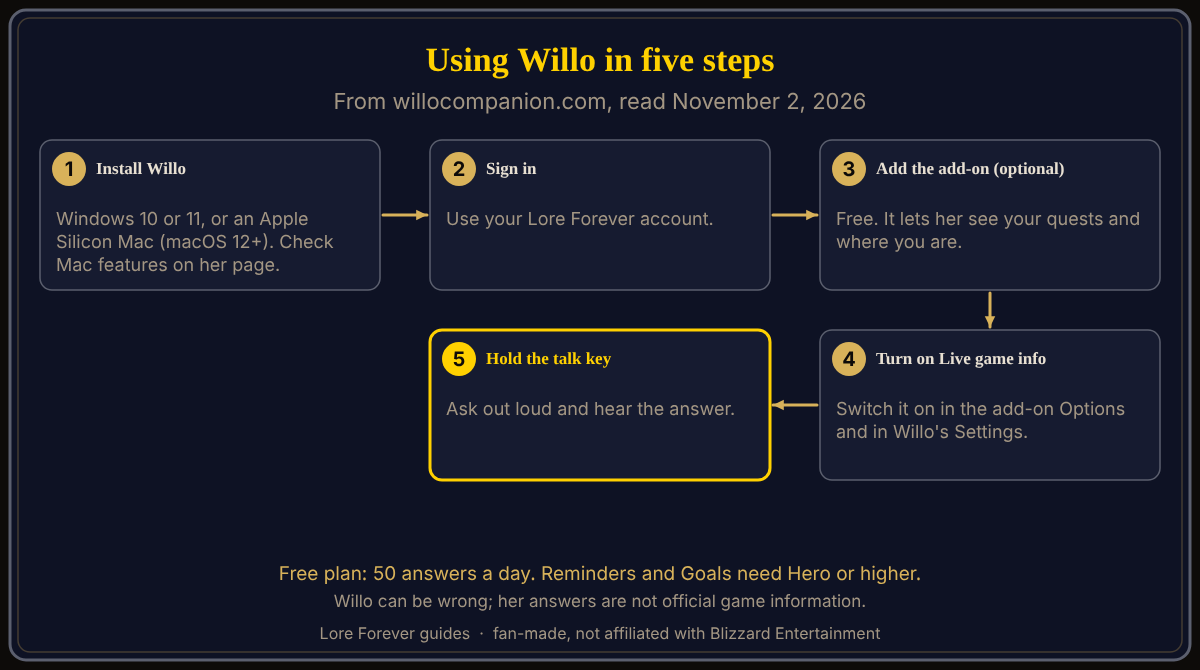
To use Willo in World of Warcraft: Forever (WoW Forever), download her from willocompanion.com/willo for Windows 10 or 11 or an Apple Silicon Mac, sign in with your Lore Forever account, then hold your talk key and ask out loud. The free plan gives 50 answers a day, and the Lore Forever add-on is optional.
Quick answer: Install, sign in, play. For her to see your quests, location and target, install the free add-on and switch on Live game info in both the add-on and Willo's Settings. Mac features: check her page. She can be wrong, and her answers are not official game information.
Willo is a little blue wisp who rides along while you play, and she answers when you speak to her.
Key facts
- Version: 0.35.0 for both platforms (Willo page, November 2, 2026)
- Windows: Willo-Setup.exe, 63 MB, Windows 10 or 11 (Willo page)
- Mac: Willo-mac.dmg, 65 MB, Apple Silicon (M1 or later), macOS 12 or later (Willo page)
- Free plan: up to 50 answers a day, plus your first days with everything (plans page)
- Reminders and goals: Hero and up (Willo page)
How do you install Willo and sign in?
- Download the installer for your computer from willocompanion.com/willo. On a Mac, open the file and drag Willo to Applications.
- Run it. The page says she finds your game by herself.
- Sign in with your Lore Forever account. Signing in lets her remember your journey and plan.
- To update, download her again.
Mac readers, this is a labelled conflict. The Willo page lists a Mac download and answers "Mac?" with yes, and Lore Forever's November 1 release notes say Willo now comes for Mac as well as Windows. But the Willo FAQ, the Lore Forever FAQ and the Lore Forever CurseForge page still call her a Windows app, and no source opened here says the talk key or Live game info works the same on Mac. This article did not test a Mac, so check the Willo page.
Do you need the Lore Forever add-on?
No. Willo works on her own, even with WoW closed, for plans, friends and chat. The free Lore Forever add-on lets her see your quests and where you are. Get it from the Downloads page or CurseForge. Its FAQ says it works anywhere the game runs; Mac and Linux players use the ZIP or CurseForge. See the add-on guide.
How do you ask Willo a question?
Hold your talk key, ask, and hear the answer. Typed questions get text answers. Per her privacy page, the microphone listens only while you hold the key, and your voice becomes text on your PC and never leaves it.
How do you turn on Live game info?
Switch it on in the add-on's Options and in Willo's Settings, says the Lore Forever FAQ. While you hold her talk key or the Lore Forever window is open, the add-on draws a small star field over your minimap showing your location, target and tracked quest, and Willo reads it several times a second. The FAQ says she never reads anything else on your screen or the game's memory, and never presses keys or clicks.
How do you talk to an NPC?
- Turn on Live game info in both places.
- In Willo's Settings, under Talk with Willo, pick a key under "Ask who you're targeting".
- Type /reload in game.
- Target a character, hold that key and ask. They answer as themselves.
Her page shows voices for a dwarf, an orc, a night elf and a tauren. The plans page lists characters answering in their own voices under its paid plans, so on the free plan check what your first days include.
What do Notebook, Pins, Friends, Reminders and Goals do?
The Notebook keeps to-dos for each character and Pins mark spots on your journey map, both on every plan. The Friends tab shows who is out and where they were last seen, when they share it. Reminders ("remind me to check my auction in fifteen minutes") and Goals ("I want my mount at 40") need Hero or higher. See the leveling planner guide.
What do you do when Willo is wrong?
The FAQ says she can get things wrong and her answers are not official. Click the cross under an answer in game, or type /lore report. Double-check anything that matters against the quests guide.
What does Willo read and keep?
Her privacy page (updated November 1) says questions go with your race, class, level, location, target, quests, a little of your journey and recent chat. A game-window picture goes with a spoken question only if you allow it. Her "what Willo keeps" page says friend messages are kept 90 days, chats stay on your computer, and deleting your profile erases her copy of your journey.
How can the Lore Forever add-on and Willo help with this?
Both are our own fan-made projects, not affiliated with Blizzard. The add-on gives readable and recorded lore as you travel; Willo answers by voice and keeps a notebook. Neither plays the game for you.
What is not confirmed yet
- Whether every feature works the same on Mac.
- How many days "first days with everything" lasts; the plans page does not say.
- How Willo performs on launch day, November 4.
Frequently asked questions
How do I use Willo in WoW Forever?
Install Willo, sign in with a Lore Forever account, then hold your talk key and ask. The add-on is optional and lets her see your quests and location.
Is Willo free?
She is free to start with 50 answers a day. Reminders and Goals need Hero or higher.
Does Willo work on Mac?
The Willo page lists a Mac download for Apple Silicon (M1 or later) on macOS 12 or later, but two FAQs still call her a Windows app and no source says every feature matches Windows. Check her page.
Can I talk to NPCs with Willo?
Yes, with Live game info on and a key set under "Ask who you're targeting", then /reload. The plans page lists character voices under its paid plans.
Does Willo play WoW Forever for me?
No. Her page says she does not play the game for you.
Sources
Reviewed November 2, 2026. Features may change. Lore Forever and Willo are fan-made and are not affiliated with Blizzard Entertainment.