Guide ·
How to Install WoW Forever, the Lore Forever Add-on and Willo
To set up World of Warcraft: Forever (WoW Forever), the Lore Forever add-on and Willo together, install the game through the Battle.net desktop app first, then the add-on, then Willo, and switch on Live game info in both the add-on and Willo. Blizzard says WoW Forever goes live on November 4, 2026 at 3:00 p.m. PST (23:00 UTC). The order of the three installs is common-sense advice, not Blizzard's.
Quick answer: Game, add-on, Willo, Live game info, test. The add-on lives inside the game; Willo is a separate download.
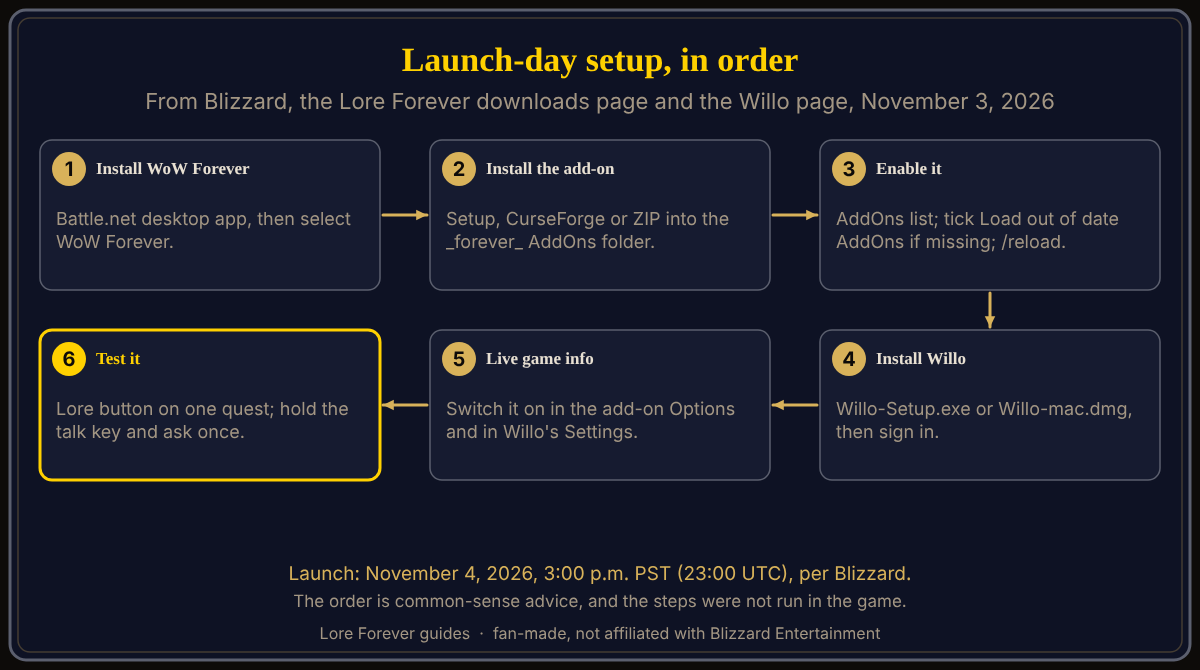
Set up before 3:00 p.m. and launch evening is for playing.
Key facts
- Launch: November 4, 2026, 3:00 p.m. PST, which is 23:00 UTC (Blizzard, November 3)
- Add-on folder: World of Warcraft\_forever_\Interface\AddOns (Lore Forever downloads page)
- Willo: Willo-Setup.exe (63 MB, Windows 10 or 11) or Willo-mac.dmg (64 MB, Apple Silicon, macOS 12 or later), version 1.0.0 (Willo page)
How do you install the game first?
Blizzard's October 28 starter guide lists the steps: create a Battle.net account, subscribe or buy Game Time, install the Battle.net desktop app, sign in, install World of Warcraft, and select WoW Forever from the game versions. You can play on Windows or Mac with a keyboard and mouse. No Blizzard page I opened mentions pre-loading. Full steps: how to download and install WoW Forever.
How do you install the add-on?
The downloads page offers the Windows Setup, the CurseForge app and a ZIP. Its Install help says the add-on goes into World of Warcraft\_forever_\Interface\AddOns, which is why the game comes first. At the character screen, click AddOns; if the add-on is missing, tick "Load out of date AddOns", then type /reload. Open it with /lore. Mac and Linux players use the ZIP or CurseForge; the FAQ says it works anywhere the game runs (see Mac, Steam Deck and Linux). All methods and bundles: the add-on install guide.
How do you install Willo, and where does she live?
Download the Windows or Mac file from willocompanion.com/willo, run it and sign in with a Lore Forever account; see the Willo install guide. She is a separate download, not an item in the AddOns list, and works even with WoW closed. The Lore Forever FAQ calls her an overlay, and CurseForge says you can chat with her in game.
Mac readers, a conflict: her page lists a Mac download, but her FAQ, the Lore Forever FAQ and CurseForge still describe a Windows app. No page I opened says every feature matches. Check her page.
How do you turn on Live game info in both places?
Switch it on in the add-on's Options and in Willo's Settings, per the Lore Forever FAQ. While you hold her talk key or the Lore Forever window is open, the add-on draws a small star field over your minimap, which Willo reads. To talk to a character you target, pick a key under "Ask who you're targeting" in Willo's Settings and type /reload. The Plans table marks "Willo sees your game" with a dash for the free plan and a check from Hero up, while free includes everything for your first 7 days.
How do you test it with one quest and one question?
These steps come from the pages; I did not run them in the game.
- Add-on: click the Lore button on a quest dialog or quest log, per CurseForge, or open the panel with /lore and ask a question.
- Willo: hold your talk key, ask, and listen.
- With Live game info on in both places, target a character and use the targeting key.
What do you do first if something fails?
- Add-on missing: check the folder path, tick "Load out of date AddOns", and /reload.
- Willo will not start or sign in: the pages give no steps; the FAQ points to Discord.
- The game itself: see launch day queues and errors and the launch week checklist.
What is not confirmed yet
- Whether pre-loading exists, and how launch-day queues behave.
- Whether every Willo feature works on a Mac.
- The steps above were not run in the game.
How can the Lore Forever add-on and Willo help with this?
The add-on gives readable and recorded lore for the zone and quest in front of you. Willo is free to start with 50 answers a day and answers by voice. Both are fan-made, not affiliated with Blizzard, and Willo can be wrong. Next: how to use Willo.
Frequently asked questions
In what order should I install WoW Forever, the add-on and Willo?
The game, then the add-on, then Willo. Blizzard documents only the game install.
Do I need the add-on to use Willo?
No; it lets her see your quests and location.
Is Willo inside the game?
She is a separate app, described as an overlay; CurseForge says you can chat with her in game.
Does Live game info need to be on?
For Willo to see your quests, location and target, yes, in both places.
When can I log in?
November 4, 2026 at 3:00 p.m. PST (23:00 UTC), per Blizzard.
Sources
Reviewed November 3, 2026. Features may change. Lore Forever and Willo are fan-made and are not affiliated with Blizzard Entertainment.