Guide ·
WoW Forever Macros and Keybinds: Setup Steps From Guides
A macro in World of Warcraft: Forever (WoW Forever) is a short list of slash commands that you build with /macro, save under an icon and drag to an action bar, and RankedBoost and Kami Labs both say one macro holds 255 characters. Keys are bound in the keybindings menu, where Method describes a Quick Keybind mode that binds an action-bar slot when you hover over it.
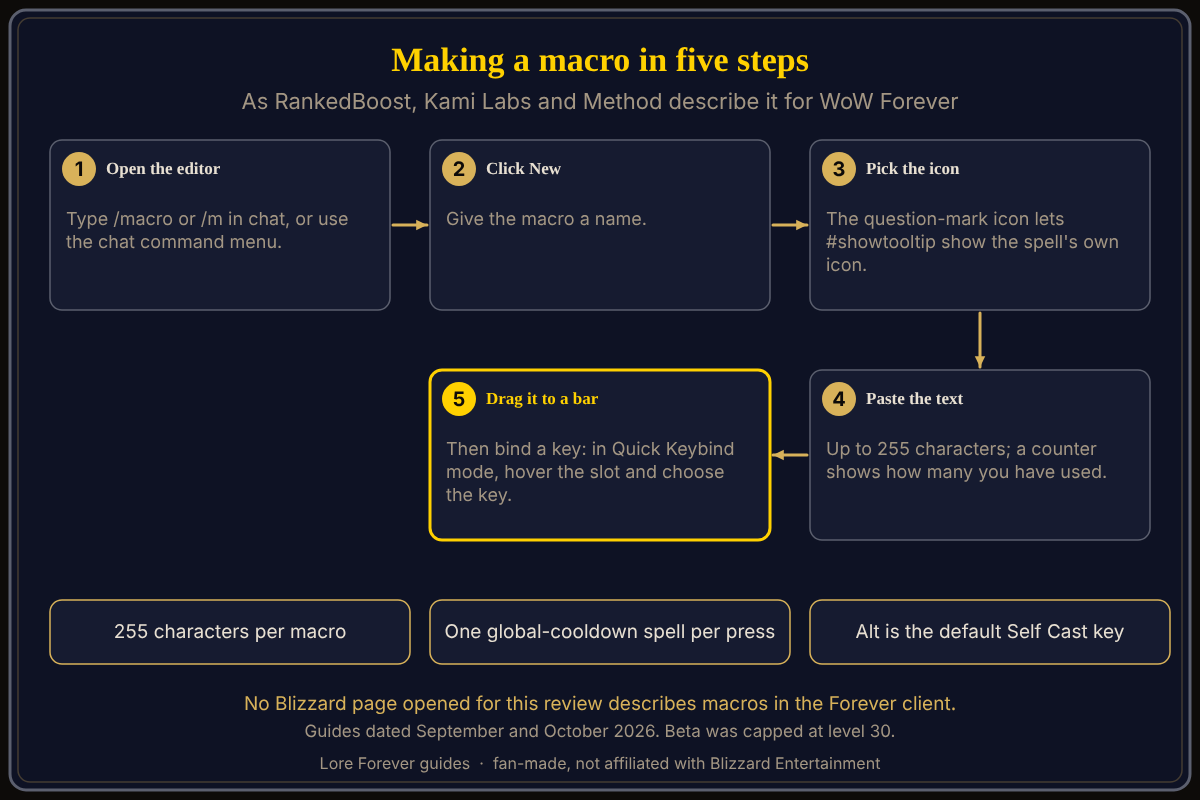
Quick answer: Type /macro, press New, name it, choose the question-mark icon so #showtooltip can show the spell's own icon, paste the text and drag the macro onto a bar. Then bind a key to that slot. No Blizzard page opened for this review describes macros in the Forever client, so the steps are player-written.
An action bar fills fast once the trainer has taught you a few spells.
Key facts
- Open the editor: /macro or /m in chat, or Macro in the chat command menu (RankedBoost, published September 25, updated October 17, 2026)
- Length: 255 characters per macro (RankedBoost; Kami Labs, October 1, 2026)
- Macro slots: the Warcraft Wiki's general Macro page lists 120 account-wide and 18 per character; not confirmed for the Forever client
- Keybinds: a Quick Keybind mode (Method, September 30, 2026); K opens Professions and Y opens Legacy Talents, while C, P, N and M keep their old jobs
What is a macro in WoW Forever?
The Warcraft Wiki's Macro page calls a macro a "grouping of several slash commands that execute together when you click a button." Kami Labs publishes ready-made macros for the nine Forever classes and gives two totals on two pages, 240 and 918, so treat any macro count as that site's own catalogue.
How do you create a macro?
RankedBoost says to type /macro or /m in chat, press New, name the macro and choose the question-mark icon so #showtooltip can display the spell's own icon. Paste the text, save it and drag the macro onto an action bar. Kami Labs describes the same order and says spell names must match your game client's language.
What are a macro's limits?
RankedBoost says a macro holds 255 characters and the editor shows a counter. RankedBoost says only one spell on the global cooldown goes off per press. Kami Labs says a /cast with no rank number always casts the highest rank you know.
Which beginner macros do the guides show?
Kami Labs names these building blocks:
#showtooltipas the first line, so the button shows the spell's icon/startattackafter it in melee macros, so the press starts auto attack/cancelformso casters can fire from Bear or Travel Form- a healing line,
[@mouseover,help,nodead][help,nodead][@player], which tries the hovered friend, then your friendly target, then you
RankedBoost lists five templates, among them stop casting and fire an interrupt, and eat and drink on one key. Kami Labs says a form number in its examples may need changing from 3 to 2.
How do keybinds work in WoW Forever?
Method's UI guide says Quick Keybind mode sits under Keybinds: hover over an action-bar slot, then choose the key. It describes separate keybinds for mouseover, self-cast and focus targets. Gfinity Esports (September 24) recommends Click Casting and Mouseover, found in the keybindings menu. RankedBoost notes that Alt is also the default Self Cast key and says to pick Ctrl or Shift instead. Layout is a separate job: see the Edit Mode guide, and for gamepads the controller support guide.
What is not confirmed yet
- No source opened shows Blizzard's own macro rules for the Forever client, including the number of macro slots.
- No source opened says whether macros or keybinds saved in the beta carry into launch.
- The guides date from September and October 2026, before launch. Add-ons that change your bars are in the best add-ons guide.
How can the Lore Forever add-on and Willo help with macros and keybinds?
With your bars set, the road is the other half. The free Lore Forever add-on, which works on Mac too, puts a Lore button on the quest dialog and quest log that opens the quest's story, up to level 30. Willo is a separate Windows companion: hold your talk key, ask what to do next, hear the answer, and keep a per-character notebook of to-dos. She is free to start with 50 answers a day and can be wrong, so test any macro text in the macro window. Lore Forever is fan-made and not affiliated with Blizzard.
Frequently asked questions
How do you make a macro in WoW Forever?
Type /macro, press New, name it, paste the text and drag it to an action bar, according to RankedBoost and Kami Labs.
How long can a macro be in WoW Forever?
RankedBoost and Kami Labs both give 255 characters, as does the Warcraft Wiki's macro FAQ.
Does WoW Forever have Quick Keybind mode?
Method's UI guide says Quick Keybind mode is under Keybinds: hover over an action-bar slot and choose the key.
Which keys open Professions and Legacy in WoW Forever?
Method's list of new keys has K for Professions and Y for Legacy Talents. Warcraft Tavern gives Y as the default hotkey for the Legacy System (Legacy guide).
Where can you find ready-made WoW Forever macros?
Kami Labs and RankedBoost publish macros for the nine classes. Neither is a Blizzard page.
Sources
Reviewed October 30, 2026. Lore Forever is fan-made and is not affiliated with Blizzard Entertainment.