Guide ·
WoW Forever Controller Support: Enable the Gamepad UI and Learn the Controls
World of Warcraft: Forever (WoW Forever) has built-in controller support, labelled "Gamepad (Alpha)" in the game's options, and you turn it on with the Enable Gamepad UI (Alpha) checkbox, according to Warcraft Tavern. Warcraft Tavern describes it as the first official controller option in any version of the game, and keyboard and mouse still work while it is on.
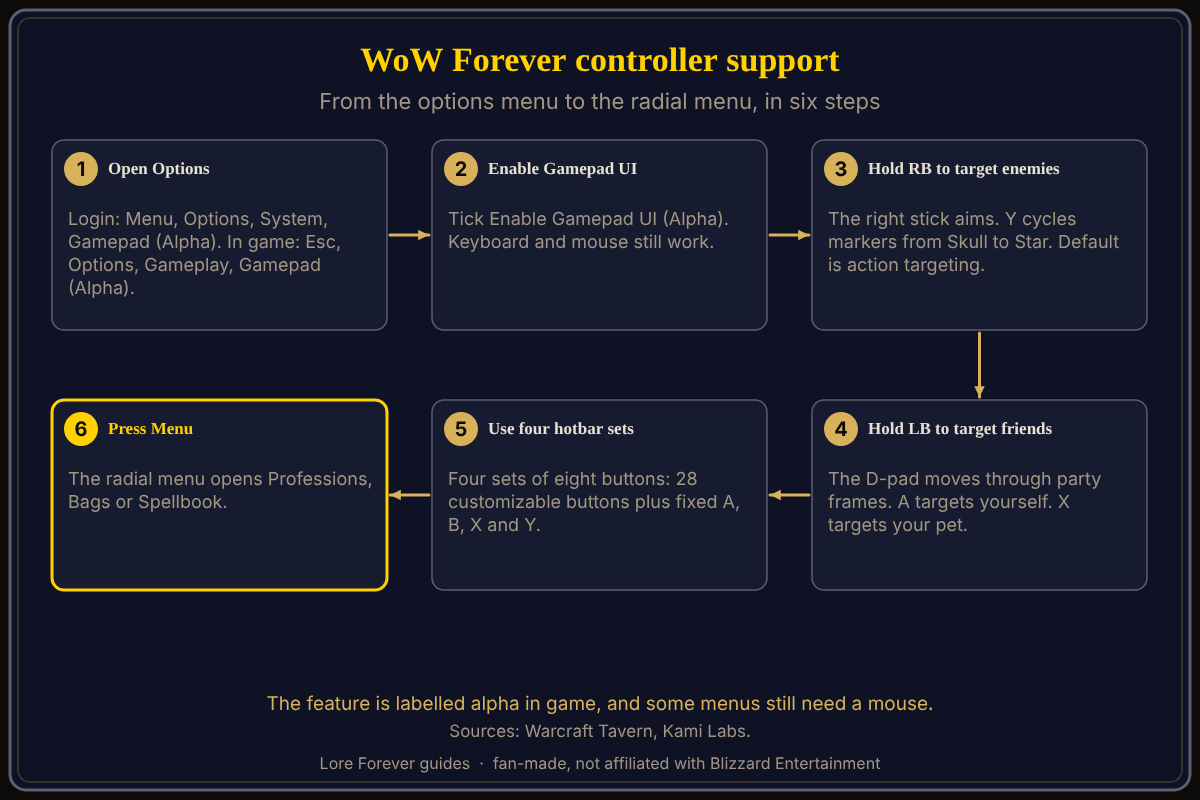
Quick answer: Open Options, go to the Gamepad (Alpha) tab, and tick Enable Gamepad UI (Alpha). Hold RB to target enemies and LB to target friends, use four sets of eight hotbar buttons, and press Menu for a radial menu. Some menus still need a mouse.
Warcraft Tavern says controller support for World of Warcraft previously came only from third-party addons, never from anything built into the game. The Gamepad UI is built in, and the sections below follow Warcraft Tavern's guide for it.
Key facts
- Label: "Gamepad (Alpha)"; the in-game description says alpha state (Warcraft Tavern)
- Announced: shown in the BlizzCon demo; Blizzard's "What's Next" recap lists official gamepad support (Warcraft Tavern, September 13, 2026)
- Default targeting: "a type of action targeting" (Warcraft Tavern's guide)
- Hotbars: four sets of eight buttons, 28 customizable plus fixed A, B, X and Y (Warcraft Tavern's guide)
- Movement: Warcraft Tavern's guide says World of Warcraft has no analog movement and suggests lowering the Back Pedal and Stick Run thresholds (defaults 0.6 and 0.5) to about 0.3 or lower
- Platform: no console version announced (Kami Labs)
How do you enable controller support in WoW Forever?
Warcraft Tavern's guide gives two paths. From the login or character select screen, press Menu, then Options, go to the System category and open the Gamepad (Alpha) tab. In game, press Esc, then Options, go to the Gameplay category and open Gamepad (Alpha). In both places the checkbox is Enable Gamepad UI (Alpha). The guide says keyboard and mouse still work with the Gamepad UI enabled, and that some menus and prompts, especially in the beta, require a mouse.
How does targeting work with a controller?
Warcraft Tavern's guide says that by default you are using a type of action targeting. Holding RB opens Enemy Targeting Mode, where the right stick aims, Y cycles raid markers from Skull to Star, A targets your last hostile target, X is Ranged Attack and B assists. Holding LB opens Friendly Targeting Mode, where the D-pad moves through party or raid frames, A targets yourself, X targets your pet and B assists. The guide uses Xbox button names and gives PlayStation equivalents: Cross, Circle, Square and Triangle for A, B, X and Y. Nintendo players swap A with B and X with Y.
How do hotbars and menus work on a controller?
The guide describes four sets of eight buttons. Holding LT, RT or both switches sets, which gives 28 customizable buttons and four fixed ones: A jumps, B cancels or closes menus, X interacts or starts attacking in combat, and Y opens a context menu. Holding LB and RB while pressing left or right pages through action bars. Pressing Menu opens a radial menu with Professions, Bags and Spellbook. To bind a spell, open the Spellbook, press X for Bind Mode and press the target button; to bind an item, hover it in your bags, press Y and choose Bind. See the professions guide and the beginner's guide.
What settings does the guide recommend?
These are the guide author's opinions, not Blizzard's. The author says most defaults are fine, recommends enabling Show Input Legend until you are comfortable, turning on Show Input Prompts, keeping the gold Frame Focus Style and leaving Follow Camera off, especially if you are prone to motion sickness. Center Camera is LB, RB and L3. These settings may change while the feature is alpha. The free Lore Forever add-on shows readable zone and quest background; it is fan-made.
What is not confirmed yet
- Final form: Warcraft Tavern says the feature is alpha and may change once players reach the beta; Kami Labs says the development team itself calls it alpha and still unstable.
- Consoles: Kami Labs says Blizzard confirmed nothing about a console version, and describes Blizzard's September 12 page as listing controller support as a PC feature, although the same article's opening says the option appears nowhere in the official announcements.
- Controller models: Kami Labs says no supported models are named by Blizzard or the demo players.
- Dating: Warcraft Tavern's controller guide shows no publication date, so its button layout may not match the launch build.
- Removing spells: the guide's author found no controller method to remove spells from hotbars; mouse dragging works.
Frequently asked questions
Does WoW Forever have controller support?
Yes. Warcraft Tavern says WoW Forever has a built-in Gamepad UI, labelled alpha, that you enable in the options.
How do I turn on the gamepad in WoW Forever?
Open Options and go to the Gamepad (Alpha) tab, then tick Enable Gamepad UI (Alpha), according to Warcraft Tavern's guide.
Can I still use a keyboard and mouse with the Gamepad UI?
Yes. Warcraft Tavern says keyboard and mouse still work, and some menus and prompts still require a mouse.
Is WoW Forever coming to consoles?
No console version has been announced, according to Kami Labs' September 14 report.
How many hotbar buttons does the controller have?
Four sets of eight buttons: 28 are customizable and four are fixed to A, B, X and Y, says Warcraft Tavern's guide.
Sources
Reviewed October 28, 2026. Details may change before launch. Lore Forever is fan-made and is not affiliated with Blizzard Entertainment.