Guide ·
WoW Forever Edit Mode: How to Move and Save Your Interface
Edit Mode in World of Warcraft: Forever (WoW Forever) opens from the Esc game menu and lets you drag, resize and snap interface elements such as action bars, player and target frames and cooldown managers, according to Gfinity Esports and AllThingsHow. AllThingsHow says nothing is saved until you click Save.
Quick answer: Press Esc, choose Edit Mode, drag the elements where you want them, click an element for its options, and press Save before you leave. Click casting and mouseover binds are set in the keybindings menu.
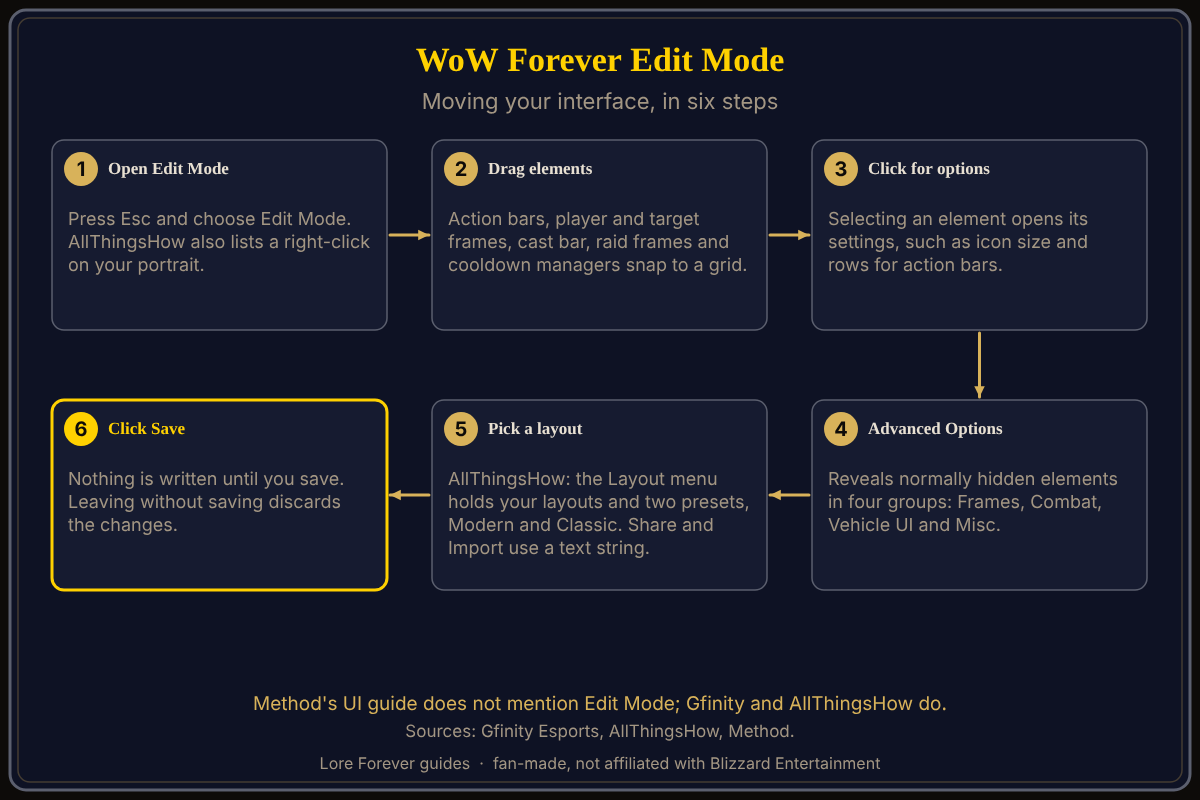
Edit Mode is the interface-layout screen the two guides below describe. Neither guide is a Blizzard page, so treat the steps as player-written instructions.
Key facts
- Open it: Esc, then Edit Mode (Gfinity Esports, AllThingsHow); AllThingsHow also lists a right-click on your portrait
- What moves: action bars, player and target frames, raid frames and cooldown managers (Gfinity Esports); cast bar, experience bar and minimap (AllThingsHow)
- Saving: nothing is written until you click Save (AllThingsHow)
- Layouts: a Layout menu with saved layouts and two presets, Modern and Classic, plus Share and Import (AllThingsHow)
- Click casting and mouseover: keybindings menu (Gfinity Esports; Method lists mouseover, self-cast and focus binds)
- Personal resource display: built in, under Combat options (Method)
- Hotkeys: K opens Professions and Y opens Legacy Talents (Method)
How do you open Edit Mode in WoW Forever?
Gfinity Esports, in a guide dated September 24, 2026, says to press Esc and choose the Edit Mode option. AllThingsHow, updated September 21, 2026, gives the same route and adds that you can right-click your character portrait and choose Edit Mode. AllThingsHow says a grid appears to help you line things up. For how the game looks before you start, see the graphics settings guide.
What can you move and change in Edit Mode?
Gfinity Esports says you can drag, resize and snap interface elements, and AllThingsHow describes them as draggable. Gfinity Esports names Action Bars, Player and Target frames, Raid Frames and Cooldown Managers. AllThingsHow names the player frame, target frame, cast bar, experience bar, minimap and action bars. Clicking an element opens its own options: AllThingsHow gives icon size and number of rows as examples for action bars. Its Advanced Options reveal normally hidden elements in four groups, Frames, Combat, Vehicle UI and Misc, and it says end cap art can be hidden.
How do layouts and saving work?
AllThingsHow says the Layout menu holds your saved layouts plus two built-in presets, Modern and Classic. You can name, save, copy and delete layouts. Share copies a layout string to your clipboard and Import Layout pastes one from someone else. Gfinity Esports calls importing community profiles optional. AllThingsHow says to click Save when you finish and that exiting without saving discards your changes.
Which other interface settings matter for beginners?
Method's UI guide, dated September 30, 2026, does not mention Edit Mode, but it covers settings you will meet next. It says the Forever UI is "not a direct 1:1 copy" of modern WoW's interface. It lists a Cooldown Manager, a Damage Meter and a swing timer under Advanced Options, a Quick Keybind mode, and separate keybinds for mouseover, self-cast and focus targets. It says camera follow is set to Always by default and recommends changing it to Never. Method's own list includes a built-in personal resource display, and Gfinity Esports calls activating it handy. For add-ons, read the best add-ons guide. The free Lore Forever add-on shows readable zone and quest background; it is fan-made.
What is not confirmed yet
- Source gap: no Blizzard page was opened for Edit Mode in WoW Forever; the two guides are third-party and dated September 2026.
- Preset names: the Modern and Classic presets come from AllThingsHow alone.
- Add-on compatibility: Gfinity Esports says Classic-era add-ons will not load, that Midnight add-ons should port, and that Mainline add-ons might work. Icy Veins' article on Blizzard developers and add-ons could not be opened.
- Beta changes: options may change before launch.
Frequently asked questions
How do I open Edit Mode in WoW Forever?
Press Esc and choose Edit Mode, according to Gfinity Esports and AllThingsHow. AllThingsHow also lists a right-click on your portrait.
Can I move my action bars in WoW Forever?
Yes. Gfinity Esports lists Action Bars among the elements you can drag, resize and snap, and AllThingsHow lists action bars too.
Do I need to save in Edit Mode?
Yes. AllThingsHow says nothing is written until you click Save, and leaving without saving discards the changes.
Does WoW Forever have a built-in personal resource display?
Method says a personal resource display is built in under Combat options, and Gfinity Esports says it shows health and resource above your character in combat.
Will my Classic add-ons work in WoW Forever?
Gfinity Esports says Classic-era add-ons will not load, while Midnight add-ons should port and Mainline add-ons might work. Gfinity Esports lists CurseForge and the Wago App as tools for finding Forever-specific add-ons.
Sources
Reviewed October 28, 2026. Details may change before launch. Lore Forever is fan-made and is not affiliated with Blizzard Entertainment.