Guide ·
WoW Forever Accessibility Settings: What Is Confirmed
World of Warcraft: Forever (WoW Forever) has accessibility settings in Esc > Options, Blizzard says, but no page opened for this guide lists which ones the Classic-era client includes. Blizzard's October 28 Starter Guide names "accessibility features" among the things Options covers and tells new players to adjust accessibility settings, yet it gives no list. This guide, current as of November 5, 2026, separates what Forever guides show from what modern WoW is documented to have.
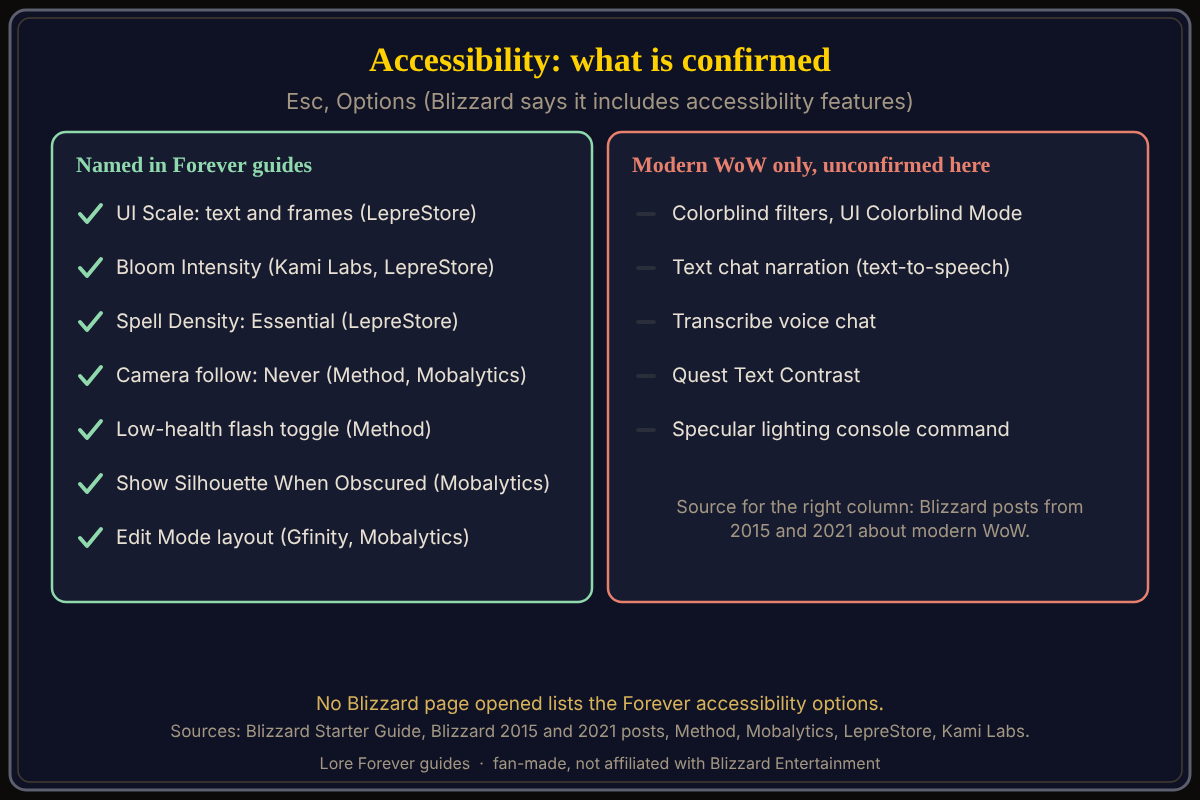
Quick answer: Press Esc > Options and look for the accessibility section. Named in Forever guides (none calls them accessibility options): UI Scale, Bloom Intensity, Spell Density, Camera, the low-health screen flash and Edit Mode. Colorblind filters, text-to-speech and quest text contrast are documented for modern WoW only; check whether your Forever menu has them.
Key facts
- Where: Game Menu (Esc) > Options, which Blizzard says includes accessibility features (Starter Guide)
- Named in Forever guides: UI Scale, Bloom Intensity, Spell Density (LepreStore); low-health flash toggle (Method)
- Named in Forever guides: Show Silhouette When Obscured (Mobalytics)
- Not confirmed: colorblind filters, text-to-speech, quest text contrast in the Forever client
What accessibility settings does WoW Forever have?
Three guides name options that help readability. LepreStore (updated November 2) says UI Scale enlarges text and frames without changing the 3D render resolution, that Bloom Intensity can be reduced if spell effects hide targets or the scene looks too bright, and that Spell Density at Essential gives clearer group combat. Bellular Warcraft, via Kami Labs, says Bloom Intensity defaults to the maximum and that Spell Density Essential costs no measured frames. Method says the low-health screen flash is on by default and can be toggled in Combat. Mobalytics names Show Silhouette When Obscured. None of these guides has a dedicated accessibility section.
Can you change the camera and movement for comfort?
Method and Mobalytics both say Camera follow defaults to always re-centering and can be set to Never, so the view stops swinging behind you. Method puts it in Options > Controls. See the camera settings guide and camera controls.
Does WoW Forever have a colorblind mode?
Unconfirmed. For modern WoW, Blizzard's 2015 patch 6.1 post describes an Accessibility section with an "Enable UI Colorblind Mode" option that adds words such as "Rare" and "Epic" to tooltips, plus protanopia, deuteranopia and tritanopia filters with a strength slider. No source opened says the Forever client has these. Blizzard's 2021 post adds that colorblind settings sit in a sub-menu under Accessibility in modern WoW.
Does WoW Forever have text-to-speech or larger text?
Not confirmed. Blizzard's June 29, 2021 post for modern WoW says its accessibility options sit in the Interface panel of the Game Menu: Text Chat Narration using an operating-system voice, Transcribe Voice Chat and Quest Text Contrast. Specular lighting is a console command. That is modern WoW; the Forever menu may differ. A Blizzard developer note on November 2 has a section titled "User Interface and Accessibility," but its items concern the swing timer, nameplates and bags, not named accessibility options.
What is not confirmed yet
- A Blizzard list of Forever accessibility options.
- Colorblind filters, text-to-speech, text size beyond UI Scale, and subtitles.
- The exact menu name; check Esc > Options.
How can Willo and the Lore Forever add-on help with this?
Willo answers out loud when you ask out loud, and typed questions get text answers, so you can ask "where is the colorblind option" and she answers from what she knows. She can be wrong and is not official, so the in-game menu is the source of truth; she does not change settings for you. She is free to start with 50 answers a day, a separate companion app for Windows 10 or 11; her page also lists an Apple Silicon Mac download (macOS 12 or later), and her FAQ says Windows and Mac, though the CurseForge page still describes her as a Windows app. The free Lore Forever add-on has no internet access; its narration, generated voices, plays only when you press Play if that option is on. It is not a screen reader. Both are fan-made and not affiliated with Blizzard.
Frequently asked questions
Does WoW Forever have accessibility options?
Blizzard says Options includes accessibility features but opened pages do not list them.
Does WoW Forever have a colorblind mode?
Unconfirmed for Forever. Modern WoW has one, per Blizzard's 2015 post.
How do I make the text bigger in WoW Forever?
LepreStore says UI Scale enlarges text and frames. Find it in Esc > Options; the exact name may differ.
How do I stop the screen flashing at low health?
Method says the low-health flash is on by default and can be toggled in Combat.
Does WoW Forever have text-to-speech?
Not confirmed. Modern WoW has Text Chat Narration. See also the interface settings guide.
Sources
Reviewed November 5, 2026. Lore Forever and Willo are fan-made and are not affiliated with Blizzard Entertainment.