Guide ·
WoW Forever Camera Settings Explained: What Each Option Does
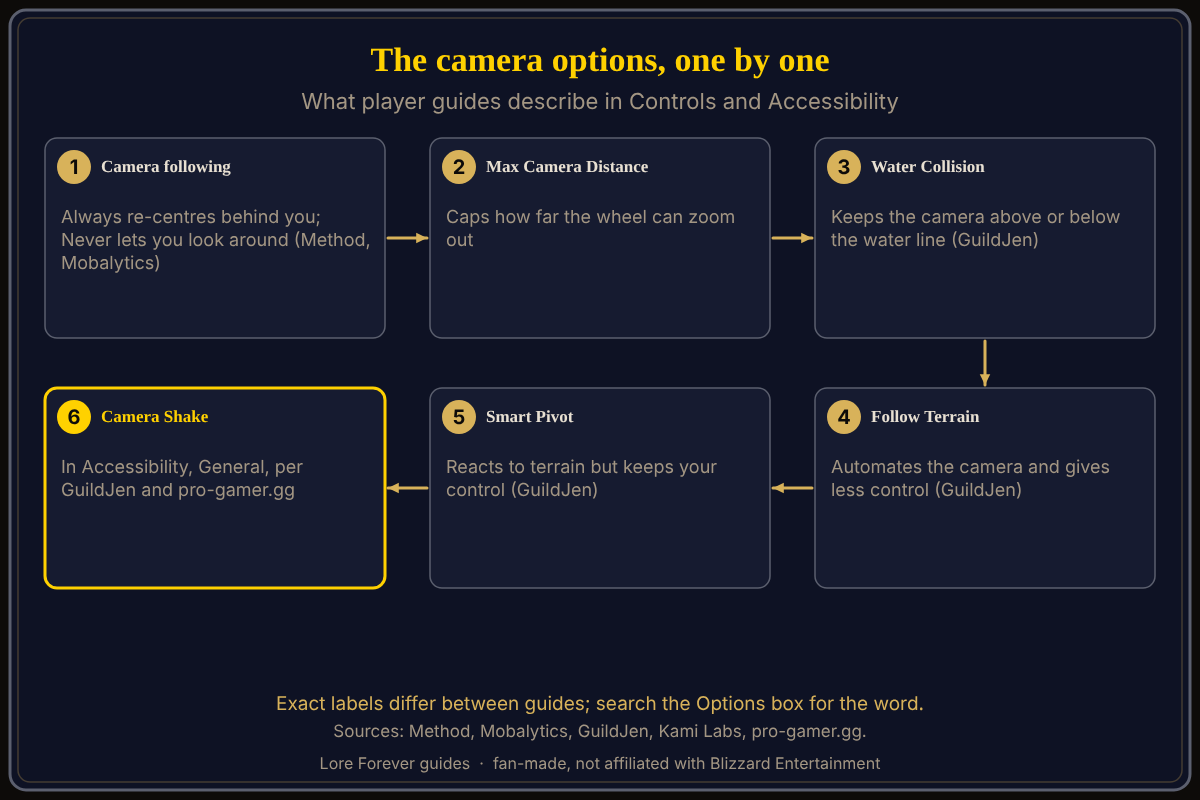
World of Warcraft: Forever (WoW Forever) puts its camera settings in Esc > Options > Controls, and the one most guides tell you to change first is the camera following style, which Method says defaults to Always and should be set to Never. The other options player guides describe are Max Camera Distance, Water Collision, Follow Terrain and Smart Pivot, with a camera shake option under Accessibility; this is as of November 5, 2026.
Quick answer: Esc > Options > Controls. Set camera following to Never for full control, raise Max Camera Distance if you want a wider view, and leave Follow Terrain and Water Collision off if you want the camera to do only what your mouse tells it. Reduce shake under Accessibility. Guide labels differ, so search the Options box.
Blizzard's pages name the Options menu but not these settings, so everything below is from player guides. For the mouse side, see camera controls.
Key facts
- Where: Esc > Options > Controls (Method, VGKami); Options has a search box at the top right (Method)
- Following style: Always by default; Never recommended (Method, Mobalytics, GuildJen, Kami Labs, Playhub)
- Other options: Max Camera Distance, Water Collision, Follow Terrain, Smart Pivot (GuildJen)
- Shake: Options > Accessibility > General > Camera Shake (pro-gamer.gg; GuildJen)
- Gamepad: a separate Camera section under Gamepad (Alpha) (Warcraft Tavern)
What does the camera following setting do?
Mobalytics (updated November 3) says the default re-centres the camera behind your character while you move, which limits your view; Never lets you spin the camera around. GuildJen calls "Never Adjust Camera" the most optimal style: most control, more mouse input, and holding the right mouse button realigns the camera on demand. Kami Labs picked "Never adjust". Method says Always is the default.
What do Water Collision, Follow Terrain and Smart Pivot do?
GuildJen describes all three. Water Collision keeps the camera above water when you are above it and below when you are below, which can be immersive but gives less control. Follow Terrain automates camera movement. Smart Pivot takes terrain into account while still giving you control. VGKami (October 30) suggests Follow Terrain and Water Collision off, and Smart Pivot off for a repeatable look-around or on for a gentler orbit; that is the author's preference.
Which camera options help with motion sickness?
GuildJen's accessibility section says to remove camera shake and enable a motion sickness option under General. pro-gamer.gg gives Options > Accessibility > General > Camera Shake set to None. Warcraft Tavern's controller guide advises leaving the gamepad Follow Camera off, especially if you are prone to motion sickness. See accessibility settings.
Is there a setting that shows my character behind objects?
Mobalytics and GuildJen both name Show Silhouette When Obscured under Combat. GuildJen says it shows your character even when objects are in front of the camera; Mobalytics says it helps in forests or caves. It is a visibility aid, not a camera control.
Are there fixes for a camera that misbehaves?
Blizzard Support's "Camera Follow Problem in World of Warcraft" says add-ons, script commands or other interface changes may alter camera settings, and suggests resetting your user interface to rule out add-on conflicts. It names no game version or menu, so I did not copy its commands. Mobalytics says to type /reload if anything gets stuck, to make sure changes are saved.
What is not confirmed yet
- Names: Camera, Camera Following Style and "Adjust camera" are three labels for what looks like one option. The exact menu name may differ; check Esc > Options.
- Tab: Water Collision, Follow Terrain and Smart Pivot sit in Controls only by implication; GuildJen lists them beside the camera style.
- Blizzard: I found no Blizzard page describing these options for WoW Forever.
How can Willo help when the camera menu confuses you?
Ask Willo out loud, for example "where do I change the camera distance". She can be wrong and is not official, so check the in-game menu; she does not change settings for you. Willo is free to start (50 answers a day) and is a separate companion app for Windows 10 or 11; her page and FAQ also list an Apple Silicon Mac version (macOS 12 or later), though the CurseForge page still describes her as a Windows app. The free Lore Forever add-on adds quest stories and narration. Both are fan-made and not affiliated with Blizzard. Also see max camera distance and first settings to change.
Frequently asked questions
Where are the camera settings in WoW Forever?
Esc > Options > Controls, per Method and VGKami, with camera shake under Accessibility.
What should I set the camera following style to?
Method, Mobalytics, GuildJen and Kami Labs all recommend Never, so the camera does not swing behind you.
What does Smart Pivot do in WoW Forever?
GuildJen says it adjusts the camera to terrain while still letting you control it.
How do I turn off camera shake?
Options > Accessibility > General, per pro-gamer.gg and GuildJen.
Do the settings match modern WoW?
Not exactly; Method says Forever's UI is not a 1:1 copy.
Sources
Reviewed November 5, 2026. Lore Forever and Willo are fan-made and are not affiliated with Blizzard Entertainment.