Guide ·
WoW Forever Max Camera Distance: How to Zoom Out More
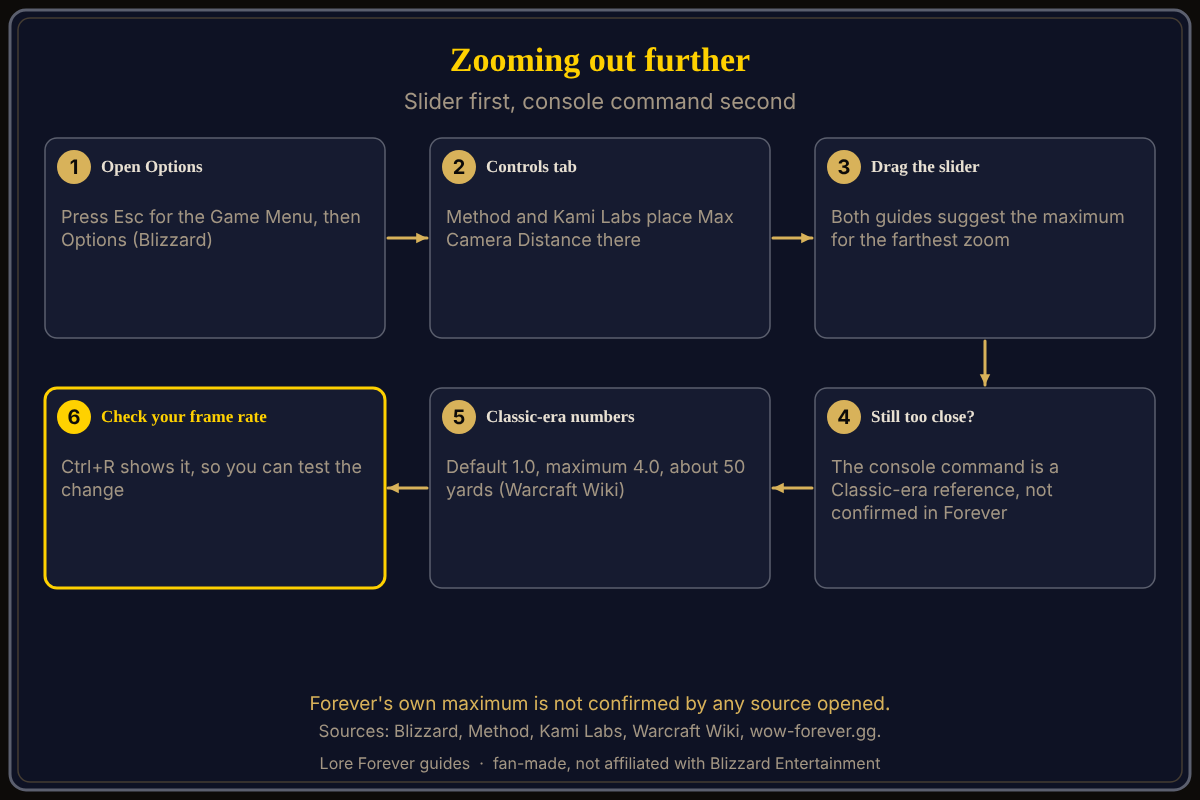
To zoom out more in World of Warcraft: Forever (WoW Forever), open Esc > Options > Controls and drag the Max Camera Distance slider to the maximum, according to Method and Kami Labs. The console command people search for, /console cameraDistanceMaxZoomFactor, is documented for the Classic-era client, but no source I opened confirms its limits in WoW Forever as of November 5, 2026.
Quick answer: Slider first: Options > Controls > Max Camera Distance, set high, then scroll the wheel out. Only if that is not far enough, wow-forever.gg suggests
/console cameraDistanceMaxZoomFactor 4, which matches the Warcraft Wiki's Classic maximum, and labels Forever's values not confirmed.
Other camera options: camera settings explained.
Key facts
- Slider: "Max Camera Distance" in Controls (Method, September 30, 2026; Kami Labs, October 29, 2026)
- Advice: Method says players typically want to zoom out as far as possible; Kami Labs sets it to the maximum
- Classic-era command:
/console cameraDistanceMaxZoomFactor; default 1.0, maximum 4.0, camera stops at 50 yards (Warcraft Wiki, tested on 1.14.4 and 3.4.3) - Modern WoW: default 1.9, range 1 to 2.6, 39 yards (Warcraft Wiki)
- WoW Forever: default, maximum and distance listed as "Not confirmed" (wow-forever.gg, updated October 9)
How do I zoom out more in WoW Forever?
Press Esc, choose Options, open Controls and find the Max Camera Distance slider. Method says players typically like to zoom out as much as possible. Kami Labs says to search "distance" in Controls and set Maximum Camera Distance to the maximum. GuildJen says the slider sets a cap and you can still zoom in and out dynamically with the wheel.
What is the max camera distance command?
The command is /console cameraDistanceMaxZoomFactor followed by a number. The Warcraft Wiki says the factor multiplies a base distance of 15, and that for Classic (tested on 1.14.4 and 3.4.3) the maximum is 4.0, though the camera will not zoom beyond 50 yards. Modern WoW's default is 1.9, range 1 to 2.6, limit 39 yards.
wow-forever.gg (October 9) says to paste /console cameraDistanceMaxZoomFactor 4 into chat, press Enter and scroll out, and labels every Forever value as not confirmed.
Do the sources agree on the Forever maximum?
No. pro-gamer.gg (updated November 2) lists 2.6 for about 39 yards, a modern WoW figure, and cites no test. VGKami (October 30) lists both 2.6 and 4 as community-sourced and unverified, says 4 may be clamped, and says the slider's top position is commonly shown as 2. I could not reconcile these or test the game, so treat the numbers as claims to try.
How do I keep the command on a button?
wow-forever.gg suggests a macro: put the same line in a new macro, drag it to a bar and click it once. The Warcraft Wiki also describes adding a SET cameraDistanceMaxZoomFactor line to Config-cache.wtf with the game closed; I did not find its Forever location confirmed. See macros and keybinds.
Does zooming out cost frames per second?
wow-forever.gg gives no figure and says to check yourself. Magic Game World's November 4 key list shows Ctrl+R as Toggle Framerate Display. See graphics settings.
What is not confirmed yet
- Forever's maximum zoom, in yards or as a factor.
- Whether the console variable behaves the same in Forever; the wiki tested other clients.
- Whether the slider alone reaches the farthest distance.
- Exact menu wording: it may differ; check Esc > Options.
Can Willo help with camera distance?
Ask Willo out loud, for instance "where do I change the camera distance". She can be wrong and is not official; the in-game menu is the source of truth, and she does not change settings for you. She is free to start (50 answers a day) and is a separate companion app for Windows 10 or 11; her page and FAQ also list an Apple Silicon Mac version (macOS 12 or later), though the CurseForge page still describes her as a Windows app. The free Lore Forever add-on adds quest stories. Both are fan-made and not affiliated with Blizzard. Related: camera controls.
Frequently asked questions
How do I zoom out more in WoW Forever?
Raise Max Camera Distance in Options > Controls, then scroll the wheel out.
What is the max camera distance command in WoW Forever?
/console cameraDistanceMaxZoomFactor is the Classic-era command, with a Classic maximum of 4.0; Forever's limit is not confirmed.
How far can you zoom out in Classic?
The Warcraft Wiki says up to a factor of 4.0, about 50 yards; modern WoW stops at 39.
Is Forever's camera distance confirmed?
No source I opened confirms it.
Does a longer camera distance lower FPS?
No source gives a figure. Press Ctrl+R to compare.
Sources
Reviewed November 5, 2026. Lore Forever and Willo are fan-made and are not affiliated with Blizzard Entertainment.