Guide ·
WoW Forever Interface Settings: What to Turn On First
In World of Warcraft: Forever (WoW Forever), press Esc, choose Options and work through Controls, Interface, Combat, Nameplates, Social and Keybinds and Action Bars; Method says the first change to make is Camera, which defaults to "Always" and should be set to "Never." Method adds a search bar at the top right of Options. Current as of November 5, 2026.
Quick answer: Esc > Options. Set Camera to Never, show health and mana text in Interface, turn on Target of Target in Combat if you tank or heal, add the personal resource display if you want it, then press Esc > Edit Mode to place your frames and Save.
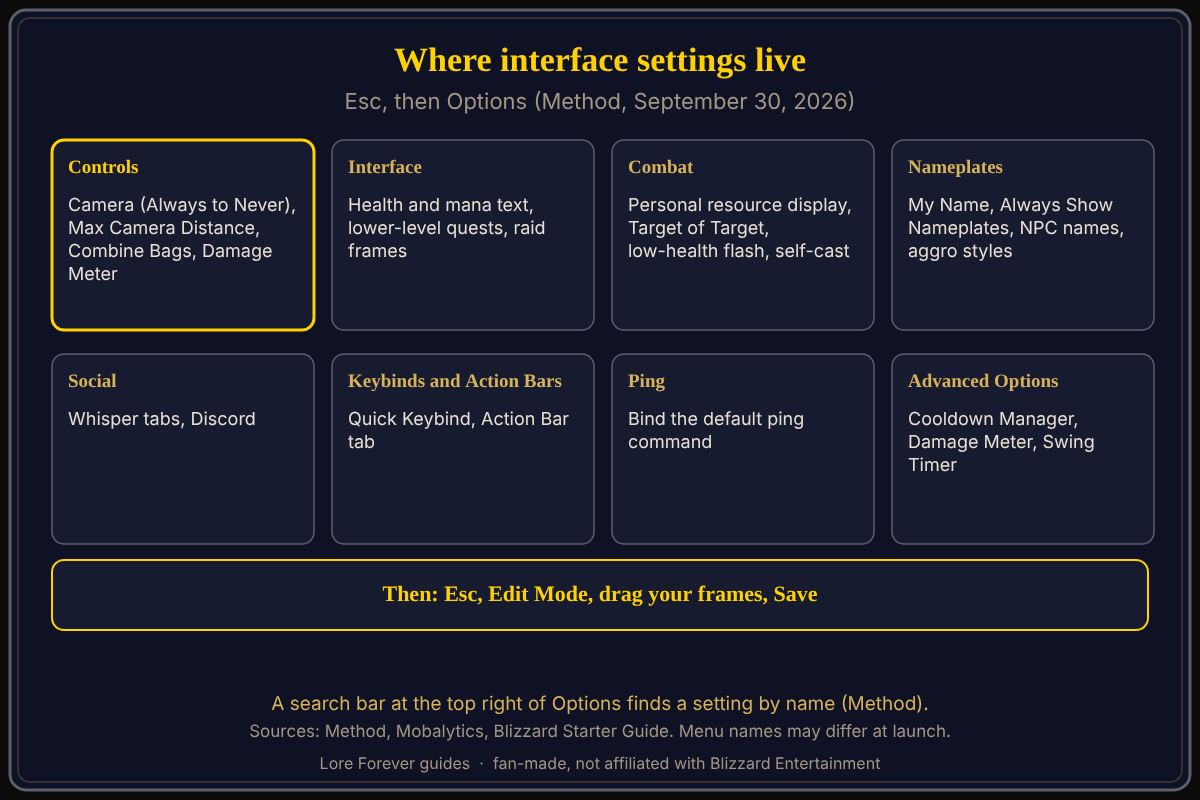
Method says the Options tab was overhauled and many old settings moved, so Classic habits may send you to the wrong tab.
Key facts
- Open: Game Menu (Esc) > Options; Blizzard lists key bindings, action bars, nameplates, chat, audio, graphics and accessibility (Starter Guide)
- Controls: Camera, Max Camera Distance, Combine Bags, Damage Meter (Method)
- Interface: health and mana text, lower-level quests, raid frames (Method)
- Combat: personal resource display, Target of Target, low-health flash (Method)
- Layout: Esc > Edit Mode (Mobalytics, Gfinity Esports)
What interface settings should you change first in WoW Forever?
Method's September 30 guide lists these. In Controls, set Camera from Always to Never and pick a Max Camera Distance with the slider; Method says players usually zoom out as far as possible. In Interface, health and mana text is "none" by default and can show amount, percentage or both. In Combat, Target of Target is off by default and Method says tanks and healers especially want it. Mobalytics (updated November 3) agrees on the camera and adds turning Sticky Targeting off so a click on the ground drops your target, and Auto Loot with a modifier key such as Shift.
What did the first-login preset already choose?
Blizzard's October 28 Starter Guide says Classic starts with SD models, one-bag off, transmog off, camera-turning keyboard binds and a Classic screen layout; Enhanced starts with HD models, one-bag on, transmog on, strafe movement on the keyboard and a centralized layout. You can change individual settings later under Game Menu > Options, and the screen does not return.
What do the Combat and Nameplates tabs hold?
Method says Combat holds the personal resource display, which shows health and resource under your character, plus the low-health screen flash (on by default) and the new mouseover and self-cast options, which let you bind one key for healing yourself and another for whoever your mouse is over. Mobalytics also names Show Silhouette When Obscured. Method says My Name, Always Show Nameplates and NPC names moved from Interface to Nameplates, and that Social sends whispers to a new tab by default.
How do you move your frames with Edit Mode?
Mobalytics says to open the Game Menu, choose Edit Mode, and enable Grid and Snap to Elements before dragging. Gfinity Esports (September 24) lists action bars, unit frames and cooldown managers as movable. Full steps: Edit Mode setup. For keys, see macros and keybinds and action bars setup.
What is not confirmed yet
- The defaults above come from Method's pre-launch guide; no Blizzard page opened lists every option.
- The exact menu names and tab order may differ after launch; check Esc > Options or use the search bar.
- Whether Sticky Targeting is on or off by default is not stated.
How can Willo and the Lore Forever add-on help with this?
When a menu is confusing, ask Willo out loud, such as "where do I change the camera distance," and she answers from what she knows. She can be wrong and is not official; the in-game menu is the source of truth, and she does not change settings for you. Willo is free to start with 50 answers a day. She is a separate companion app for Windows 10 or 11; her page also lists an Apple Silicon Mac download (macOS 12 or later), and her FAQ says Windows and Mac, though the CurseForge page still describes her as a Windows app. The free Lore Forever add-on has no internet access and adds quest stories with generated-voice narration. Both are fan-made and not affiliated with Blizzard.
Frequently asked questions
What interface settings should I change first in WoW Forever?
Camera to Never, health and mana text, Target of Target if you tank or heal, and a layout in Edit Mode, per Method and Mobalytics.
Where are the WoW Forever interface options?
Press Esc, then Options. Method says a search bar at the top right finds any setting.
How do I show health and mana numbers in WoW Forever?
Method says it is in Interface, set to none by default, with amount, percentage or both.
Can I move the WoW Forever interface?
Yes. Esc > Edit Mode lets you drag, resize and snap elements (Gfinity Esports). AllThingsHow adds that you must click Save, though its steps read like modern WoW.
What other settings should I check?
See the first settings to change and camera settings.
Sources
Reviewed November 5, 2026. Lore Forever and Willo are fan-made and are not affiliated with Blizzard Entertainment.