Guide ·
WoW Forever Action Bars Setup: Show Extra Bars and Keys
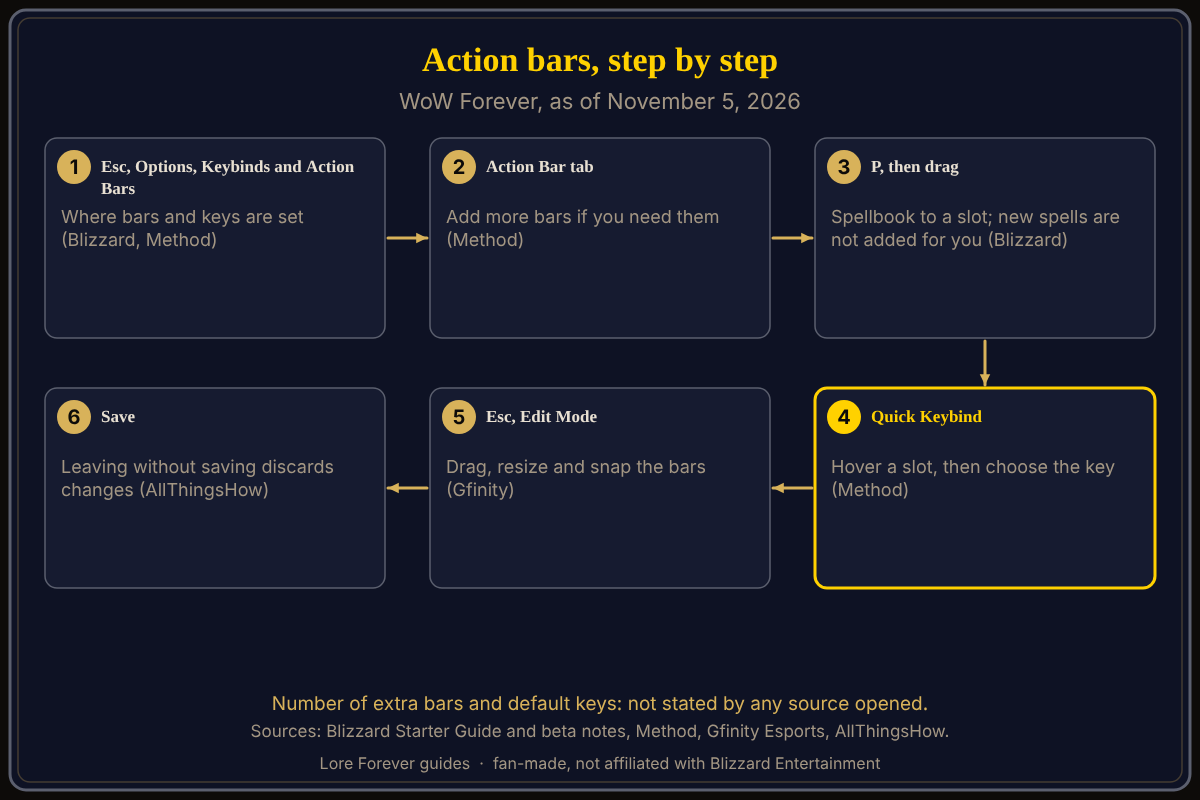
To show more action bars in World of Warcraft: Forever (WoW Forever), press Esc > Options > Keybinds and Action Bars and use the Action Bar tab to add bars, then press Esc > Edit Mode to place them, according to Method's UI guide. Blizzard's Starter Guide adds that you drag spells from the Spellbook (default P) onto a slot and change keys under Game Menu > Options > Keybindings. This guide is current as of November 5, 2026.
Quick answer: Add bars in Options > Keybinds and Action Bars > Action Bar tab. Drag abilities from the Spellbook onto the slots. Bind keys with Quick Keybind: hover a slot, then choose the key. Arrange the bars in Esc > Edit Mode and click Save.
Key facts
- Add bars: Options > Keybinds and Action Bars > Action Bar tab (Method, September 30)
- Fill a bar: drag from the Spellbook; P opens it by default (Blizzard Starter Guide, October 28)
- Bind a key: Game Menu > Options > Keybindings, or Quick Keybind mode (Blizzard; Method)
- Move a bar: Esc > Edit Mode, then Save (Gfinity Esports; AllThingsHow)
- New spells: no longer added to your bars automatically, per Blizzard's beta notes of November 2
How do you show extra action bars in WoW Forever?
Method says the Keybinds and Action Bars section is where you adjust key assignments, and that "if you need more Action Bars" you go to the Action Bar tab to add more. Method does not say how many bars exist, and no other source opened gives the count. Blizzard's Starter Guide lists action bars among the things Options covers.
How do you put spells on the bars?
Blizzard's Starter Guide says to press P for the Spellbook, drag an ability to a slot, and put the abilities you use most within easy reach. A Blizzard developer note in the November 2 beta update states that learning a new spell no longer adds it to your bars automatically, so after you visit a class trainer you place new spells yourself.
How do you set keys for the bars?
Method describes a Quick Keybind mode: hover over a slot on your action bar and select the key you want. The same November 2 notes say that while the keybinds menu is open, hovering over an action bar keybind highlights that button on the bar. Blizzard also says you can assign or change a key under Game Menu > Options > Keybindings. For macros and click casting see macros and keybinds and how to change keybinds.
How do you move or resize the bars?
Gfinity Esports (September 24) says Esc then Edit Mode lets you drag, resize and snap action bars. AllThingsHow (updated September 21) says to click a bar for its own options, with icon size and number of rows as examples, and to click Save, because leaving without saving discards the changes. Its steps read like modern WoW's Edit Mode, so check that your menu matches. Blizzard's November 2 notes add that gamepad settings, including its own action bar, are set through Edit Mode and Options (controller support). More in the Edit Mode setup guide.
What is not confirmed yet
- The number of extra bars and their default keys; no source opened lists them.
- Whether each bar is switched on from the Action Bar tab or from Edit Mode; Method names the tab, AllThingsHow describes Edit Mode options.
- Whether launch matches the beta notes, and the exact menu names; check Esc > Options.
How can Willo and the Lore Forever add-on help with this?
If you cannot find a bar option, ask Willo out loud, for example "how do I add another action bar," and she answers from what she knows. She can be wrong and is not official, so trust the in-game menu; she does not change settings for you. She is free to start with 50 answers a day, a separate companion app for Windows 10 or 11; her page also lists an Apple Silicon Mac download (macOS 12 or later), and her FAQ says Windows and Mac, though the CurseForge page still describes her as a Windows app. The free Lore Forever add-on has no internet access and adds quest stories with generated-voice narration. Both are fan-made and not affiliated with Blizzard.
Frequently asked questions
How do I add more action bars in WoW Forever?
Method says to open the Action Bar tab in the Keybinds and Action Bars section of Options and add bars there.
How do I put spells on my action bar in WoW Forever?
Open the Spellbook with P and drag the ability to a slot, per Blizzard.
Do new spells go on the action bar automatically?
No. Blizzard's November 2 beta notes say they no longer do.
How do I bind keys to action bar buttons in WoW Forever?
Use Quick Keybind: hover over a slot and choose the key, per Method.
How do I move my action bars?
Press Esc, choose Edit Mode, drag the bar and click Save.
Sources
Reviewed November 5, 2026. Lore Forever and Willo are fan-made and are not affiliated with Blizzard Entertainment.