Guide ·
Best WoW Forever Settings for a Low-End PC and Mac
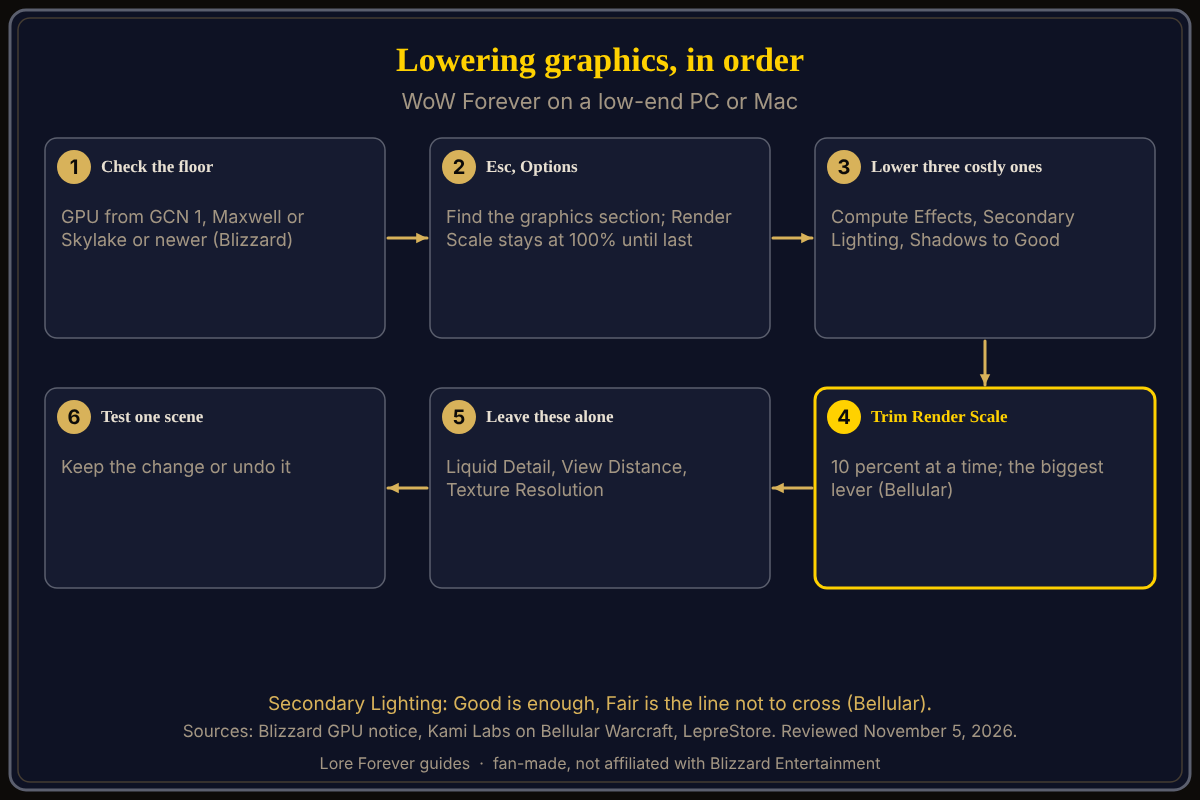
For the best WoW Forever settings on a low-end PC or Mac, open Esc > Options and its graphics section, step Compute Effects, Secondary Lighting and Shadow Quality down one level at a time, then trim Render Scale in 10 percent steps. No Blizzard page opened for this guide ranks these options, so the order below comes from player tests, as of November 5, 2026.
Quick answer: Lower Compute Effects, Secondary Lighting (not below Fair) and Shadow Quality to Good, then remove Render Scale 10 percent at a time. Leave Liquid Detail, View Distance and Texture Resolution alone. Change one thing, test, keep or undo.
Key facts
- Where: Game Menu (Esc) > Options, which Blizzard says covers graphics and accessibility (Starter Guide)
- Lower: Compute Effects, Secondary Lighting, Shadow Quality; then Render Scale, the biggest lever (Bellular Warcraft, via Kami Labs)
- Mac minimum: macOS 12, Apple M2 or 9th-generation Intel Core, 8 GB RAM (Blizzard Shop)
What are the best WoW Forever settings for a low-end PC?
Start from the floor. Blizzard's September 17 notice says Forever needs a GPU from AMD Graphics Core Next 1 (2012), NVIDIA Maxwell (2014) or Intel Skylake (2015), or newer. Compatible cards can still be below the minimum, so read can my PC run WoW Forever.
Then follow Bellular Warcraft's October 28 video, summarized by Kami Labs: lower shadows, Compute Effects and Secondary Lighting, then Render Scale. He calls Render Scale the biggest lever, and says removing just 10 percent gains a lot without much blur (the write-up says both "first" and "last"). His rule is one level below the maximum, or at least one above the lowest. He reports up to 50 FPS between High and Ultra Secondary Lighting, and says Good is enough in most cases and Fair is the line not to cross. LepreStore (updated November 2) names Secondary Lighting as the first test for stutter and says results depend on build and hardware.
Which settings can you leave alone?
According to Bellular, Liquid Detail can stay on High (negligible cost), View Distance can stay high because the new fog keeps its cost low, and Texture Resolution can be High with no impact seen. LepreStore keeps Projected Textures on so ground warnings stay visible.
What are the best WoW Forever settings for a Mac?
Blizzard's Shop page lists macOS 12, an Apple M2 or 9th-generation Intel Core chip and 8 GB RAM as the minimum and does not name the M1 (see WoW Forever on Mac). Bellular's only Mac test is a 2020 MacBook Pro with little video memory: each setting one level above minimum gave about 15 FPS, and half resolution about 22. With Render Scale low, main settings at minimum and textures and View Distance at maximum, it ran about 40 FPS in Mulgore. He expects a recent MacBook Air to do much better.
What if the graphics menu breaks?
LepreStore describes a Battle.net route: click the cogwheel beside Play, open Game Settings, choose Reset In-Game Options. That is a single source and it resets your preferences.
What is not confirmed yet
- No Blizzard page opened ranks the graphics options or gives a low-end preset.
- Bellular tested two machines in a video made before launch.
- Whether the Classic experience preset raises frame rate is unstated; Blizzard calls it "simpler visuals."
- Menu wording may differ from these pre-launch guides; check Esc > Options.
How can Willo and the Lore Forever add-on help with this?
When a menu name confuses you, ask Willo out loud, such as "where do I change the render scale," and she answers from what she knows. She can be wrong and is not official, so trust the in-game menu; she does not change settings for you. She is free to start with 50 answers a day, a separate companion app for Windows 10 or 11; her page also lists an Apple Silicon Mac download (macOS 12 or later), and her FAQ says Windows and Mac, though the CurseForge page still describes her as a Windows app. The free Lore Forever add-on adds quest stories with generated-voice narration and has no internet access. Both are fan-made and not affiliated with Blizzard.
Frequently asked questions
What are the best WoW Forever settings for a low-end PC?
Native resolution, Compute Effects, Secondary Lighting and Shadow Quality at Good, then a lower Render Scale, per player tests. Blizzard has not published a preset.
What is the best WoW Forever setting for Mac?
No Mac preset is published. One tester's 2020 MacBook Pro needed most settings at minimum to reach about 40 FPS.
Which graphics setting costs the most FPS?
Bellular names Render Scale as the biggest lever and Secondary Lighting and Compute Effects as costly at the top levels.
Can an old graphics card run WoW Forever?
Only if it meets Blizzard's architecture floor and the Shop minimum; Blizzard lists the GTX 760 to 780 as unsupported.
Where do I change graphics in WoW Forever?
Esc, then Options and its graphics section; LepreStore calls it Graphics, but check the exact name. See also graphics settings and the interface settings guide.
Sources
Reviewed November 5, 2026. Lore Forever and Willo are fan-made and are not affiliated with Blizzard Entertainment.