Guide ·
Can My PC or Laptop Run WoW Forever? Requirements Checked
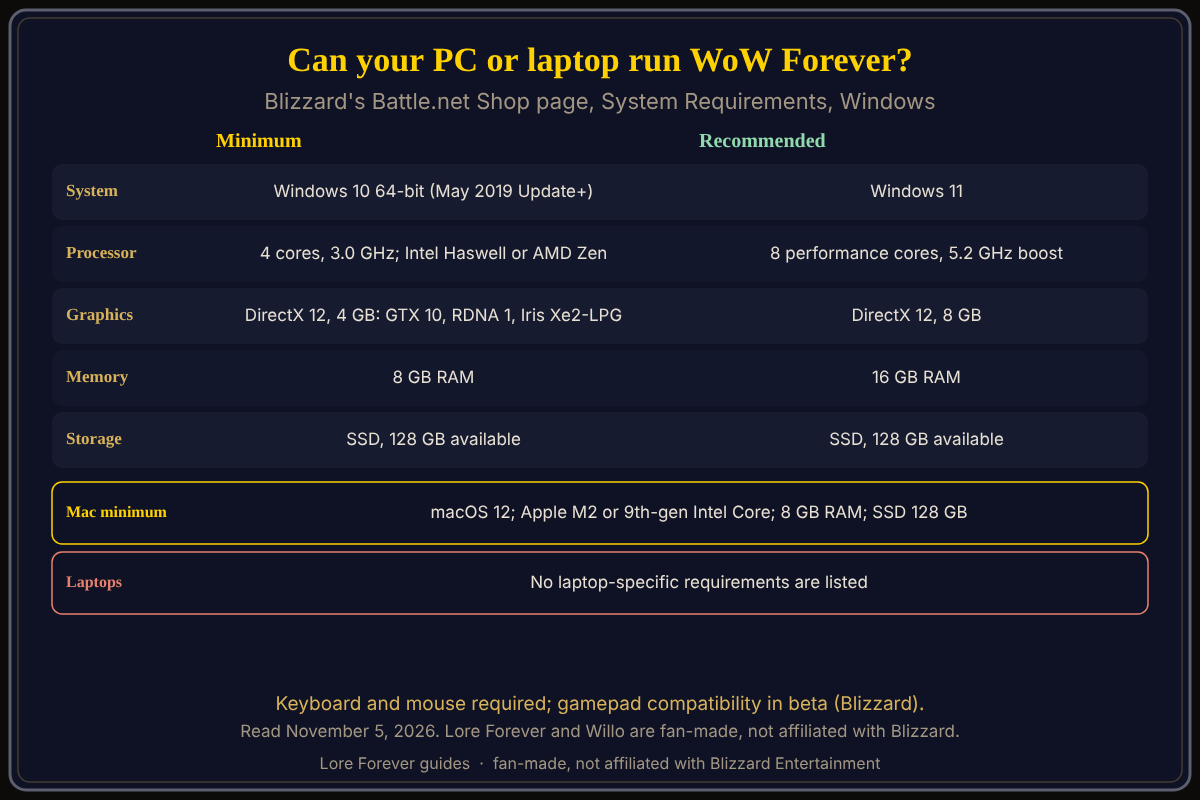
Your PC or laptop can run World of Warcraft: Forever (WoW Forever) if it meets Blizzard's minimum: Windows 10 64-bit, a 4-core 3.0 GHz processor, a DirectX 12 GPU with 4 GB, 8 GB of RAM and an SSD with 128 GB free. Blizzard lists no separate laptop requirements, so a laptop is judged by the same table. The game launched on November 4, 2026.
Quick answer: Compare your Windows PC or laptop with the table below, GPU first. Minimum GPUs include GeForce GTX 10 series, AMD RDNA 1 and Intel Iris Xe2-LPG (Lunar Lake). Macs need macOS 12 and an Apple M2 or 9th-generation Intel Core chip.
Key facts
- Windows minimum: Windows 10 64-bit (May 2019 Update or newer); 4 cores at 3.0 GHz (Intel Haswell or AMD Zen); DirectX 12 GPU with 4 GB (GeForce GTX 10 series, AMD RDNA 1, Intel Iris Xe2-LPG Lunar Lake); 8 GB RAM; SSD with 128 GB available
- Windows recommended: Windows 11; 8 performance cores at 5.2 GHz boost (Intel Core Ultra Series 2, AMD Zen 5 or NVIDIA RTX Spark); DirectX 12 GPU with 8 GB; 16 GB RAM; SSD with 128 GB
- Input: keyboard and mouse required; gamepad compatibility in beta
Does my laptop meet the WoW Forever requirements?
Blizzard's Shop page does not mention laptops, so use the same lines. The page says the game plays best on Windows. TimeSaver (September 28) notes that minimum means the game will launch, not that it runs at high settings or frame rates. I found no Blizzard frame-rate figure.
Can an older GPU or integrated graphics run it?
Blizzard's graphics-card post (dated September 17) says the GPU must be from AMD Graphics Core Next 1 (2012), NVIDIA Maxwell (2014) or Intel Skylake (2015), or newer. It then warns these are "well below the minimum requirements" for the game. It lists AMD Radeon HD 6950, NVIDIA GTX 760 to 780 and GTX 8xxM, and Intel HD Graphics 6000 as unsupported, and Intel HD Graphics 530 as compatible. So an old chip may start the game yet fall below the Shop minimum, whose only Intel entry is Iris Xe2-LPG (Lunar Lake). If your chip is not listed, treat it as unconfirmed.
Do I need an SSD?
Yes, by Blizzard's line: solid state drive with 128 GB available, both minimum and recommended. TimeSaver adds that a mechanical hard drive is not supported. Install steps: how to download and install.
What about a Mac, Steam Deck or Linux?
Mac minimum on the Shop page: macOS 12; Apple M2 or 9th-generation Intel Core (Coffee Lake); Metal-capable 4 GB GPU (Apple M2: 8 GB); 8 GB RAM; SSD with 128 GB. Recommended: macOS 15, Apple M4, 16 GB RAM. Blizzard's starter guide says Windows or Mac with a keyboard and mouse and does not mention Steam Deck or Linux; see Mac, Steam Deck and Linux and what you need to play.
How do I check my own hardware?
General advice, not from a Blizzard page: Windows Settings, System, About shows processor and memory, Task Manager names your GPU, and About This Mac names a Mac's chip. Near the minimum, see the graphics settings guide.
What is not confirmed yet
- Any laptop-specific requirement or frame-rate figure from Blizzard.
- Whether chips between the oldest supported families and the Shop minimum are playable in practice.
- Whether an M1 Mac qualifies; the Shop page names M2 and 9th-generation Intel, not M1.
How can the Lore Forever add-on and Willo help with this?
The free Lore Forever add-on has no internet access and adds readable and recorded stories inside the game once your machine runs it. Willo is a separate companion app, free to start with 50 answers a day; ask her where a setting lives in the menus. She can be wrong and is not official, so the in-game menu is the source of truth. Willo's page lists a Windows 10 or 11 download and an Apple Silicon Mac download (macOS 12 or later), and her FAQ and the Lore Forever FAQ say Windows and Mac, though CurseForge still calls her a Windows app. Both are fan-made and not affiliated with Blizzard.
Frequently asked questions
Can my PC run WoW Forever?
If it meets the Windows minimum above, including a 128 GB SSD and a listed-class DirectX 12 GPU.
Can my laptop run WoW Forever?
Blizzard lists no laptop table; the same minimum applies, and graphics are the usual limit.
Can I run WoW Forever without a graphics card?
Only on graphics that meet the DirectX 12, 4 GB line; the Shop names Intel Iris Xe2-LPG. Others are unconfirmed.
Do I need Windows 11?
No. Windows 10 64-bit (May 2019 Update or newer) is the minimum; Windows 11 is recommended.
Can I play WoW Forever on a Mac?
Yes, on macOS 12 or later with an Apple M2 or 9th-generation Intel Core chip at minimum.
Sources
Reviewed November 5, 2026. Lore Forever and Willo are fan-made and are not affiliated with Blizzard Entertainment.