Guide ·
WoW Forever Chat Settings: Tabs, Whispers and Channels
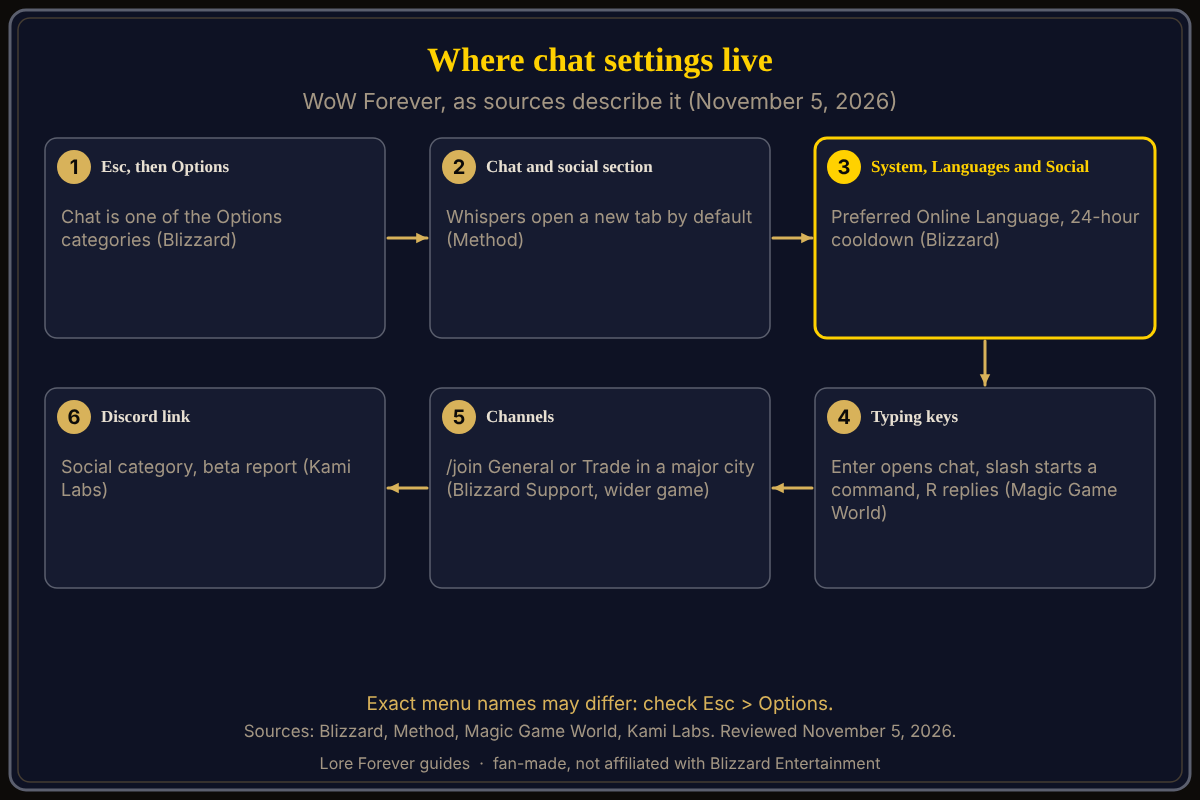
To change chat settings in World of Warcraft: Forever (WoW Forever), press Escape, choose Options and look for the chat section; Blizzard's starter guide lists chat among the Options categories, and Method says whispers go to their own tab by default. WoW Forever launched on November 4, 2026; no source describes a full chat menu, so exact names may differ.
Quick answer: Press Esc, then Options, then open the chat section (Method calls it Social). Press Enter to type, / to start a command, R to reply to a whisper. Set your Preferred Online Language under System, then Languages and Social. Check Esc > Options for the exact names.
Key facts
- Open the menu: Esc, then Options; chat is one of the categories (Blizzard Starter Guide, October 28)
- Whispers: set to always move to a new tab by default (Method)
- Language: Esc > Options > System > Languages and Social > Preferred Online Language; account-wide, 24-hour cooldown (Blizzard)
- Typing keys: Enter, /, R to reply (Magic Game World, November 4; third-party)
How do I open chat settings in WoW Forever?
Blizzard's New Player's Starter Guide says to press Escape for the Game Menu, select Options, and adjust "controls and key bindings, action bars, nameplates, chat, audio, graphics, accessibility features" and more. It says to start with the defaults. Method's guide names a Social section and a search bar at the top right of Options. For the other first changes, see first settings to change and the interface settings guide.
How do I stop whispers opening a new tab?
Method says whispers are set to always move to a new tab by default. It does not give the switch's name, so look in the social section or search Options for "whisper". The exact name may differ; check Esc > Options.
How do I change the chat language I meet?
Blizzard says to press Escape, choose Options, select Languages and Social under the System heading, and pick a Preferred Online Language. It applies to all characters and has a 24-hour cooldown. See Familiar Faces for how it affects who you meet.
What are the typing keys and channel commands?
Magic Game World's Forever keybinding list gives Enter to open chat, / to open chat with a slash, R to reply, and Page Up and Page Down to scroll. Warcraft Wiki's Chat page (not Forever-specific) lists /s, /y, /p, /g for say, yell, party and guild, /w for whispers, and /join for channels. Blizzard Support's global channels article, written for the wider game, says to type /join General, /join Trade or /join LookingForGroup in a major city if a channel is missing, and /resetchat to reset chat settings. Our chat channels guide covers channels named for Forever, and the looking for group guide how to ask for a group.
Can I link guild chat to Discord?
Kami Labs, in a September 26 beta report, says to search "disc" in Options, find Enable Discord Functionality in the Social category, link Battle.net to Discord, then pick a channel in the Guilds and Communities window (J key). The report says the option vanished once in the beta and came back.
What is not confirmed yet
- No source lists Forever's chat tab, filter or font-size menus; they name only whispers, language and Discord.
- I found no source on a profanity filter for Forever, so I make no claim about one.
- Channel commands come from pages for the wider game; Forever matching them in every detail is unconfirmed. The key list is third-party.
How can the Lore Forever add-on and Willo help with this?
When a menu name is unclear, Willo can answer "where do I change whisper tabs" out loud. She is free to start with 50 answers a day, can be wrong, and the in-game menu is the source of truth; she does not change settings for you. She is a separate companion app: her page lists a Windows 10 or 11 download and an Apple Silicon Mac download (macOS 12 or later), and her FAQ and the Lore Forever FAQ now say Windows and Mac, though CurseForge still describes her as a Windows app. The free Lore Forever add-on prints a clickable question in your chat when you enter a zone. Both are fan-made, not affiliated with Blizzard, and the add-on has no internet access.
Frequently asked questions
Where are the chat settings in WoW Forever?
Press Esc, then Options, and open the chat section.
How do I reply to a whisper?
Press R, according to Magic Game World's keybinding list.
How do I change my online language?
Esc > Options > System > Languages and Social, per Blizzard.
How do I join Trade or General chat?
For the wider game, Blizzard Support says to type /join Trade in a major city; Forever is not named there.
Is there a profanity filter setting?
I found no Forever source that mentions one.
Sources
Reviewed November 5, 2026. Lore Forever and Willo are fan-made and are not affiliated with Blizzard Entertainment.