Guide ·
Lore Forever on Mac and Windows: Free Add-on and Willo
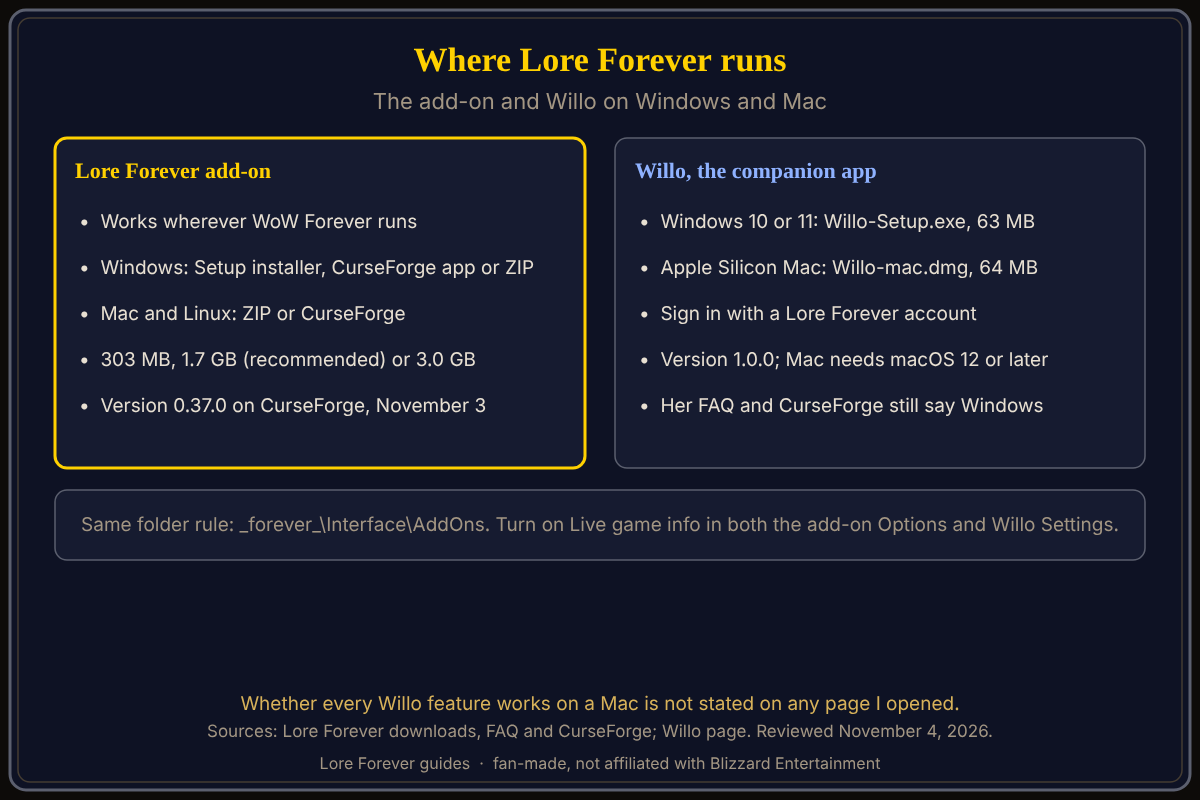
The Lore Forever add-on for World of Warcraft: Forever (WoW Forever) is free and works wherever the game runs: Windows users can run a Setup installer, and Mac users take the ZIP or the CurseForge app; the companion app Willo has a Windows 10 or 11 download and, on her page, an Apple Silicon Mac download. Lore Forever is a fan-made add-on, not a game mode, and is not affiliated with Blizzard. As of November 4, 2026.
Quick answer: Install the add-on via CurseForge, the Windows Setup or the ZIP (303 MB to 3.0 GB), then /reload and /lore voice. Willo is a separate app.
Two companions for the road: a book that knows the ground you stand on, and a small blue wisp who answers when you ask.
Key facts
- Add-on version: 0.37.0 on CurseForge, November 3, for the Forever game version (CurseForge)
- Downloads: The add-on 303 MB; Storyteller 1.7 GB (recommended); Everything 3.0 GB (downloads page)
- Willo: Willo-Setup.exe 63 MB (Windows 10 or 11); Willo-mac.dmg 64 MB (Apple Silicon, macOS 12 or later); version 1.0.0 (Willo page)
- Windows folder: World of Warcraft\_forever_\Interface\AddOns (downloads page)
- Mac folder: /Applications/World of Warcraft/_forever_/Interface/AddOns (same page)
Which Lore Forever pieces run on Mac and Windows?
The downloads page is headed "Free forever, Windows and Mac." Its FAQ says the add-on is plain add-on code with nothing Windows-only; only the Setup.exe installer is Windows. Mac and Linux players take the ZIP or CurseForge. Blizzard says the game plays on Windows or Mac, and its Shop page lists macOS 12 and an Apple M2 or 9th-generation Intel Core as the Mac minimum; see Mac, Steam Deck and Linux.
How do you install the add-on on Windows?
The downloads page offers three ways. Setup (Windows) finds your World of Warcraft folder and installs into _forever_\Interface\AddOns, with no admin rights needed. In the CurseForge app, pick your Forever install (add your _forever_ folder if it is not listed) and click Install. Or unzip the ZIP into the folder above. Then start WoW or type /reload. Full steps: how to install the Lore Forever add-on.
How do you install it on a Mac?
Use the CurseForge app, or unzip the ZIP into the Mac folder above so each folder sits next to LoreForever, not inside it; when updating, delete the old LoreForever folders first, says the page. If the add-on is missing, click AddOns on the character screen and tick Load out of date AddOns.
Which download size should you pick?
The add-on (303 MB) has the male narrator reading zones, cities and dungeons, plus every lore entry. Storyteller (1.7 GB) adds people, bosses, more places, quest and item stories. Everything (3.0 GB) adds quest dialogue and quest givers' voices. Other languages and the female narrator are separate CurseForge projects. Choose a voice under Options > AddOns > Lore Forever > Narration voices, or /lore voice; the FAQ calls the narrators generated voices, not voice actors.
Does Willo run on Mac and Windows?
Her page lists Willo-Setup.exe for Windows 10 or 11 and Willo-mac.dmg for Apple Silicon (M1 or later), macOS 12 or later; on a Mac, drag her to Applications, and update by downloading again. Sign in with a Lore Forever account. The conflict: the FAQ on willocompanion.com and CurseForge still call her a companion app for Windows. No page I opened says every feature, such as the talk key or Live game info, matches on a Mac, so check her page. Guides: how to install Willo and install everything together.
How do you turn on Live game info?
Switch it on in the add-on's Options and in Willo's Settings, says the FAQ. While you hold her talk key or the Lore Forever window is open, the add-on draws a small star field over the minimap with your location, target and tracked quest, which Willo reads. The add-on works without her and has no internet access.
What is not confirmed yet
- Whether Willo's talk key and Live game info work the same on a Mac.
- Whether the add-on runs on Linux or Steam Deck; that depends on the game.
How can the Lore Forever add-on and Willo help with this?
The add-on gives story, tooltips and narration for levels 1 to 30 and place lore beyond. Willo is free to start with 50 answers a day and everything for the first 7 days, per her Plans page; she can be wrong and is not official. See the add-on guide and Willo guide.
Frequently asked questions
Does the Lore Forever add-on work on Mac?
Yes, per the Lore Forever FAQ: use the ZIP or CurseForge instead of the Windows Setup.
Is Lore Forever free?
The add-on is free; Willo is free to start with 50 answers a day.
Where does the Lore Forever add-on folder go?
World of Warcraft\_forever_\Interface\AddOns on Windows; /Applications/World of Warcraft/_forever_/Interface/AddOns on a Mac.
Is there a Willo for Mac?
Her page lists an Apple Silicon download for macOS 12 or later; her FAQ and CurseForge still say Windows.
How do I get the narrator voices?
Pick them under Options > AddOns > Lore Forever > Narration voices or with /lore voice.
Sources
Reviewed November 4, 2026. Lore Forever and Willo are fan-made and are not affiliated with Blizzard Entertainment.