Guide ·
Can't Install or Download WoW Forever? Fixes for Launch Day
If you cannot install or download World of Warcraft: Forever (WoW Forever), first check that your account has a subscription or Game Time and that "World of Warcraft: Forever" is selected under the game versions in the Battle.net app; then use Blizzard Support's general fixes for slow downloads, "Initializing" and a missing install. I found no Forever-specific install-error article from Blizzard. As of the morning of November 4, 2026; the game opens at 3:00 p.m. PST.
Quick answer: Check access, check the Game Version, set the download limit to zero, then wait out the maintenance window (10:00 a.m. to 3:00 p.m. PST on November 4, per Blizzard). Fixes below are Blizzard Support's general ones, not Forever-only.
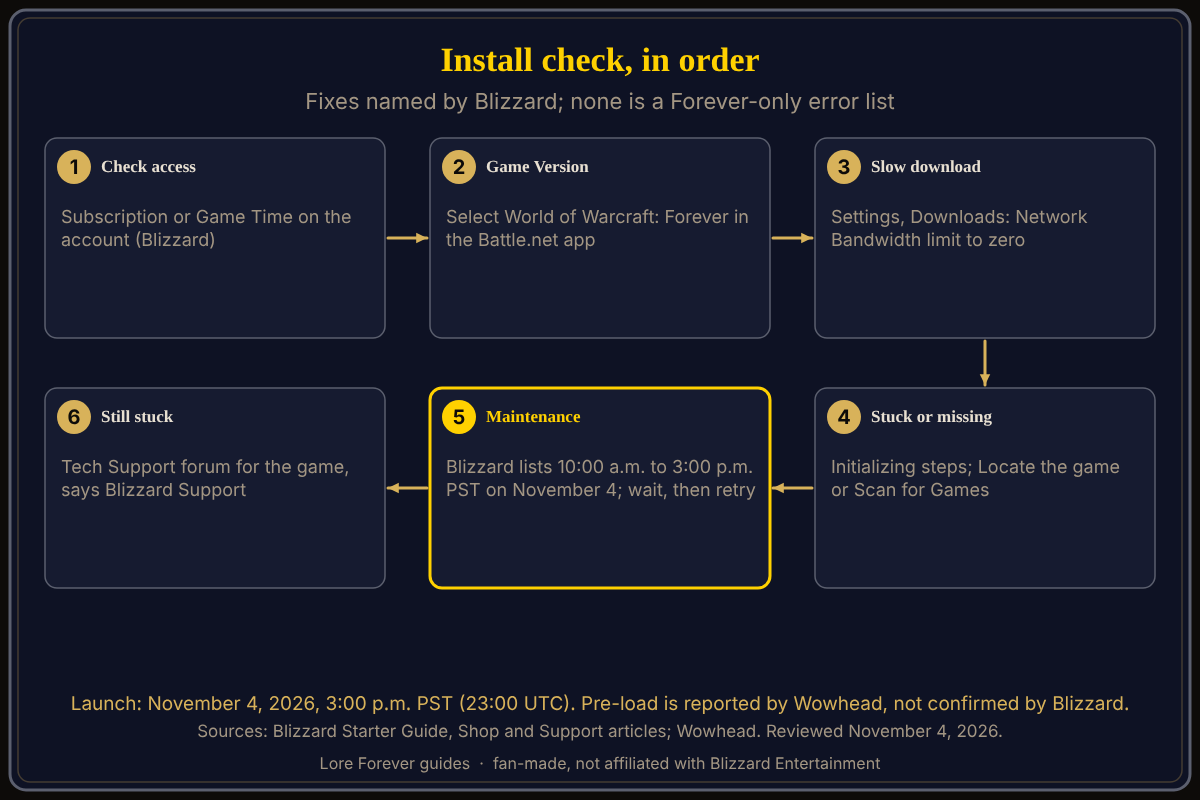
When the road will not open, check the gate before the lock.
Key facts
- Access: subscription or Game Time required (Blizzard)
- Install route: Battle.net app, install World of Warcraft, select WoW: Forever (Blizzard Starter Guide)
- Slow download: Settings > Downloads, Network Bandwidth limit to zero (Blizzard Support)
- Maintenance: 10:00 a.m. to 3:00 p.m. PST on November 4 (Blizzard Support schedule)
- Disk space: SSD with 128 GB free, on Windows and Mac (Blizzard Shop requirements)
Why can't I install WoW Forever in Battle.net?
Start with the route Blizzard gives: download the Battle.net desktop app, sign in, install World of Warcraft, and select World of Warcraft: Forever from the available game versions. Blizzard says to review the system requirements before installing, and you can play on Windows or Mac. Its Shop page lists Windows 10 64-bit or macOS 12 as the minimum, 8 GB of RAM and an SSD with 128 GB free; see how to download and install. A user thread from the September 17 beta shows a greyed-out Install button with no staff reply; it is a beta user report.
Why is the WoW Forever download slow or stuck?
Blizzard Support's "Slow Game Download" article says to open the Battle.net app Settings, then Downloads, and set the maximum Network Bandwidth limit to zero; it says pre-release content is limited to 1000 KB per second by default. If speed does not improve, it says to optimize your internet connection, then try uninstalling and reinstalling the Battle.net app. I found no Blizzard figure for the download itself; see pre-download and install size.
What if the Battle.net app is stuck on Initializing?
Blizzard Support's "Stuck on Initializing While Installing or Patching" article gives Windows steps: shut down the app, open the ProgramData folder, delete three folders (Battle.net, Battle.net_components and Blizzard Entertainment) and restart the app. Read the article before deleting anything.
What if the app says Install but the game is already installed?
Blizzard Support's "Battle.net App Can't Locate Game" article says to click Locate the game under the Install button and pick the installation folder, or go to Settings, Downloads and click Scan for Games. If neither works, it says to delete the Battle.net files and cache.
Should you wait or retry during launch-day maintenance?
Blizzard Support's Weekly Maintenance Schedule lists World of Warcraft: Forever as "Game unavailable during this time" on November 4 from 10:00 a.m. to 3:00 p.m. PST. Wowhead expected about five hours, possibly extended. Blizzard's Realm Status page showed no Forever entry on the morning of November 4. If the install works but you cannot log in, see launch day queues and errors and name reservation errors.
What if an add-on breaks the game at startup?
This is generic add-on advice, not from a Blizzard page I opened: at the character screen click AddOns, untick everything and log in, then re-enable add-ons one at a time. The Lore Forever downloads page says to tick "Load out of date AddOns" only if an add-on is not showing.
What is not confirmed yet
- A Forever-specific install-error list from Blizzard.
- Whether pre-loading is open for everyone: Wowhead says yes, TimeSaver said on November 3 that Blizzard had announced no pre-load date for subscription-only players.
- Whether the maintenance ends on time; Wowhead said it could be extended.
How can the Lore Forever add-on and Willo help with this?
Once you are in, the free Lore Forever add-on gives the story behind your quests and zone, levels 1 to 30. Willo answers "what do I do next?" by voice, free to start with 50 answers a day; she cannot fix an install and can be wrong. Both are fan-made, not affiliated with Blizzard.
Frequently asked questions
Why can't I download WoW Forever?
Check that your account has a subscription or Game Time and that World of Warcraft: Forever is selected under the game versions in Battle.net.
Why is my WoW Forever download stuck?
Blizzard Support says to set the Battle.net Network Bandwidth limit to zero under Settings, Downloads.
Is there maintenance before launch?
Yes. Blizzard Support's maintenance schedule lists November 4 from 10:00 a.m. to 3:00 p.m. PST.
Where do I choose WoW Forever in Battle.net?
In the game versions for World of Warcraft, says Blizzard's Starter Guide.
Can I install WoW Forever early?
Wowhead says all players can pre-download; no Blizzard page I opened confirms it, and TimeSaver said no date was announced for subscription-only players.
Sources
Reviewed November 4, 2026. Lore Forever and Willo are fan-made and are not affiliated with Blizzard Entertainment.