Guide ·
How to Install WoW Forever Addons: CurseForge and Manual
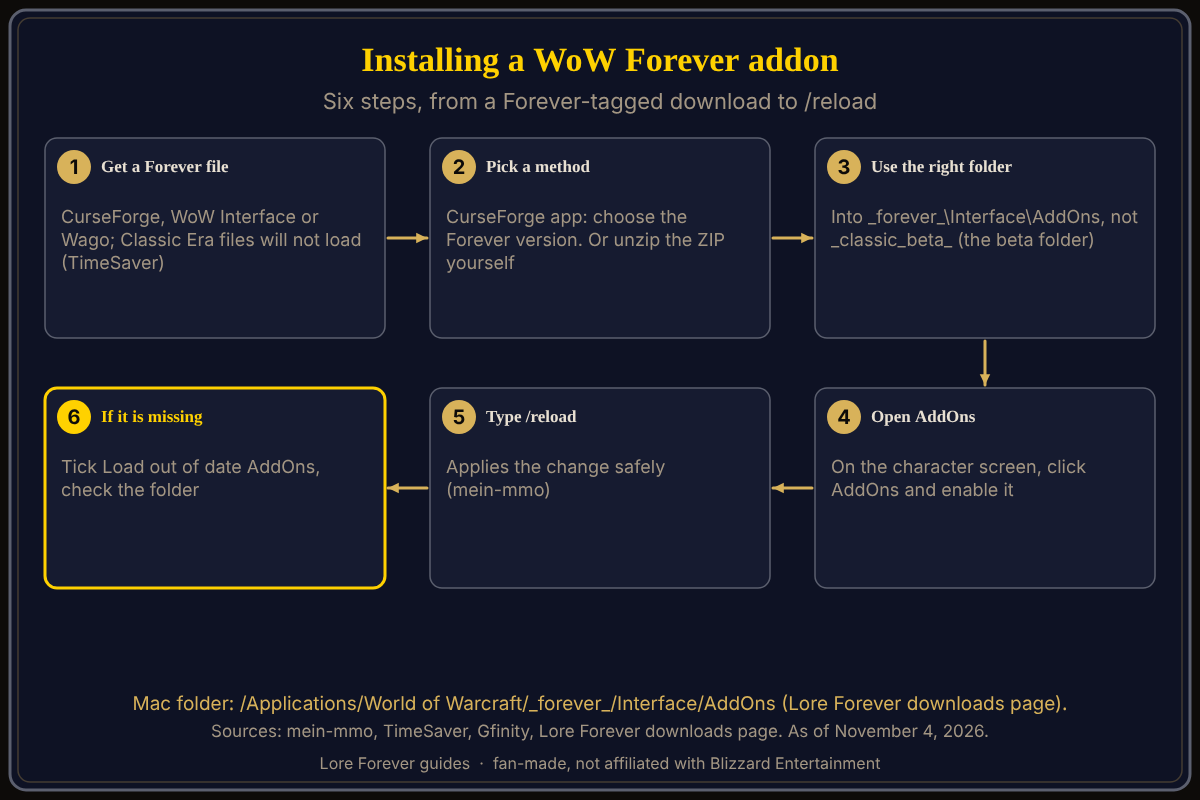
To install addons for World of Warcraft: Forever (WoW Forever), either use the CurseForge app and pick the Forever version, or unzip the addon into the game's _forever_/Interface/AddOns folder, then enable it in the AddOns list at character select and type /reload. CurseForge's blog, mein-mmo and the Lore Forever downloads page agree on that folder; I did not find the path on a Blizzard page. As of November 4, 2026, launch day.
Quick answer: Download addons made for Forever, put them in World of Warcraft\_forever_\Interface\AddOns (on a Mac, /Applications/World of Warcraft/_forever_/Interface/AddOns), check the AddOns list, then /reload. Tick "Load out of date AddOns" if one is missing.
Back up before you move anything.
Key facts
- Folder:
World of Warcraft\_forever_\Interface\AddOns(CurseForge blog and Lore Forever downloads page; mein-mmo gives/_forever_/Interface/AddOns) - Beta folder:
_classic_beta_, not the live one (CurseForge blog, TimeSaver, Icy Veins) - Launch: November 4, 2026, 3:00 p.m. PST (Blizzard)
How do I install addons with the CurseForge app?
mein-mmo (October 26) describes it: install the CurseForge app, select World of Warcraft, choose the Forever version from the dropdown, pick addons, and let the app download and update them. It says you can skip Overwolf if you only want addons. The Lore Forever downloads page gives the same idea: open World of Warcraft, pick your Forever install, add your _forever_ folder if it is not listed, and click Install on the project's page. CurseForge shows the Lore Forever project with a Forever flavor. Search curseforge.com for any other addon and check it lists Forever.
How do I install a WoW Forever addon manually?
mein-mmo: download the latest version from a site such as CurseForge or WoW Interface, open the ZIP, and extract the folders into /_forever_/Interface/AddOns. The Lore Forever page names the Windows and Mac paths above and adds that each addon folder must sit next to the others, not inside another folder. For Lore Forever, update by deleting the old LoreForever folders first; mein-mmo notes manual installs also mean manual updates.
Which addon managers work with WoW Forever?
Only those that pages I opened name. mein-mmo names the CurseForge app. Gfinity (September 24) says you can use CurseForge or the Wago App to find addons made for Forever. I found no page confirming that WowUp or another manager supports Forever, so I do not claim it; check the manager's own site for a Forever option.
How do I enable addons and fix "out of date"?
At character select, click AddOns (the Lore Forever page; mein-mmo describes the game menu), enable each addon, then type /reload. If one is missing, the Lore Forever page says to tick "Load out of date AddOns". TimeSaver adds that Classic Era files will not load, so use files tagged for Forever.
Can I copy my beta addons and settings?
That is outlet advice, not Blizzard's. CurseForge's blog (October 25) says to close the game and CurseForge, back up first, copy Interface and WTF from _classic_beta_ into _forever_ before installing any live addons, because pasting can overwrite files, rename the beta account folder inside WTF\Account to your account name, and expect to fix some per-character settings. Icy Veins (October 28) and TimeSaver give the same copy advice; TimeSaver also suggests starting light on launch night.
What is not confirmed yet
- A Blizzard page naming the
_forever_addon path or its add-on policy; I found none. Icy Veins reports a Blizzard representative saying Forever shares modern WoW's UI architecture, with the same API restrictions as Midnight; that is second-hand. - Which managers support Forever.
- Whether beta settings carry over cleanly.
How can the Lore Forever add-on and Willo help with this?
The free Lore Forever add-on is a worked example of this install: it is on CurseForge or as a ZIP, with a Windows Setup that finds your folder, and the FAQ says it works anywhere the game runs. It adds readable and recorded stories for zones, cities and dungeons and has no internet access. Steps: install the Lore Forever add-on; other picks: best addons. Willo is a separate app, free to start with 50 answers a day; she can be wrong. Both are fan-made and not affiliated with Blizzard.
Frequently asked questions
Where is the WoW Forever AddOns folder?
World of Warcraft\_forever_\Interface\AddOns, per the Lore Forever downloads page; on a Mac /Applications/World of Warcraft/_forever_/Interface/AddOns.
Does CurseForge work with WoW Forever?
mein-mmo describes picking the Forever version in the CurseForge app, and CurseForge lists a Forever flavor on at least one project.
Why is my addon not showing?
Check the folder, tick "Load out of date AddOns" at character select, then /reload.
Is there a WoW Forever addon manager?
CurseForge's app is the one named by mein-mmo and CurseForge's blog; Gfinity adds the Wago App.
Do my beta addons work in the live game?
Only if they are Forever versions; copying folders is outlet advice.
Sources
Reviewed November 4, 2026. Lore Forever and Willo are fan-made and are not affiliated with Blizzard Entertainment.