Guide ·
How to Play WoW Forever: From Download to Your First Quest
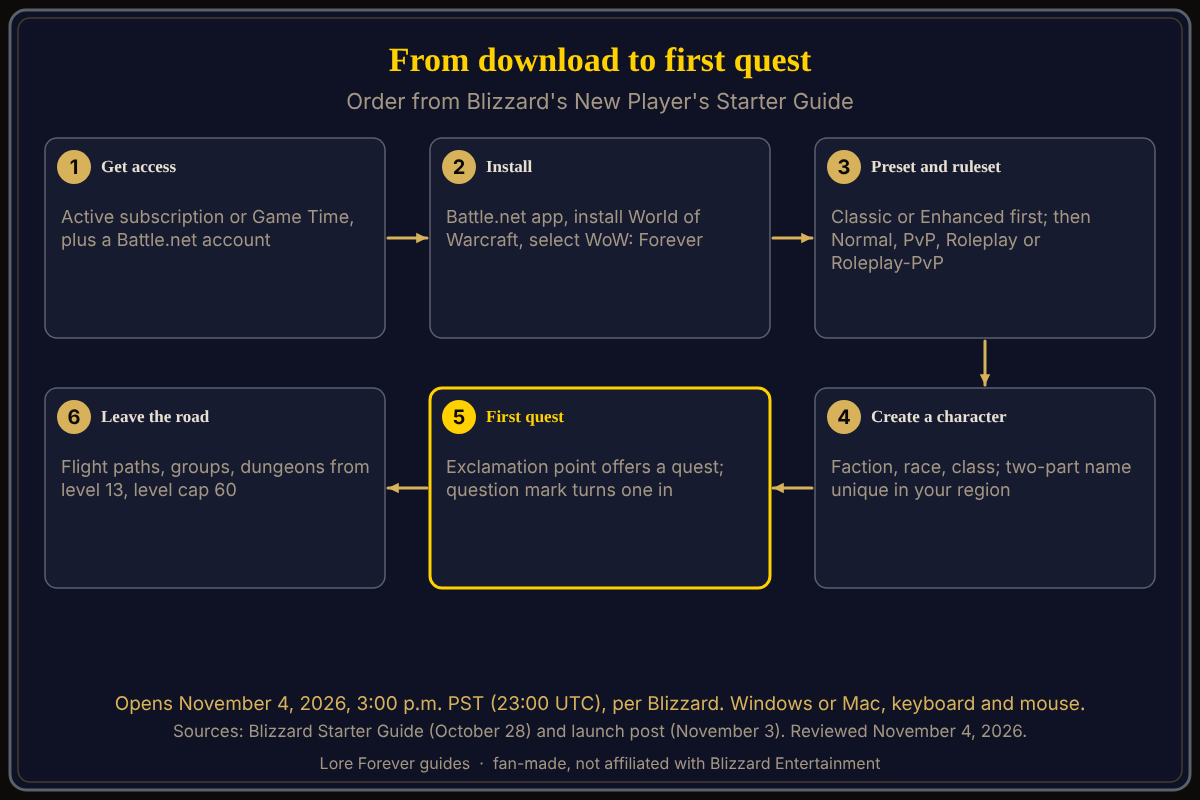
To play World of Warcraft: Forever (WoW Forever), you need an active World of Warcraft subscription or Game Time, the Battle.net desktop app with World of Warcraft installed, and the game version "World of Warcraft: Forever" selected; Blizzard opens it on November 4, 2026 at 3:00 p.m. PST (23:00 UTC). As of the morning of November 4, 2026.
Quick answer: Access, install, preset, ruleset, character, first quest. Windows or Mac, keyboard and mouse; a gamepad works in a beta state, says Blizzard.
Every road in Azeroth starts with one small decision and a first step. This one starts at a login screen.
Key facts
- Launch: November 4, 2026, 3:00 p.m. PST, which is 23:00 UTC (Blizzard, November 3)
- Access: included with an active World of Warcraft subscription or Game Time (Blizzard)
- Platforms: Windows or Mac, keyboard and mouse; controller support in beta (Blizzard)
- First login: Experience Preset first, then Ruleset (Blizzard)
- Grouping: only with players on your ruleset and faction (Blizzard)
What do you need before you can play WoW Forever?
Blizzard's Starter Guide lists a Battle.net account, a World of Warcraft subscription or Game Time, the Battle.net desktop app, and a check of the system requirements. An Invite-A-Friend code covers November 4 to 11 without a subscription. Prices and packs are in do you need to buy WoW Forever.
How do you install and start it?
Download the Battle.net desktop app, sign in, install World of Warcraft, and select World of Warcraft: Forever from the available game versions, says Blizzard. Steps: how to download and install WoW Forever. Blizzard's Shop page lists Windows 10 64-bit or macOS 12 at minimum, 8 GB of RAM and an SSD with 128 GB free. Blizzard Support's Weekly Maintenance Schedule shows the game unavailable on November 4 from 10:00 a.m. to 3:00 p.m. PST.
What happens the first time you log in?
You are asked to Choose Your Experience Preset, before your ruleset. Blizzard describes two: Classic (Standard Definition models, quest markers, one-bag and transmog off) and Enhanced (High Definition models, those features on). If you are unsure, Blizzard says start with Enhanced; every setting can be changed later under Game Menu > Options.
Then you choose a ruleset: Normal, PvP, Roleplay or Roleplay-PvP (Hardcore comes later). The Starter Guide says Normal offers a welcoming place to learn. See which ruleset to pick.
How do you make your first character?
Pick a faction, Alliance or Horde, then a race and a class. The race sets your look, starting location and racial abilities; the class sets how you play. The Skyborne race needs the Heroic Pack or higher, and the two-part name must be unique in your region. Guides: character creation and best class for beginners.
How do the first quests and fights work?
Characters with an exclamation point above their heads offer quests; a question mark means a quest is ready to turn in. Blizzard's guide gives L for the quest log, M for the world map and P for the Spellbook (written "Hotkey-L" and so on, so check your key bindings). Drag abilities to your action bar, pull one enemy at a time, carry food and drink, and visit a class trainer as you level. If you die, follow the corpse marker and select Resurrect near your body; the Spirit Healer also works but damages your gear's durability. More: your first hour.
When do you leave the starter area and group up?
Blizzard says to watch the level of enemies when you leave the road, keep your Hearthstone close and learn flight paths. You can invite nearby players, join a guild or ask in chat. Dungeon groups use a tank, a healer and damage dealers; the nine new dungeons span level 13 to 60, and raids open December 9. Read leveling in a group and the launch day guide for beginners.
What is not confirmed yet
- Launch-day queue lengths; no source I opened gives numbers.
- Pre-loading: Wowhead says all players can pre-download; no Blizzard page I opened says so, and TimeSaver said on November 3 that Blizzard had announced no pre-load date for subscription-only players.
How can the Lore Forever add-on and Willo help with this?
The free Lore Forever add-on adds a Lore button to quests with the story behind them (levels 1 to 30). Willo answers "what do I do next?" by voice and is free to start with 50 answers a day. Both are fan-made, not affiliated with Blizzard, and Willo can be wrong.
Frequently asked questions
How do I start playing WoW Forever?
Install World of Warcraft in Battle.net, select World of Warcraft: Forever as the game version, and log in with a subscription or Game Time.
What do I choose first in WoW Forever?
An Experience Preset, Classic or Enhanced, then a ruleset; Blizzard suggests Enhanced if you are unsure.
Can I play WoW Forever on a controller?
Yes, in a beta state, per Blizzard's Starter Guide.
What level can you reach in WoW Forever?
Level 60, per Blizzard's launch post.
Where do I find my first quest in WoW Forever?
Look for a character with an exclamation point above their head.
Sources
Reviewed November 4, 2026. Lore Forever and Willo are fan-made and are not affiliated with Blizzard Entertainment.