Guide ·
WoW Forever Movement Controls: WASD, Strafe, Autorun, Jump
In World of Warcraft: Forever (WoW Forever) you move with W and S, jump with Spacebar and steer by holding the right mouse button, and the Experience Preset you picked at first login decides whether the side keys strafe or turn. Blizzard's Starter Guide says the Classic preset defaults to camera turning on keyboard binds and Enhanced defaults to strafe movement on keyboard binds; keys below are as of November 5, 2026.
Quick answer: W forward, S backward, Spacebar jump. Strafe is sidestepping without turning. Hold the right mouse button and move the mouse to steer. Autorun is Num Lock or Mouse Button 4 in one key list. Change any key in Esc > Options > Keybindings.
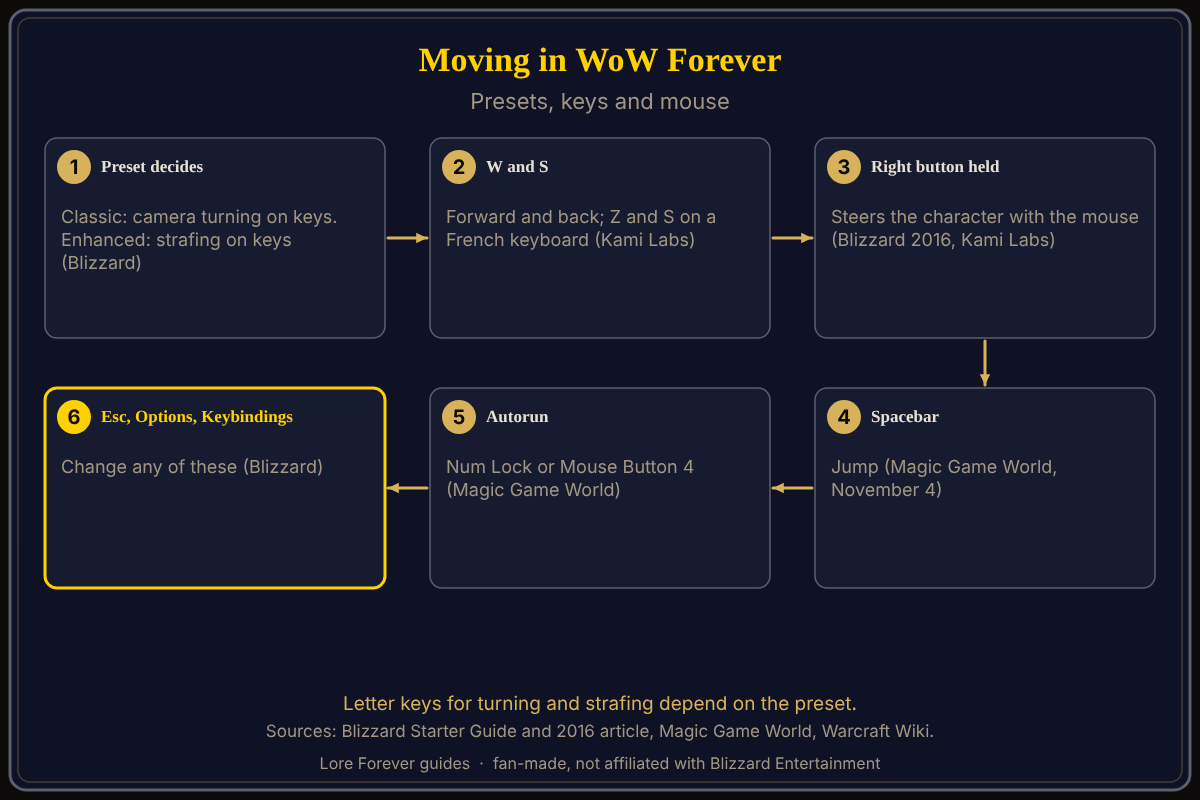
See also camera controls, mouse settings and default keybindings.
Key facts
- Presets: Classic "Defaulted to camera turning keyboard binds"; Enhanced "Defaulted strafe movement to keyboard binds" (Blizzard Starter Guide, October 28)
- Basic keys: Move Forward W or Up Arrow; Move Backward S or Down Arrow; Jump Spacebar or Num Pad 0 (Magic Game World, November 4)
- Turn and strafe in that list: turn Q and E, strafe A and D; the author says presets vary
- Autorun: Toggle Autorun is Num Lock or Mouse Button 4; start and stop autorun are not bound (Magic Game World)
- Walk or run: Num Pad /; sit: X (Magic Game World)
What is the difference between strafe and turn?
Blizzard's new-player article describes strafing as running sideways and says mouse turning is much faster than keyboard turning. Kami Labs (October 29) calls strafing a sidestep that changes position without turning and recommends turning with the mouse, since keyboard turning hurts responsiveness in raids and PvP; that is the author's opinion. Blizzard's Starter Guide gives each preset's default but does not name the letter keys.
How do I move with the mouse?
Blizzard's 2016 article, written for modern WoW, says to hold the right mouse button to control the camera. With it held, W or the left mouse button moves you forward and moving the mouse turns your character; A or D then strafe. Magic Game World lists Move and Steer on the middle mouse button.
How do I change from turning to strafing, or the reverse?
Press Esc, open Options and choose Keybindings, the route Blizzard's Starter Guide names. VGKami (October 30) says to remove Turn Left and Turn Right from A and D, then assign Strafe Left to A and Strafe Right to D. Note the old keys first.
What are the autorun, walk and jump keys?
Magic Game World's list, built from keybinding screenshots, gives Spacebar or Num Pad 0 for jump, Num Lock or Mouse Button 4 to toggle autorun, and Num Pad / to toggle run and walk. The Warcraft Wiki's Autorun page says W or S cancels autorun, while turning and strafing do not; it gives Num Lock on Windows and Clear (Fn+6) on Mac as general defaults and notes players often rebind it, for example to Shift plus W. On a laptop without a number pad, rebind it.
Is there click-to-move in WoW Forever?
The Warcraft Wiki describes "Click-to-move" as a mouse option, and VGKami recommends keeping it disabled. No source I opened shows where Forever puts it. Search Options for "click".
What is not confirmed yet
- Which letter keys turn and which strafe under each preset; Magic Game World's list (turn Q and E, strafe A and D) says presets may vary.
- Mac keys; the wiki's Clear (Fn+6) is general, not Forever-specific.
- Click-to-move's location in the Forever client.
- Keyboard layout: Kami Labs' screenshots use Z, Q, S and D on a French keyboard.
- Gamepad movement: see controller support.
How can Willo help with movement questions?
Ask Willo out loud, for example "how do I autorun". She can be wrong and is not official, so the in-game Keybindings menu is the source of truth; she does not change settings for you. Willo is free to start (50 answers a day) and is a separate companion app for Windows 10 or 11; her page and FAQ also list an Apple Silicon Mac version (macOS 12 or later), though the CurseForge page still describes her as a Windows app. The free Lore Forever add-on adds quest stories. Both are fan-made and not affiliated with Blizzard. Start with the first hour guide.
Frequently asked questions
What are the movement controls in WoW Forever?
W and S move forward and back, Spacebar jumps, and the right mouse button steers. Strafe or turn on A and D depends on your preset.
Does WoW Forever use WASD?
W and S move; A and D strafe or turn depending on the preset.
How do I autorun in WoW Forever?
Magic Game World lists Num Lock or Mouse Button 4; you can rebind it.
How do I switch between strafing and turning?
Pick a preset at first login, or edit Esc > Options > Keybindings.
Can I move with the mouse only?
Hold the right button and press the left, per Blizzard's modern WoW article.
Sources
Reviewed November 5, 2026. Lore Forever and Willo are fan-made and are not affiliated with Blizzard Entertainment.