Guide ·
WoW Forever Default Keybindings: Movement, Targeting, Panels
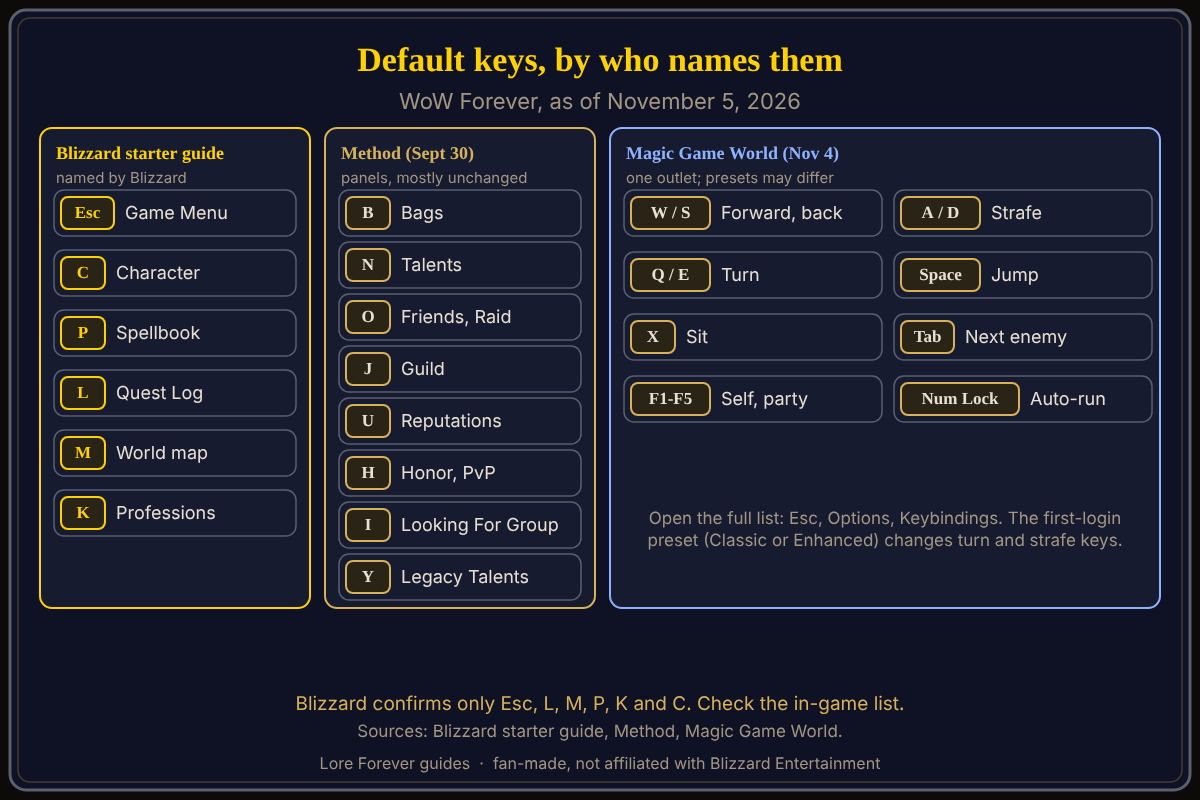
The default keybindings in World of Warcraft: Forever (WoW Forever) put the panels on familiar keys: Blizzard's starter guide names Esc for the Game Menu, L for the Quest Log, M for the map, P for the Spellbook, K for Professions and C for the Character panel. Movement and targeting keys come from one third-party guide, and your first-login preset can change turn and strafe keys.
Quick answer: C Character, P Spellbook, L Quest Log, M Map, B Bags, N Talents, K Professions, Y Legacy. Move with W and S, strafe with A and D, jump with Space, target with Tab. Check or change any of them under Esc, Options, Keybindings.
Most of these keys will feel like old friends.
Key facts
- Open the list: Esc, Options, Keybindings (Blizzard starter guide, October 28, 2026)
- Method adds: B, N, O, J, U, H, I, Y and V (Method, September 30, 2026)
- Movement and targeting: Magic Game World, November 4, 2026; one outlet
- Presets: Classic binds camera turning to the keyboard, Enhanced binds strafing (Blizzard)
What are the default keybindings for panels in WoW Forever?
Method lists these defaults and says they mostly match earlier versions of the game: C Character, P Spellbook, L Quest Log, M Map, B Bags, N Talents, O Friends List and Raid, J Guild and Communities, U Reputations, H Honor and PvP, I Looking For Group, K Professions and Tradeskills, and Y Legacy Talents. It marks K and Y as new. Magic Game World, writing on November 4, lists the same keys for the panels it covers (it has no I, K or Y) and adds Shift+M for the zone map and Shift+B to open all bags. Method also lists V and Shift+V for nameplates. Blizzard's starter guide confirms only Esc, L, M, P, K and C.
Which keys move your character?
Magic Game World lists W or Up Arrow forward, S or Down Arrow backward, Q to turn left, E to turn right, A and D to strafe, Space to jump, X to sit and Z to sheathe a weapon. It lists Num Lock, or Mouse Button 4, to toggle auto-run and Num Pad slash for run and walk. Warcraft Wiki's general auto-run page gives Numlock on Windows and Clear (Fn+6) on Mac, with no game version named. Verify in the menu.
Which keys target enemies and friends?
Magic Game World lists Tab for the nearest enemy, Shift+Tab for the previous one, Ctrl+Tab for the nearest friend, F1 for yourself, F2 to F5 for party members, G for the last hostile target and F to assist. It says mouseover, focus and interact are unbound by default.
Do the first-login presets change the keys?
Yes, in part. Blizzard says the Classic preset is "defaulted to camera turning keyboard binds" and the Enhanced preset "defaulted strafe movement to keyboard binds." Magic Game World says its list matches its screenshots but that the presets differ, so your keys may not match. That guide shows Q and E turning and A and D strafing, while Blizzard's older Basic Movement and Combat article, which names no game version, describes A and D as turning. If your keys differ, the preset is a likely reason; see movement controls and how to change keybinds.
What is not confirmed yet
- Blizzard has not published a full default key list for WoW Forever that I found; the movement and targeting keys rest on one third-party guide.
- The exact menu name may differ; check Esc > Options.
- Method's list dates from September 30, in the beta.
- Magic Game World lists a "Move and steer" binding on the middle mouse button; no other source I opened mentions it.
How can the Lore Forever add-on and Willo help with this?
When a menu is confusing, you can ask Willo out loud, for example "where do I change the camera distance", and she answers from what she knows. She can be wrong, her answers are not official, and the in-game menu is the source of truth. She does not change settings for you. Willo is free to start with 50 answers a day: a separate companion app for Windows 10 or 11 and for Apple Silicon Macs (macOS 12 or later) according to her page and both FAQs, though CurseForge's add-on page still calls her a Windows app. The free Lore Forever add-on has no internet access. Both are fan-made, not affiliated with Blizzard.
Frequently asked questions
What is the key for the map in WoW Forever?
M opens the world map, according to Blizzard's starter guide.
What key opens professions in WoW Forever?
K opens Professions, according to Blizzard and Method. Method marks it as new.
How do I target an enemy in WoW Forever?
Tab cycles the nearest enemy, according to Magic Game World. You can also left-click.
What key makes you auto-run in WoW Forever?
Magic Game World lists Num Lock or Mouse Button 4.
Where do I see all keybindings?
Esc, Options, Keybindings, per Blizzard. More in macros and keybinds.
Sources
Reviewed November 5, 2026. Lore Forever and Willo are fan-made, not affiliated with Blizzard Entertainment.