Guide ·
WoW Forever Mouse Settings: Mouse Look, Targeting, Auto Loot
WoW Forever needs a keyboard and a mouse: Blizzard's Battle.net Shop page lists "Keyboard and mouse required (Gamepad compatibility currently in beta)." World of Warcraft: Forever (WoW Forever) mouse settings sit in Options. Guides name Sticky Targeting, Auto Loot, camera behavior and mouseover casting, while Blizzard's movement article describes holding the right mouse button to steer.
Quick answer: Hold the right mouse button and move the mouse to steer the camera and your character, left-click to target, right-click to loot or sell. Mobalytics names Sticky Targeting, Auto Loot and a camera setting but gives no menu path; start in Esc > Options. I found no source for sensitivity, invert or click-to-move in WoW Forever.
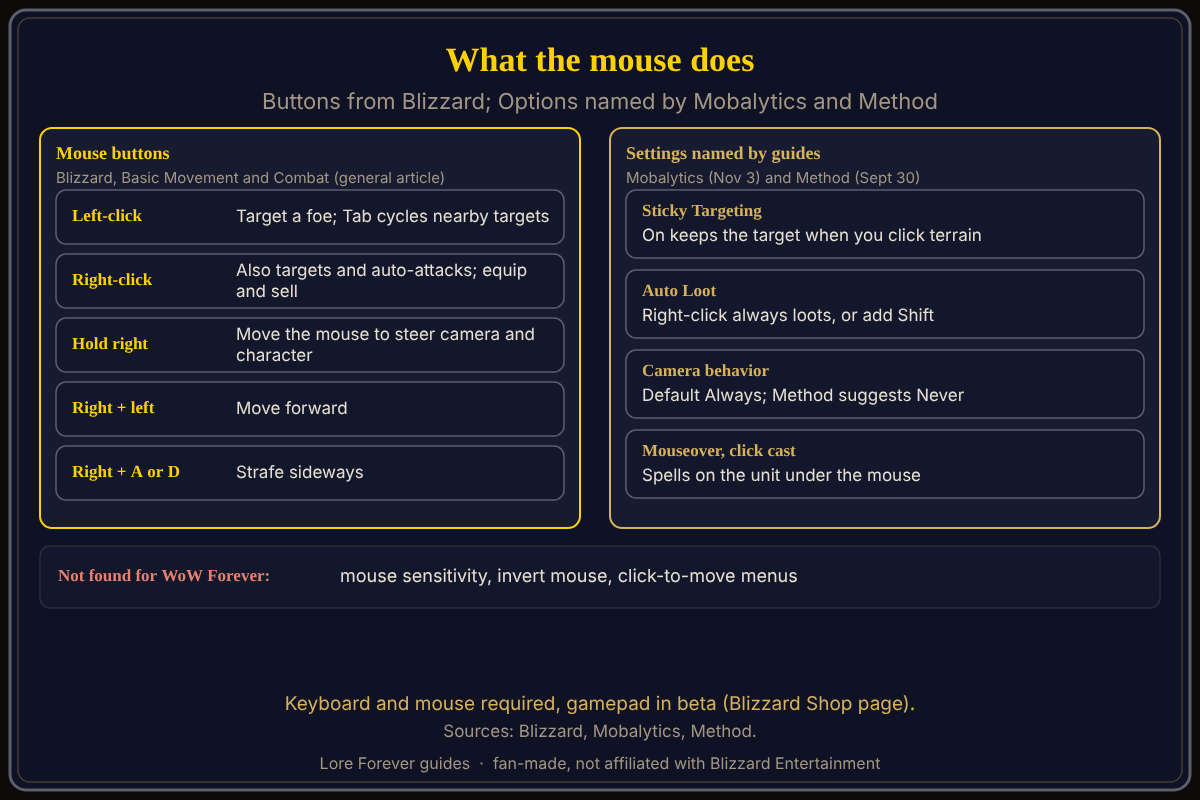
One button points, the other steers.
Key facts
- Input: keyboard and mouse required, gamepad in beta (Blizzard Battle.net Shop page)
- Steer: hold the right mouse button (Blizzard, "Basic Movement and Combat", a general modern WoW article)
- Target: left-click a foe; Tab cycles nearby targets (same article)
- Settings named for Forever: Sticky Targeting, Auto Loot, camera behavior, mouseover and click casting (Mobalytics, updated November 3, 2026)
- Camera follow default: Always, which Method suggests changing to Never
How do you look around and steer with the mouse?
Blizzard's older Basic Movement and Combat article, which names no game version, says to hold the right mouse button to control the camera: moving the mouse turns your character, which it calls faster than keyboard turning. Holding the right button and pressing the left moves you forward, and holding right plus A or D strafes. Whether WoW Forever keeps all of this is not stated there. The first-login preset (Classic or Enhanced) changes what the keyboard keys do, per Blizzard's starter guide. Details: camera controls and movement controls.
What do the mouse buttons do on targets, loot and items?
Blizzard's movement article says left-clicking a foe targets it and right-clicking also targets and starts auto-attack. Blizzard's starter guide describes right-click and dragging for equipping, buying, selling and repairing. Mobalytics says you can make a right-click always auto loot, or add a modifier such as Shift. It also describes Sticky Targeting: when it is on, your target stays selected if you click terrain, and turning it off lets you deselect by clicking anywhere. These are Mobalytics's descriptions of Forever's options, not Blizzard's.
How do mouseover and click casting work?
Method says mouseover cast and self-cast give you separate keybinds for spells that target whoever your mouse is over, such as heals, plus focus targets. Mobalytics says Click Casting bindings let you hover over nameplates and the player HUD to quick-cast spells, and that it is built into the game. Method lists them among the keybinds; see macros and keybinds.
What about sensitivity, invert and click-to-move?
No source I opened shows these for WoW Forever. Blizzard's general Support article on a spinning camera points to the Interface menu, Mouse, and an Enable Mouse Sensitivity box, but it names no game version, so treat the path as unconfirmed here. Blizzard's accessibility article, also general and naming no game version, lists Click-to-Move and Mouseover Cast under character control settings; WoW Forever's menu may differ. The Mouselook Forever add-on, listed for the Forever version (updated October 12), offers toggle or hold-to-look modes and remappable mouse buttons; untested by me.
Can you use a mouse with a controller?
Warcraft Tavern says keyboard and mouse still work with the Gamepad UI enabled, and some menus need a mouse. A beta forum thread reports cursor trouble with a Steam Controller. See gamepad controls.
What is not confirmed yet
- Mouse sensitivity, invert and click-to-move menus for WoW Forever.
- Blizzard confirmation of the options Mobalytics names.
How can the Lore Forever add-on and Willo help with this?
When the menu is confusing, ask Willo out loud, for example "where do I turn on auto loot". She can answer from what she knows, can be wrong, is not official, and does not change settings for you; the in-game menu is the source of truth. She is free to start with 50 answers a day, a separate companion app for Windows 10 or 11 and for Apple Silicon Macs (macOS 12 or later) according to her page and both FAQs, though CurseForge's add-on page still calls her a Windows app. The free Lore Forever add-on has no internet access. Both are fan-made and not affiliated with Blizzard.
Frequently asked questions
Do you need a mouse to play WoW Forever?
Blizzard's Shop page lists keyboard and mouse as required, with gamepad compatibility in beta.
How do I rotate the camera in WoW Forever?
Hold the right mouse button and move the mouse, per Blizzard's general movement article.
How do I turn on auto loot in WoW Forever?
Mobalytics says Auto Loot can be set so right-click always loots, or with a modifier such as Shift.
Where is the invert mouse option in WoW Forever?
No source I opened shows it.
Can I click to move in WoW Forever?
Not confirmed; Blizzard's general accessibility article lists it without naming a game version.
Sources
Reviewed November 5, 2026. Lore Forever and Willo are fan-made, not affiliated with Blizzard Entertainment.