Guide ·
WoW Forever Gamepad Controls, Button Layout and Steam Deck
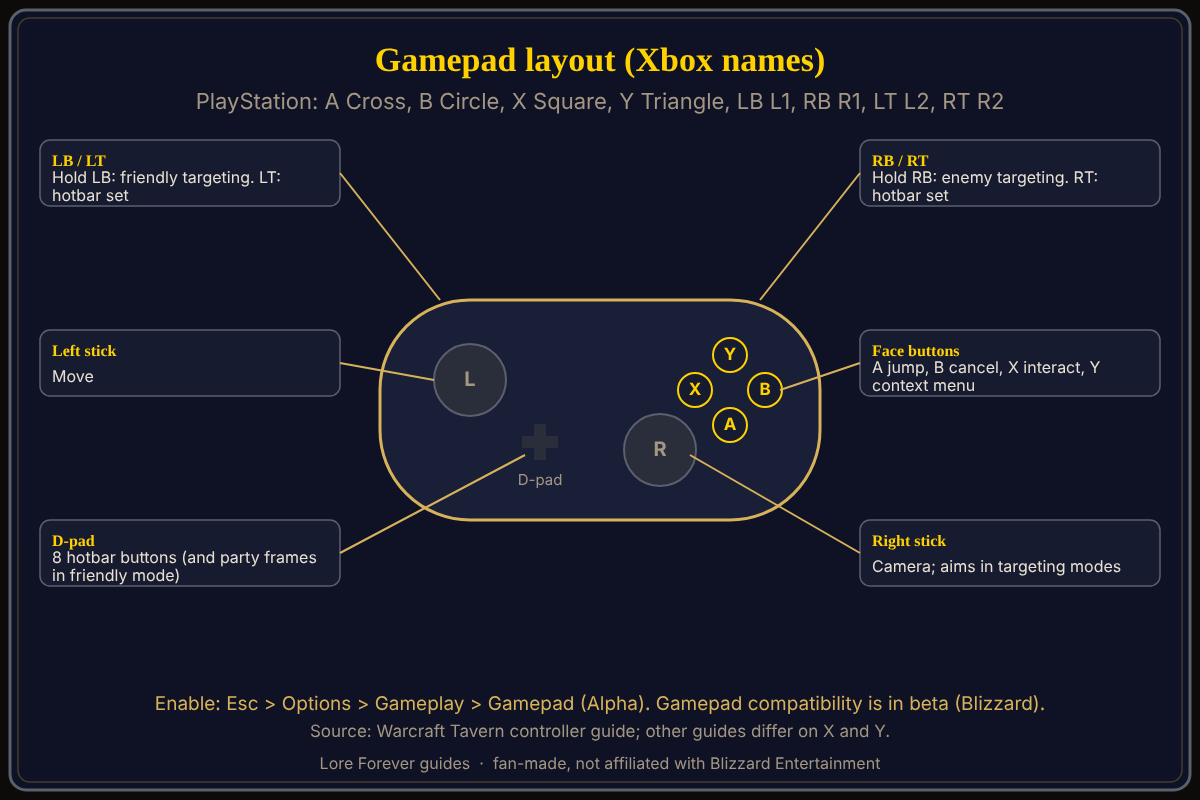
World of Warcraft: Forever (WoW Forever) has a built-in Gamepad UI that you turn on with the Enable Gamepad UI (Alpha) checkbox, and Blizzard's Battle.net Shop page says "Gamepad compatibility currently in beta." Warcraft Tavern gives the layout: left stick moves, right stick steers, hold RB for enemies and LB for friends. Blizzard names no Steam Deck support that I found; players say it works.
Quick answer: In game, press Esc, then Options, Gameplay, Gamepad (Alpha), and tick Enable Gamepad UI (Alpha). A jumps, B cancels, X interacts, Y opens a context menu, LT and RT switch hotbars, Menu opens the radial menu. PlayStation: Cross, Circle, Square, Triangle for A, B, X, Y.
A handheld on the couch is a different way into Azeroth.
Key facts
- Status: gamepad compatibility in beta (Blizzard Shop page; starter guide, October 28, 2026)
- Enable: Esc > Options > Gameplay > Gamepad (Alpha); at login, Menu > Options > System (Warcraft Tavern)
- Targeting: hold RB for enemies, hold LB for friends (Warcraft Tavern)
- Hotbars: 28 customizable buttons plus fixed A, B, X and Y (Warcraft Tavern)
How do you turn on gamepad controls in WoW Forever?
Warcraft Tavern's guide gives two paths. In game, open the Game Menu with Esc, then Options, then Gamepad (Alpha) under Gameplay, and tick Enable Gamepad UI (Alpha). From the login or character select screen, use Menu, Options, the System tab, then Gamepad (Alpha). Nerdschalk (September 23) gives the Options, Gameplay, Gamepad (Alpha) path without mentioning Esc. Keyboard and mouse still work while it is on, and some menus still need a mouse. The exact menu names may differ; check Esc > Options.
What is the button layout on Xbox and PlayStation?
Warcraft Tavern, using Xbox names: the left stick moves and the right stick steers the camera or aims in targeting modes. The D-pad and face buttons are hotbar buttons, and LT and RT are modifiers that switch hotbar sets. The fixed buttons are A to jump, B to cancel or close, X to interact or, in combat, start attacking, and Y for a context menu. PlayStation equivalents are Cross, Circle, Square and Triangle for A, B, X and Y, with R1, L1, R2 and L2 for RB, LB, RT and LT.
How does targeting work?
Warcraft Tavern says the default is action targeting. Hold RB for Enemy Targeting Mode: the right stick aims, A targets your last hostile target and B assists. Hold LB for Friendly Targeting Mode: the D-pad moves through party or raid frames, A targets yourself and X targets your pet. Magic Game World lists a right-stick click to ping.
Does WoW Forever work on Steam Deck?
Blizzard has not stated support in anything I opened. Warcraft Tavern's author mentions playing "on a handheld like the Steam Deck." In a Blizzard forum thread started September 21, one player says it works really well on a Steam Deck, another says the controller UI works "pretty well" on a Lenovo Legion Go once adjusted, though not as well as mouse and keyboard; one says Steam Deck install and launch support comes only from third parties. Pure Xbox (September 18) relayed a journalist's hands-on report of the ROG Xbox Ally X; it had not tested the game itself. For more, see Mac, Steam Deck and Linux.
Where do guides disagree?
Nerdschalk (September 23) says Square or X is auto-attack or melee and Triangle or Y inspect or context actions; Warcraft Tavern says X interacts. Nerdschalk adds a left-stick click for auto-run, which Warcraft Tavern does not list, and says the face buttons cannot hold other spells; forum posters asked for remapping in September. Both guides predate launch.
What is not confirmed yet
- Whether the layout changed at launch.
- Steam Deck and other handheld support from Blizzard.
- Button remapping for A, B, X and Y.
- Menu names; our earlier controller support guide covers the same feature.
How can the Lore Forever add-on and Willo help with this?
If a gamepad menu is confusing, ask Willo out loud, for example "how do I target a friend with a controller". She can be wrong, is not official and does not change settings for you; the in-game menu is the source of truth. She is free to start with 50 answers a day, a separate companion app for Windows 10 or 11 and for Apple Silicon Macs (macOS 12 or later) according to her page and both FAQs, though CurseForge's add-on page still calls her a Windows app. The free Lore Forever add-on has no internet access. Both are fan-made and not affiliated with Blizzard.
Frequently asked questions
Does WoW Forever support controllers?
Yes, in beta, according to Blizzard's Shop page, which still lists keyboard and mouse as required.
How do I enable the gamepad in WoW Forever?
Esc, Options, Gameplay, Gamepad (Alpha), then tick Enable Gamepad UI (Alpha), per Warcraft Tavern.
What are the PlayStation controls in WoW Forever?
Cross jumps, Circle cancels, Square interacts, Triangle opens a context menu, mapping Warcraft Tavern's Xbox names.
Can I play WoW Forever on Steam Deck?
Players report it works; I found no Blizzard statement.
Can I remap gamepad buttons?
Not confirmed. See keybindings.
Sources
Reviewed November 5, 2026. Lore Forever and Willo are fan-made, not affiliated with Blizzard Entertainment.
- Blizzard: Battle.net Shop, Starter Guide, forum threads: Steam Deck, controller feedback
- Warcraft Tavern controller guide, Nerdschalk, Magic Game World, Pure Xbox
- Willo, Willo FAQ, Lore Forever FAQ, CurseForge