Guide ·
WoW Forever for Dummies: What to Do First, in 8 Simple Steps
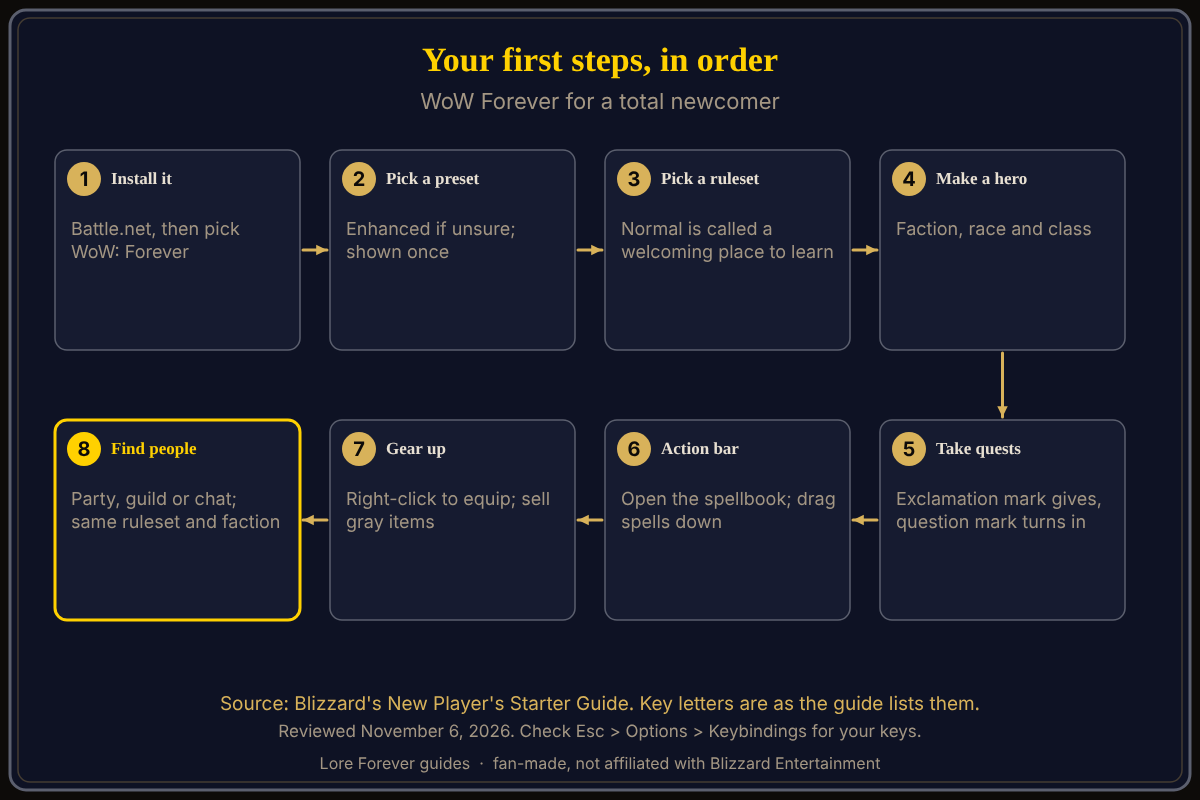
If you are brand new to World of Warcraft: Forever (WoW Forever), do eight things in order: install it from Battle.net, pick an Experience Preset, pick a Ruleset, create a character, take your first quests, learn your action bar, gear up, and then find other players. The steps condense Blizzard's New Player's Starter Guide (October 28) into eight, as of November 6, 2026; no source says how long they take.
Quick answer: Install, choose Enhanced if unsure, choose the Normal ruleset, make a hero, follow the exclamation marks, drag spells to your action bar, sell gray items, and invite someone nearby to a party.
Key facts
- Access: included with an active WoW subscription or Game Time (Blizzard Starter Guide)
- Presets: Classic or Enhanced, chosen once at first login; "start with Enhanced" if unsure (Blizzard)
- Rulesets: Normal, PvP, Roleplay, Roleplay-PvP; Hardcore comes later (Blizzard)
What do I do first in WoW Forever, step by step?
- Install it. Open the Battle.net app, sign in, install World of Warcraft and select World of Warcraft: Forever from the game versions. More: how to play.
- Pick a preset. On first login you choose Classic (simpler visuals, classic screen layout) or Enhanced (higher fidelity, quest markers, one bag). Blizzard says: "start with Enhanced." The screen appears only once, but individual settings can be changed later under Game Menu > Options.
- Pick a ruleset. Blizzard calls Normal "a welcoming place to learn" with optional PvP. Your ruleset decides who you can group with, so read which ruleset to pick first.
- Create a character. Choose a faction (Alliance or Horde), a race and a class. Blizzard says the class sets your combat role. See best class for beginners.
- Take your first quests. A character with an exclamation point over their head offers a quest; a question mark means turn it in. Blizzard's guide writes the quest log as "Hotkey-L" and the map as "Hotkey-M".
- Set up your action bar. Blizzard's guide writes the spellbook as "Hotkey-P"; drag abilities from it to the bar. Carry food and drink, and note that innkeepers sell them and can bind your Hearthstone.
- Gear up. Right-click an item in your bags to equip it, compare tooltips, and sell gray items. If you sell by mistake, the vendor's Buyback tab undoes it.
- Find people. Invite nearby players to a party, join a guild or use chat; dungeon groups are generally five players: a tank, a healer and damage dealers.
What happens if I die?
Blizzard's guide says to follow the corpse marker, or use the map, then select Resurrect once your spirit is close enough. The Spirit Healer revives you at the graveyard but damages durability and may apply Resurrection Sickness. More in death and corpse runs.
Is there an "explain it like I'm 5" thread?
A Blizzard forum thread titled "Explain to me like i'm 5" exists in the WoW: Forever category (November 6), but its first posts debate Blizzard's business reasons for the game rather than teaching beginners. Blizzard's Starter Guide is the better beginner source.
What tips does Blizzard give beginners?
Five: read tooltips and quest text, keep your Hearthstone nearby, repair gear and save coin, ask for help on hard quests, and try another class if your first does not suit you.
What is not confirmed yet
- Key names: the guide writes "Hotkey-L" style labels, so the letters are not confirmed. Check Game Menu > Options > Keybindings for your actual keys.
- Timing: no source says how long each step takes.
- Layering: the guide does not explain why friends may be invisible; see can't see party members.
Can the Lore Forever add-on and Willo help a beginner?
When a quest text confuses you, the free Lore Forever add-on adds a Lore button on quests that opens the quest's story, and it has no internet access. Willo is a separate companion app for Windows 10 or 11 and Apple Silicon Macs (macOS 12 or later), per her page; her FAQ and the Lore Forever FAQ say Windows and Mac, though CurseForge still calls her a Windows app. Hold the talk key and ask "what do I do next". She is free to start with 50 answers a day, can be wrong and is not official, so the in-game text and Blizzard's pages stay the source of truth. Both are fan-made, not affiliated with Blizzard, and narration uses generated voices. See also the first hour guide and beginner's guide.
Frequently asked questions
What should a total beginner do first in WoW Forever?
Install from Battle.net, choose Enhanced if unsure, choose the Normal ruleset, create a character and follow the exclamation marks.
Which preset should I pick?
Blizzard's Starter Guide says to start with Enhanced if you are not sure; you can change settings later.
Do I need to buy WoW Forever?
Blizzard says access is included with an active WoW subscription or Game Time; the Skyborne race needs the Heroic Pack or higher.
Can I play with friends right away?
Only on the same ruleset and faction, per Blizzard. See how to play with friends.
What is a ruleset?
Per Blizzard, your ruleset sets the PvP rules and community conventions, and who you can group with.
Sources
Reviewed November 6, 2026. Lore Forever and Willo are fan-made and are not affiliated with Blizzard Entertainment.