Guide ·
Can't See Party Members in WoW Forever? Group Fix Steps
If you cannot see your party members in World of Warcraft: Forever (WoW Forever), first confirm you share a ruleset and faction, then look for the blue message after joining the group and click it to reach a "Refresh Now" button. A Blizzard community manager asked players about exactly this prompt on November 5, 2026, and Wowhead reports that joining a group no longer moves you to your friends' layer automatically.
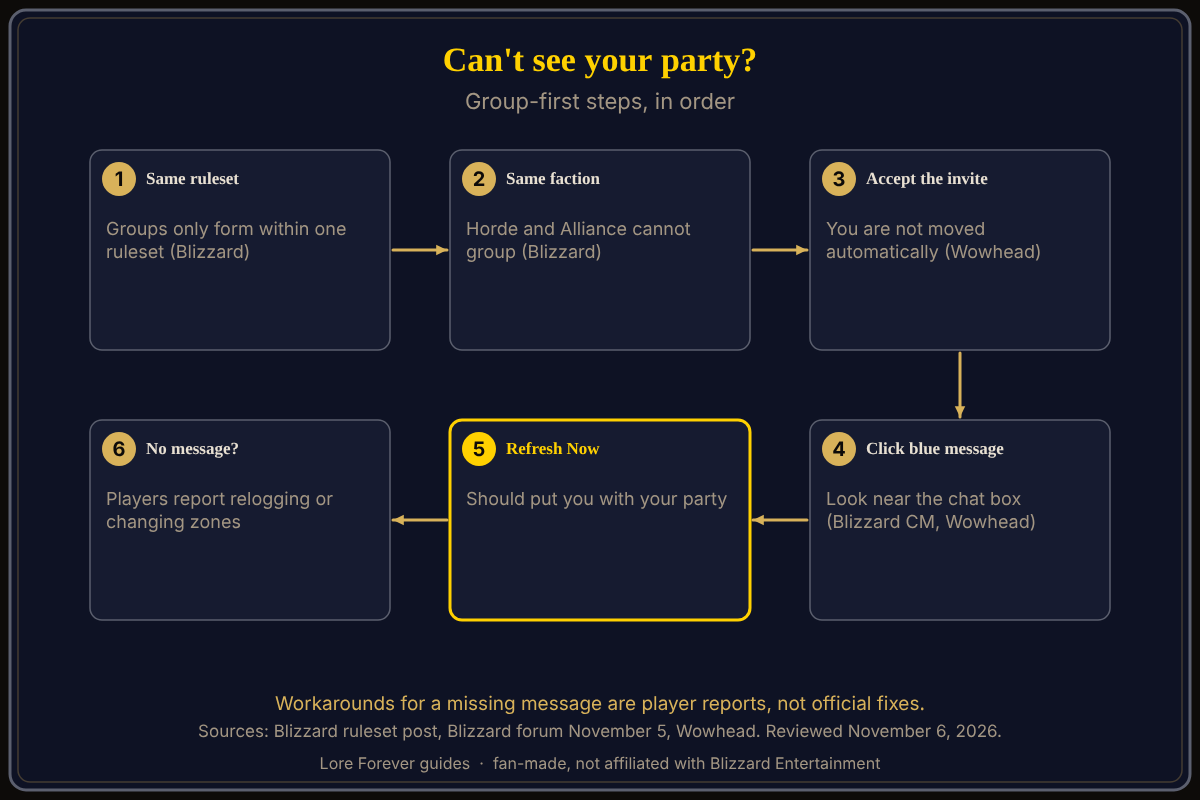
Quick answer: Same ruleset, same faction, accepted party invite, then click the blue notice and press Refresh Now. If no notice appears, players report relogging or leaving and re-entering the zone. None of those workarounds is an official fix.
Key facts
- Grouping limit: groups only with the same ruleset; Horde and Alliance cannot group (Blizzard, October 22)
- Prompt: after joining a group you must trigger the move yourself (Wowhead, November 5)
- Button: a blue message leads to a pop-up with "Refresh Now" (Blizzard community manager Kaivax, forum, November 5)
- Missing prompt: several forum players say it did not appear for them (Blizzard forum, November 5)
What should I check first when I can't see my party?
Start with the rule that no refresh can fix. Blizzard's ruleset post says groups are limited to players in the same ruleset, and Horde and Alliance players cannot group together. On the PvP ruleset you can only create characters for one faction. A friend on another ruleset or faction will not join your party at all. The different phase fix covers that message; this page is the group-first checklist.
How do I refresh to my group's layer?
Wowhead (November 5) says Blizzard changed this after the beta, as announced on its podcast: joining a group does not automatically move you to the same layer. Players click an arrow at the top left of the chat window to trigger the move. Wowhead says the prompt can appear even in town.
On November 5 a Blizzard community manager, Kaivax, asked a player in a forum thread: after accepting the invite, do you see the blue message, can you click it, does a pop-up offer "Refresh Now", and does clicking it put you together? So the sequence is: accept the invite, find the blue message, click it, press Refresh Now. Kaivax's post puts the message at "lower-right here", while Wowhead says top left of chat, so look near the chat box.
What if the Refresh Now message never shows up?
The same Blizzard thread has players saying they did not get it. All of these are player reports, not official fixes:
- One player said no notice appeared; their group walked from Tirisfal to Silverpine and back.
- Another saw it once, then not again after relogging; when the friend invited them, the friend's message appeared and clicking it worked.
- One player said the message "does NOT look like a button" and that their party waited 30 minutes before pressing it.
- One player said refreshing did nothing even in safe zones; another said they could see players but fought mobs on different layers.
Blizzard's Forever Common Issues support page, read November 6, does not list this problem. Background: layering explained, realms and regions (Blizzard says you pick a ruleset, not a realm) and mega realms.
What is not confirmed yet
- Cause and timer: Blizzard has not, in any page I opened, explained why the notice is missed or how long a refresh takes.
- Where the message sits: Wowhead says top left of chat; Kaivax's post says lower right. Treat both as "near the chat box."
- Any fix for a missing notice: every workaround above is single-player reports.
Can the Lore Forever add-on or Willo help?
Neither one moves you between layers. While you wait, the free Lore Forever add-on has no internet access and adds quest stories in game. Willo is a separate companion app for Windows 10 or 11 and Apple Silicon Macs (macOS 12 or later), per her page; her FAQ and the Lore Forever FAQ say Windows and Mac, though CurseForge still calls her a Windows app. Ask her out loud what a notice means; she is free to start with 50 answers a day, can be wrong and is not official, so check Blizzard's pages. Both are fan-made and not affiliated with Blizzard. More: how to play with friends.
Frequently asked questions
Why can't I see my party members in WoW Forever?
Either you are on a different ruleset or faction, or you are on a different layer and have not triggered the refresh after joining the group.
What is the Refresh Now button?
Per a Blizzard community manager's forum post, a blue message after joining a party opens a pop-up with "Refresh Now" that should put you with your group.
Does joining a group move me automatically?
Wowhead says no; Blizzard changed that after the beta, so you trigger it yourself.
Can Horde and Alliance group?
No. Blizzard says Horde and Alliance players cannot group together.
What if there is no message?
Players report relogging, or leaving the zone and returning, with mixed results; Blizzard has not confirmed either.
Sources
Reviewed November 6, 2026. Lore Forever and Willo are fan-made and are not affiliated with Blizzard Entertainment.