Guide ·
WoW Forever on Windows: Requirements, Install, Addons
World of Warcraft: Forever (WoW Forever) on Windows needs at minimum Windows 10 64-bit (May 2019 Update or newer), a 4-core 3.0 GHz processor, 8 GB of RAM, a DirectX 12 graphics card with 4 GB and an SSD with 128 GB free, according to Blizzard's Battle.net Shop page. The game opens on November 4, 2026 at 3:00 p.m. PST; this is current as of that morning.
Quick answer: Check the specs below, install the Battle.net desktop app, pick WoW: Forever under Game Version and click Install. Addons go in World of Warcraft\_forever_\Interface\AddOns.
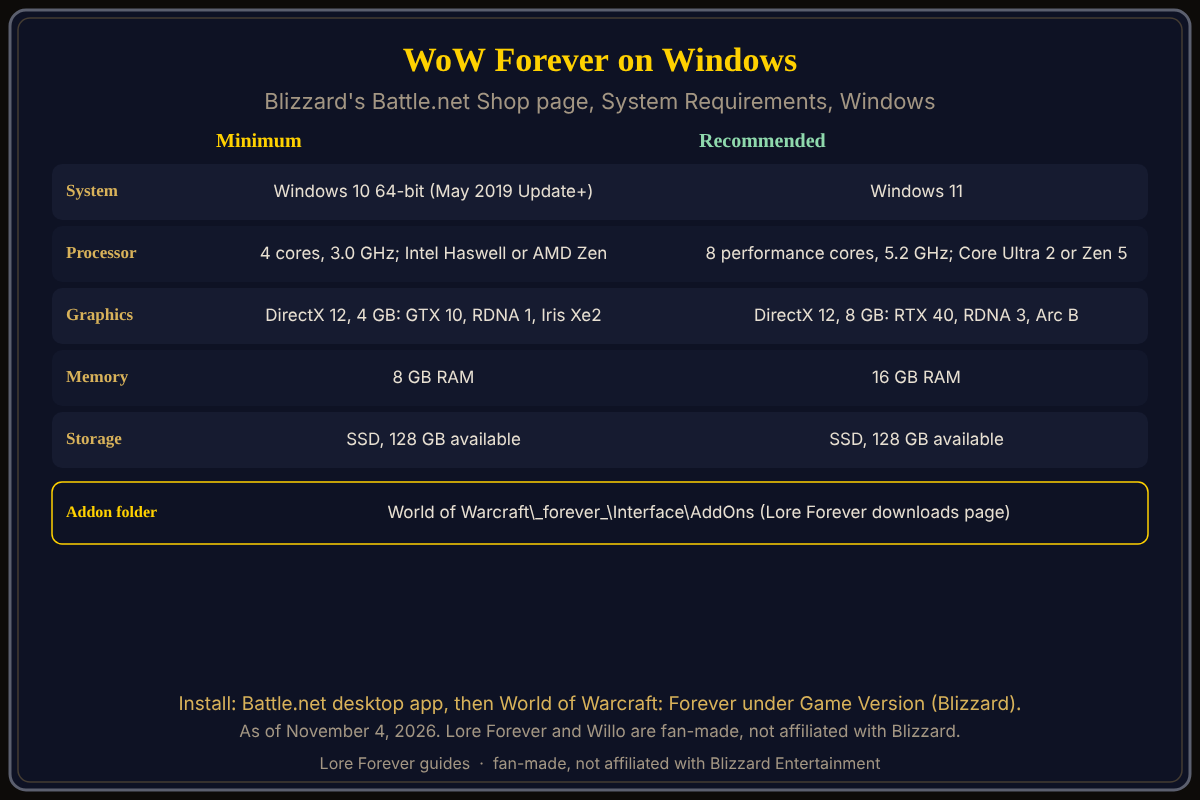
Fast storage is the line most people miss.
Key facts
- Platforms: Windows or Mac, keyboard and mouse (Blizzard Starter Guide, October 28)
- Minimum: Windows 10 64-bit; 4 cores, 3.0 GHz (Intel Core Haswell or AMD Ryzen Zen); DirectX 12 GPU with 4 GB (NVIDIA GeForce GTX 10 series, AMD RDNA 1 or Intel Iris Xe2 Lunar Lake graphics); 8 GB RAM; SSD with 128 GB available; 1280 x 720
- Recommended: Windows 11; 8 performance cores at 5.2 GHz boost (Intel Core Ultra Series 2 or AMD Ryzen Zen 5); DirectX 12 GPU with 8 GB (GeForce RTX 40 series, AMD RDNA 3 or Intel Arc B-Series); 16 GB RAM; SSD with 128 GB
- Source: the System Requirements section of Blizzard's Battle.net Shop page for WoW: Forever
What are the WoW Forever PC requirements?
Those above. Blizzard lists the same 128 GB SSD line for minimum and recommended. TimeSaver repeats it and says players report a clean install closer to 50 GB (a third-party report; see pre-download and install size). The starter guide tells you to review the requirements before installing.
How do I install WoW Forever on Windows?
Blizzard's starter guide: create a Battle.net account, subscribe or buy Game Time (access is included with either), download the Battle.net desktop app, sign in, install World of Warcraft and select World of Warcraft: Forever from the available game versions. TimeSaver adds picking the right WoW account in a second dropdown. Details and troubleshooting: how to download and install.
Where do addons go on Windows?
World of Warcraft\_forever_\Interface\AddOns, per the Lore Forever downloads page and FAQ; mein-mmo gives /_forever_/Interface/AddOns. Not _classic_beta_, which was the beta folder (TimeSaver). If an addon is missing, click AddOns at character select, tick "Load out of date AddOns" and /reload. Full guide: how to install WoW Forever addons.
How do I install Lore Forever and Willo on Windows?
The Lore Forever downloads page offers CurseForge or a ZIP, and its Install help describes a Windows Setup that is signed, finds your World of Warcraft folder and installs into _forever_\Interface\AddOns with no admin rights. (My browser showed only the CurseForge and ZIP buttons, so check the page for the Setup button.) Willo has a separate download: Willo-Setup.exe, 63 MB, Windows 10 or 11, version 1.0.0 on her page this morning. Sign in with a Lore Forever account. Together: install the game, add-on and Willo.
What is not confirmed yet
- Whether launch-day performance matches the recommended spec; no source tests it.
- The real download size; Blizzard states free space, not a download figure.
- A Blizzard page for the
_forever_addon path; I did not find one.
How can the Lore Forever add-on and Willo help with this?
The free Lore Forever add-on adds readable and recorded stories for zones, cities and dungeons, with no internet access. Sizes on the page: The add-on 303 MB, Storyteller 1.7 GB, Everything 3.0 GB. Willo is a separate companion app, free to start with 50 answers a day; she sees your quests only with Live game info on in both the add-on Options and Willo Settings (Hero and up after the first days, per her Plans page). Both are fan-made, not affiliated with Blizzard, and Willo can be wrong.
Frequently asked questions
What are the WoW Forever Windows requirements?
Windows 10 64-bit, 8 GB RAM, a DirectX 12 GPU with 4 GB and a 128 GB SSD at minimum, per Blizzard.
Does WoW Forever need Windows 11?
Windows 11 is the recommended line; Windows 10 64-bit is the minimum.
Do I need an SSD for WoW Forever?
Blizzard's Shop page lists an SSD in both specifications.
Where is the WoW Forever AddOns folder on Windows?
World of Warcraft\_forever_\Interface\AddOns.
Can a laptop with integrated graphics run it?
Only Intel Iris Xe2 Lunar Lake graphics is named at minimum; other integrated chips are not mentioned.
Sources
Reviewed November 4, 2026. Lore Forever and Willo are fan-made and are not affiliated with Blizzard Entertainment.