Guide ·
Best Keybinds for WoW Forever: A Simple Beginner Layout
The best keybinds for a beginner in World of Warcraft: Forever (WoW Forever) are mostly the defaults, learned in a sensible order. There is no single correct layout; this is a starting point built from the default keys listed by Magic Game World, Method and Blizzard.
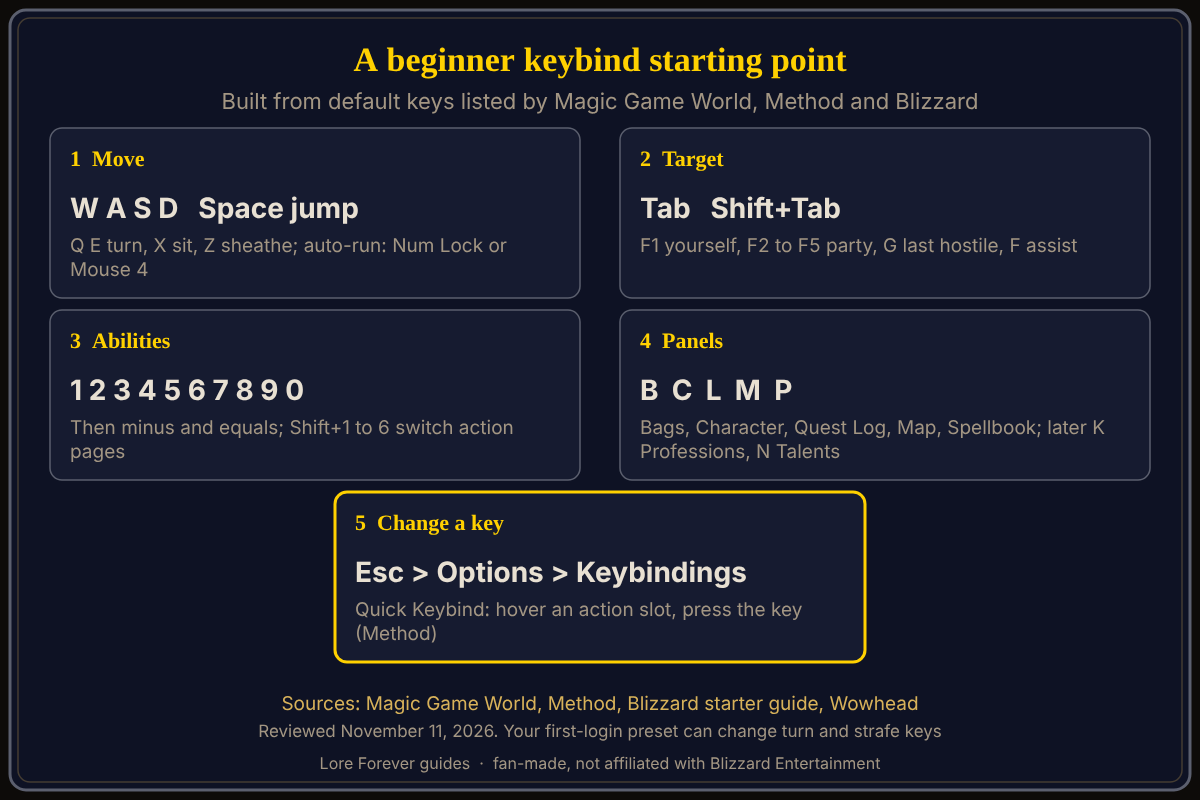
Quick answer: Learn W, A, S, D to move, Tab to target, 1 to 0 for abilities and B for bags first, as Magic Game World suggests. Then add the panel keys (C, P, L, M, K, N). Rebind under Esc, Options, Keybindings, where Method says a Quick Keybind mode lets you hover an action slot and press the key you want.
Key facts
- Open the list: Esc, Options, Keybindings (Blizzard's starter guide)
- Input: keyboard and mouse are required; a multi-button mouse with a scroll wheel is recommended (Wowhead's system requirements)
- Presets: the Classic preset starts with camera turning on the keyboard and the Enhanced preset starts with strafing on the keyboard (Blizzard)
Which keys should a beginner learn first?
Magic Game World's order is W, A, S, D for movement, Tab for nearby enemies, 1 to 0 for action bar abilities and B for bags. Its defaults:
- Move: W or Up Arrow forward, S or Down Arrow back, A and D strafe, Q and E turn, Space jumps, X sits, Z sheathes your weapon
- Auto-run: Num Lock or Mouse Button 4 toggles it; start and stop auto-run are unbound
- Target: Tab nearest enemy, Shift+Tab previous, Ctrl+Tab nearest friend, F1 yourself, F2 to F5 party members, G last hostile target
- Fight: F assists your target, T attacks, abilities sit on 1 to 0, then minus and equals
If your turn and strafe keys differ, the first-login preset is a likely reason. Check the Keybindings list.
What are the panel keys?
Method and Magic Game World agree on C Character, P Spellbook, L Quest Log, M Map, B Bags, N Talents, J Guild and Communities, U Reputations, H PvP, K Professions and Y Legacy. Method marks K and Y as new. Blizzard's starter guide confirms L, M, P, K and C. Magic Game World adds Shift+M for the zone map and V for enemy nameplates. The two differ on O (Method says Friends and Raid, Magic Game World says Social pane), and I as Looking For Group is in Method only.
My suggestion, not a source's: learn C, B, L, M and P first, then K and N when you start professions and talents.
How do I change a keybind?
- Press Escape, open Options and choose Keybindings.
- Find the action and click it, then press the new key.
- For action bars, try Method's Quick Keybind mode: hover a slot and press the key you want for it.
- Need more bars? Method says to add them on the Action Bar tab. The Options search bar at the top right finds settings.
What about self-cast and mouseover?
Method says the self-cast and mouseover cast options let one key heal yourself and another heal whoever your mouse is over. They are not needed on day one.
Which camera setting do people change?
Method says the Camera setting under Controls defaults to always follow and suggests never. See camera controls and mouse settings.
What is not confirmed yet
- Defaults: Blizzard has not published a full key list that I found. Movement and targeting keys come from Magic Game World, which says its guide covers the default PC bindings, and panel keys come from Method, whose page shows no date.
- Presets: your Classic or Enhanced choice may change turn and strafe keys. The exact menu names may differ, so check Esc, Options.
How can the Lore Forever add-on and Willo help with keybinds?
The free Lore Forever add-on lets you choose its own key on first login and opens from the minimap book or /lore, so it needs no extra binding to find. It is fan-made, not affiliated with Blizzard, and has no internet access. Willo is a separate companion app for Windows 10 or 11 and Apple Silicon Macs (macOS 12 or later), free to start with 50 answers a day. Ask her out loud where a setting lives; she can be wrong, and the in-game list is the source of truth. She never presses keys or clicks in the game.
Frequently asked questions
What are the default keybinds in WoW Forever?
W, A, S, D move you, Tab targets, 1 to 0 fire abilities, and C, P, L, M and B open panels, per Magic Game World and Method. See default keybindings.
How do I change keybinds in WoW Forever?
Esc, Options, Keybindings, per Blizzard. How to change keybinds has more.
What key is auto-run?
Magic Game World lists Num Lock or Mouse Button 4.
What key opens the quest log?
L, per Blizzard's starter guide.
Can I play with a controller?
Blizzard says controller support is in a beta state; this layout is for keyboard and mouse.
Related guides: movement controls, macros and keybinds and action bars setup.
Sources
Reviewed November 11, 2026. Lore Forever and Willo are fan-made and are not affiliated with Blizzard Entertainment.