Guide ·
5 Tips to Get More From the Lore Forever Add-on
The five most useful things to know about the free Lore Forever add-on are how to open it, how to replay a story, how to order narrator voices, how to move its pop-ups and how to flag a wrong answer. Lore Forever is a fan-made add-on for World of Warcraft: Forever (WoW Forever) that narrates the story of zones, dungeons, bosses, places and people as you play. Everything below comes from its own FAQ and update notes, as of November 11, 2026.
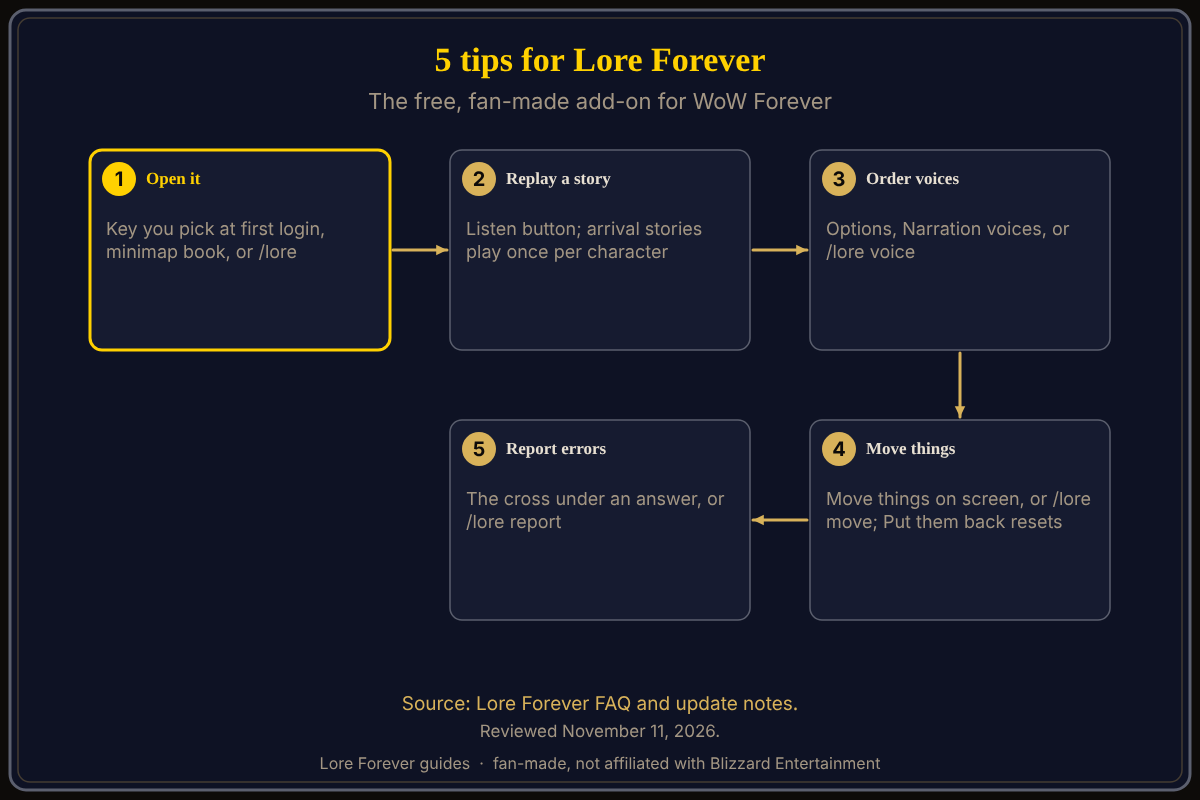
Quick answer: 1) Open it with the key you pick on first login, the minimap book or /lore. 2) Press Listen to replay any story. 3) Install voices and order them with /lore voice. 4) Drag its pop-ups with Move things on screen or /lore move. 5) Click the cross under a wrong answer or type /lore report.
Key facts
- Price: free, fan-made, not affiliated with Blizzard
- Where it runs: inside WoW Forever only; it does not need an app or the internet
- Narrators: the included male narrator and the optional female narrator are generated voices; voices other players record are real people
- First visits: a zone's story plays once per character, the first time you arrive
- Quest dialogue: a separate optional pack, off by default
What are the five tips?
1. How do you open Lore Forever fast?
The FAQ gives three ways: the key you pick on first login, the minimap book, or typing /lore. An update note from November 5 adds that Options has a Keys section with a Set... button for each Lore Forever key, so you do not need the game's Key Bindings menu. Step-by-step: how to open Lore Forever and set its key.
2. How do you hear a story again?
By default a zone's or place's story plays by itself once per character, on your first arrival. That setting is called Skip what you've heard and it starts on. The FAQ says you can still play any story again with its Listen button. To stop arrival stories, untick Play narrations as you arrive in Options or type /lore autoplay. More in Listen, playlist and subtitles.
3. How do you choose and order narrator voices?
Install the voices you like from the Downloads page, then pick them in game under Options, AddOns, Lore Forever, Narration voices, or type /lore voice. Put them in your order: the FAQ says a voice that has not recorded a story hands it to the next one. See narrator voices explained.
4. How do you tidy the screen?
The November 10 update added Move things on screen in Options, also reached with /lore move. It shows the subtitles, the new-page note, the pin card and Willo's sky in gold so you can drag them together; Put them back resets them. Dragging a single pop-up also works, per the November 9 note: it opens in that spot from then on.
5. What do you do when an answer is wrong?
Click the cross under the answer, or type /lore report. The FAQ says player reports of a wrong answer get it fixed. Questions themselves are covered in how to ask Lore Forever questions.
Should you turn on quest dialogue?
It is off by default, including the play button on the quest window. The FAQ says to install a Quest Dialogue pack from Downloads and turn on Speak quest dialogue in Options if you want it, and to skip the pack if another add-on already speaks your quests. See Lore Forever vs Spoken.
What is not confirmed yet
- Default keys: I did not find a default key written on the FAQ, so I give none; you choose one at first login
- Exact menu labels: they are as the FAQ and notes spell them; the game may differ slightly
Frequently asked questions
Is Lore Forever free?
Yes. The FAQ says it stays free, and that Blizzard's add-on rules do not allow selling add-ons.
Does it need an app?
No. The FAQ says the lore, narration and your journey work fully in game on their own.
Does it work on Classic or modern WoW?
No. The FAQ says it is made for WoW Forever only and no other version is planned.
Does it send my data anywhere?
The FAQ says your Chronicle stays on your PC and the game does not let add-ons reach the internet.
Does it change quest text?
No. The FAQ says it adds its own panel and narration next to the game's text.
How can the Lore Forever add-on and Willo help with these tips?
The free Lore Forever add-on is the thing these tips are about: fan-made, not affiliated with Blizzard, no internet access, narration by generated voices plus voices players record. Willo is a separate, optional companion app for Windows and Mac, free to start with 50 answers a day; she can answer questions out loud, can be wrong, and is not official.
Sources
Reviewed November 11, 2026. Lore Forever and Willo are fan-made and are not affiliated with Blizzard Entertainment.
Related guides: Lore Forever add-on guide, slash commands explained.