Guide ·
How to Ask Lore Forever Questions: Typing, Matches, Reports
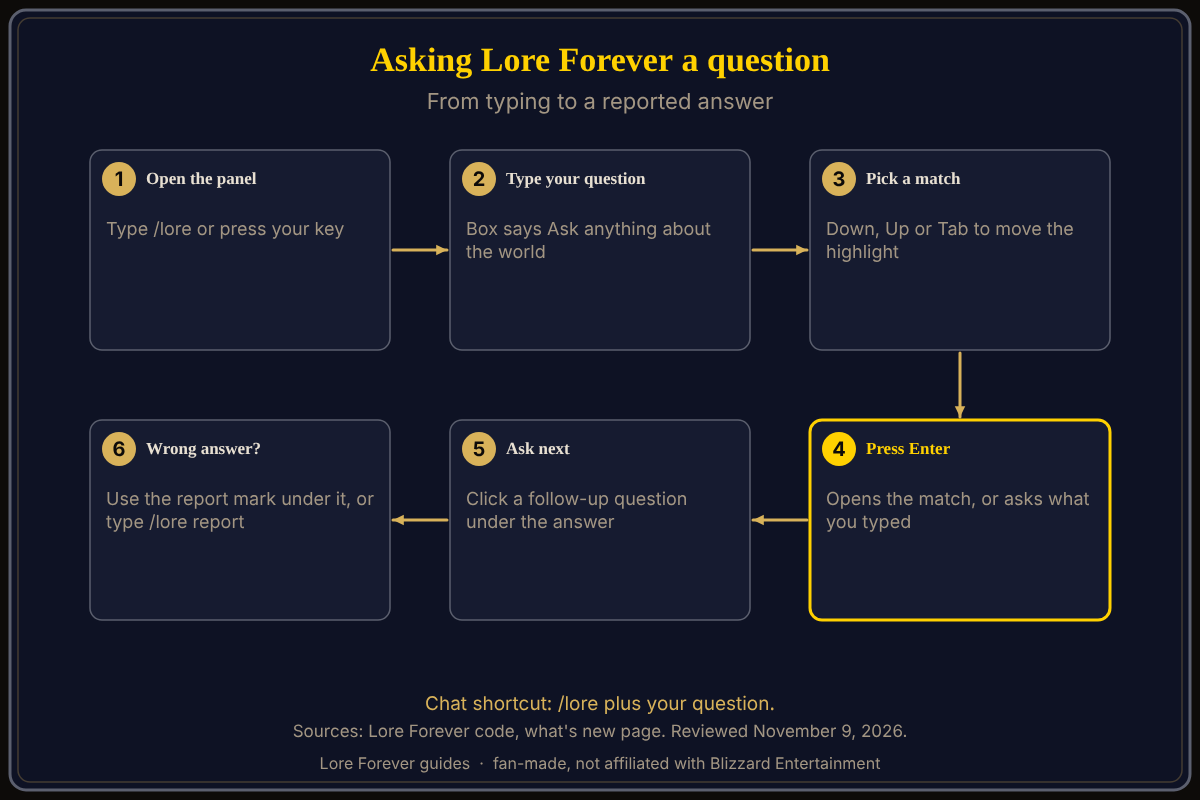
To ask the Lore Forever add-on a question in World of Warcraft: Forever (WoW Forever), open the panel with /lore, type in the box that says "Ask anything about the world", pick a match with the arrow keys or Tab, and press Enter. You can also skip the panel and type /lore followed by your question in chat.
Quick answer: /lore why is westfall so poor asks from chat. In the panel, type, press Down or Tab to choose a match, then Enter. A wrong answer? Use the report mark under it or type /lore report.
Key facts
- Chat: /lore <question>; anything after /lore that is not a command is a question
- Panel box: "Ask anything about the world"; the Send button works like Enter
- Matches: a list drops down as you type
- Wrong answer: the report mark under it, or /lore report
How do I type a question and pick a match?
- Press your key or type /lore to open the panel (see how to open Lore Forever).
- Click the box and start typing. Up to six matches drop down in two groups, per the code: "Stories" and "Related questions".
- Press Down or Up to move through them. Tab moves down one and wraps around to the top.
- Press Enter to open the highlighted match. With nothing highlighted, Enter asks what you typed. Send does the same.
- Escape closes the match list first; pressing it again closes the panel.
Questions can be plain, such as "what am I doing here?" or "who leads them?", which the what's new page says answer from where you are. The add-on has no internet access, so it only answers from what it ships with. See the add-on guide.
What is Ask next?
Under an answer the add-on offers up to three follow-up questions to click instead of typing. The what's new page (0.2.0) calls them "Ask next", CurseForge calls them follow-up questions, and the code I read from October 22 labels the row "Suggested:". Clicking one asks it straight away. Answers also contain clickable names of other entries, and Back and Forward buttons appear above the chat once there is somewhere to go back to.
Does it forgive typos?
Yes, per the what's new page: names forgive typos. When the add-on is not sure, the code shows "I'm not sure I have that. Did you mean one of these?" and a "Did you mean:" row of suggestions. Click the right one. If none fits, rephrase with the NPC's or place's name.
What does "who is this guy?" do?
With an NPC targeted, a short question like "who is this guy?" means your target, says the code. Without a target it continues your last conversation instead. Opening the panel with an NPC or boss targeted also opens their story once, headed "Who is" and the name.
- Target the NPC.
- Open the panel and type "who is this guy?", or hover them and press your key.
- Check the answer names the right character. If not, type their name.
How do I report a wrong answer?
The what's new page (0.5.0) and the live FAQ say to click the cross under an answer, which opens a short report to send. The code I read from October 22 draws a wax seal ("Good answer") and a quill ("Not right?") there instead, and the quill opens the report. Or type /lore report right after the answer; it reports the newest one. If you have not asked anything yet, the add-on says to ask something first. The FAQ also says you can send feedback through the feedback page or Discord.
What is not confirmed yet
- Whether your version shows a cross or a quill under each answer.
- Whether "who is this guy?" works with a mouseover but no target. The code mentions a target.
- The code I read is from October 22; the add-on has changed since.
How can the Lore Forever add-on and Willo help with this?
The add-on is free, fan-made and not affiliated with Blizzard, and it answers offline. Willo is a separate companion app for Windows 10 or 11 and Apple Silicon Macs (macOS 12 or later) per her page; CurseForge still calls her a Windows app. She is free to start with 50 answers a day, and you can ask her out loud instead of typing. She can be wrong, and her answers are not official game information. See how to use Willo and the Spoken comparison.
Frequently asked questions
How do I ask Lore Forever a question?
Type /lore and your question in chat, or type in the panel's box and press Enter.
How do I choose a suggestion?
Press Down, Up or Tab, then Enter.
Does Lore Forever understand typos?
Per its what's new page, yes; it also offers "Did you mean" suggestions.
What is "who is this guy" for?
With an NPC targeted, it asks about that NPC.
How do I report a wrong answer?
Use the report mark (cross or quill) under the answer, or type /lore report.
Sources
Reviewed November 9, 2026. Features may change. Lore Forever and Willo are fan-made and are not affiliated with Blizzard Entertainment.
- Lore Forever add-on source files (October 22, 2026 checkout): panel box, type-ahead, report
- Lore Forever what's new and FAQ
- Lore Forever on CurseForge