Guide ·
How to Open Lore Forever and Set Its Key in WoW Forever
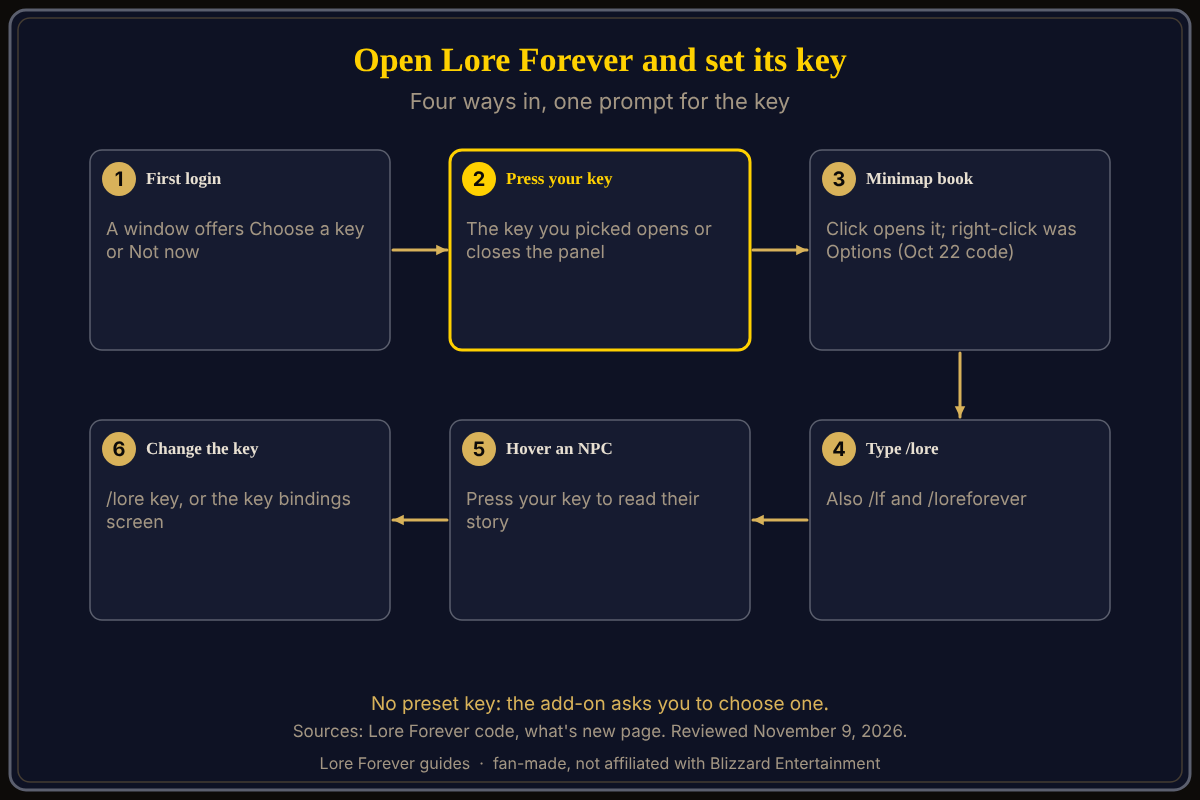
To open the Lore Forever add-on in World of Warcraft: Forever (WoW Forever), press the key you picked at first login, click the book on your minimap, or type /lore. There is no preset key: the add-on asks you to choose one, and /lore key lets you change it any time.
Quick answer: Type /lore to open or close the panel. To set the key, type /lore key, click "Choose a key", then press the key you want. Hover an NPC and press it to read about them.
Key facts
- Open: your key, the minimap book, or /lore (or /lf)
- Change the key: /lore key, or Esc, Options, Key Bindings, AddOns, Lore Forever
- Default key: none; the add-on asks at login
What happens at first login?
About six seconds after you log in, per the code, a small window appears if no key is bound yet and you have not chosen before: "Pick a key to open the lore panel from anywhere, like M for the map." Click Choose a key, then press the key you want, with Shift, Ctrl or Alt if you like. Escape cancels. In combat it asks you to wait.
If the key is already used, the window says so and tells you to press it again to use it anyway, or pick another. When it works, chat says "press X to open the lore panel. Change it any time with /lore key."
Not now closes the window and, per the code, it does not come back by itself. Use /lore key later.
How do I open it from the minimap book?
The add-on puts a book on the edge of your minimap. Per the code:
- Click to open or close Lore Forever.
- Right-click opened or closed Options in the October 22 code, with no menu. The what's new page (1.1.0) adds that Ctrl-right-click keeps Willo's sky up, so hover the book to see its current tooltip.
- Shift-click plays or pauses your playlist, and Shift-right-click plays the next narration.
- Drag the book to move it.
The Options checkbox "Minimap button" shows or hides it; /lore works either way. The panel's title bar has a gear that opens Options too.
What is the add-on compartment entry?
The add-on's .toc file declares an add-on compartment click, which just opens or closes the panel like /lore. The code calls this the minimap's add-on menu. Whether WoW Forever's client shows that menu is not confirmed, so use the book or /lore if you do not see it.
How do I read about an NPC with the key?
Hover an NPC (mouse over them) who has an entry, then press your key, and their story opens. If you have an NPC or boss targeted when you open the panel, it opens their story once, with the question "Who is" and their name. The separate narration key plays the story aloud for what you hover, then your target, then where you are. See Listen, playlist and subtitles.
How do I rebind the key later?
- Type /lore key and choose a new key as above; /lore key narrate does the same for the narration key.
- Or open the game's key bindings screen, find the Lore Forever section under AddOns, and bind "Toggle Lore Forever panel". Other entries there include "Play narration" and "Next narration". Exact menu names in Forever may differ; check Esc > Options.
- The what's new page says version 1.1.0 added a Keys section in the add-on's Options, with a Set... button for each key, so you no longer need the Key Bindings menu. I did not see that screen myself.
See how to change keybinds for the game's own screen.
What is not confirmed yet
- The Options Keys section's exact wording.
- Whether plain right-click on the book still opens Options.
- Whether the add-on compartment shows in Forever.
- The code read is from October 22, and the add-on has changed since.
How can the Lore Forever add-on and Willo help with this?
The add-on is free, fan-made and not affiliated with Blizzard. Lost in a setting? Ask Willo out loud; she is a separate companion app for Windows 10 or 11 and Apple Silicon Macs (macOS 12 or later) per her page, free to start with 50 answers a day. She can be wrong, and the game's menus are the source of truth. See how to install the add-on and the add-on guide.
Frequently asked questions
What key opens Lore Forever?
The one you pick at first login; there is no preset key.
How do I open Lore Forever without a key?
Click the book on your minimap or type /lore.
How do I change the Lore Forever key?
Type /lore key and press a new key.
What does right-clicking the minimap book do?
In the add-on's code as of October 22, it opens or closes Options; later versions may add more.
Why did the key window not appear?
A key may be bound already, or you chose Not now. Type /lore key.
Sources
Reviewed November 9, 2026. Features may change. Lore Forever and Willo are fan-made and are not affiliated with Blizzard Entertainment.
- Lore Forever add-on source files (October 22, 2026 checkout): key prompt, minimap button, bindings, .toc
- Lore Forever what's new and FAQ
- Lore Forever on CurseForge