Guide ·
Lore Forever Listen, Playlist and Subtitles: How They Work
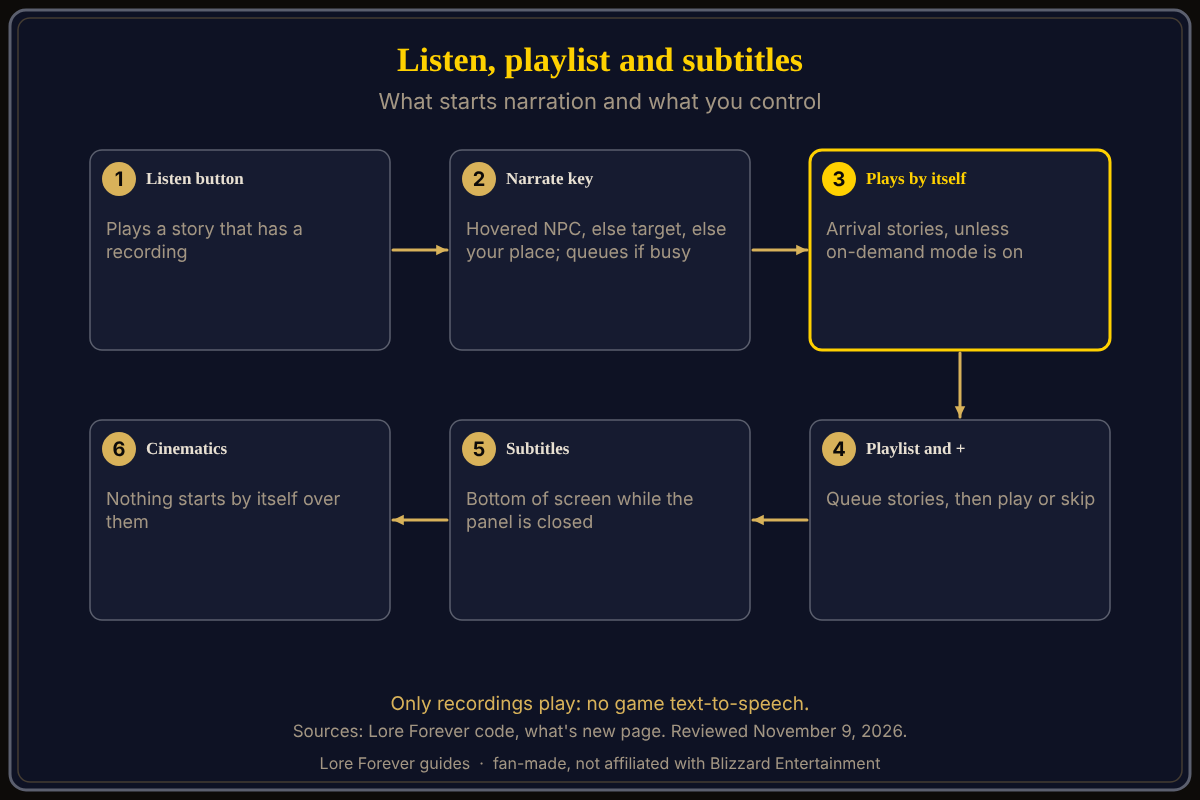
In the Lore Forever add-on for World of Warcraft: Forever (WoW Forever), Listen plays a story's recording, the Narrate key plays what you hover, target or stand in, the playlist queues stories with a + button, and subtitles show the words at the bottom of the screen while the panel is closed. Only recordings play; the add-on never uses the game's text-to-speech.
Quick answer: Press Listen on a story, or your Narrate key. Click + to queue more. To stop it playing by itself, tick "Narration: only when I press Play" or type /lore ondemand. Type /lore subtitles to move the subtitles.
Key facts
- On-demand mode: off by default, per the code; /lore ondemand toggles it.
- Subtitles: on by default; /lore subtitles moves them.
- Flight narration: its own option, off by default in the code I read
How do Listen and the Narrate key work?
Answers whose story has a recording get their own Listen button, and the panel header plays where you are. The what's new page says Listen starts where a story begins, and that Listen and "Add to playlist" share one quiet button by the title.
The Narrate key has no preset: set it with /lore key narrate (see how to open Lore Forever and set its key). It plays the NPC you hover if they have lore, else your target, else the place you are in. Per the code, pressing it again while that plays stops it. The what's new page (1.1.0) adds that the key never cuts in: if something is already playing, your pick goes next in the playlist, and with nothing playing it plays right away. With the panel closed, chat says what is playing and offers a "Read along" link. With no recording, chat says it "isn't narrated yet". /lore listen and /lore stop do the same by command.
How do I use the playlist and the + button?
- Open the Library tab (or type /lore library) and press + beside a story to add it after the others.
- Shift-click a lore link in an answer, or a quest, to queue it.
- Click Playlist on the player to see the queue; Clear playlist empties it.
- Play and pause with the "Play/pause narration playlist" key or Shift-click the minimap book; Shift-right-click plays the next story.
Closing the player keeps the list, per the code.
What is on-demand mode?
The Options box reads "Narration: only when I press Play". Its help text: nothing plays by itself, not on arrival, on flights, at quest givers or in books, while Play buttons, the Narrate key and your playlist still work. By default it is off, so a recorded zone story plays on arrival, once per character unless "Skip what you've heard" is off, says the FAQ. Type /lore ondemand to switch it; /lore autoplay switches arrival narration, and turning that on ends on-demand mode.
How do subtitles work and how do I move them?
Subtitles are on by default. While a narration plays and the panel is closed, its words show at the bottom of the screen in step with the voice. With the panel open, the chat already shows them. In Options you can switch them off, change their size, or press Move the subtitles..., which lets you drag them for 30 seconds, for example off your action bars. /lore subtitles does the same and /lore subtitles reset puts them back. The code also says Shift-drag works.
What happens during cinematics and flights?
Nothing starts by itself over the game's cinematics, movies or talking-head pop-ups, and narration that started by itself stops when one begins. What you started yourself plays on. The code also stops automatic narration when a fight starts in a group dungeon or raid.
Flight narration is its own option, "Narrate flights": it reads each zone's recorded story during a flight path and queues the next zone's story as you cross a border. It skips stories you have heard; on-demand mode switches it off. /lore narrate toggles it.
What is not confirmed yet
- Whether flight narration is still off by default; the code I read is from October 22. CurseForge lists flight narration among the Options settings.
- Whether pressing the Narrate key again still stops playback, given the 1.1.0 change.
- The current Options layout; later versions changed buttons.
How can the Lore Forever add-on and Willo help with this?
The add-on is free, fan-made and not affiliated with Blizzard. Its narrators are generated voices, per the FAQ. Willo, a separate companion app for Windows 10 or 11 and Apple Silicon Macs (macOS 12 or later) per her page, answers out loud; free to start with 50 answers a day. She can be wrong. See narrator voices explained, sound settings and accessibility settings.
Frequently asked questions
Does Lore Forever use text-to-speech?
No; only recordings play, per the add-on's code.
How do I stop narration playing by itself?
Tick "Narration: only when I press Play" or type /lore ondemand.
How do I move the subtitles?
Press "Move the subtitles..." in Options or type /lore subtitles.
What does the + button do?
It adds that narration to your playlist.
Does narration play during cinematics?
Not by itself, per the code.
Sources
Reviewed November 9, 2026. Features may change. Lore Forever and Willo are fan-made and are not affiliated with Blizzard Entertainment.
- Lore Forever add-on source files (October 22, 2026 checkout): player, playlist, options, subtitles
- Lore Forever what's new and FAQ
- Lore Forever on CurseForge