Guide ·
Lore Forever Slash Commands: Every /lore Command Explained
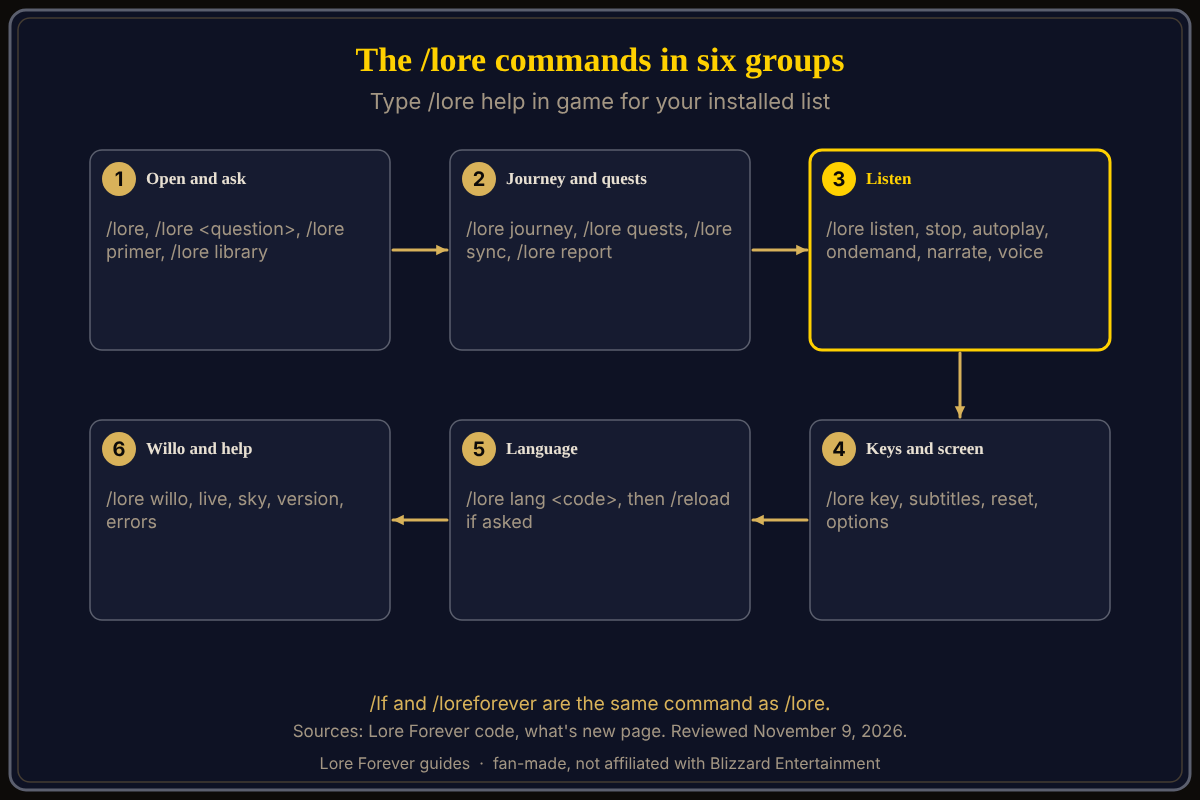
The Lore Forever add-on for World of Warcraft: Forever (WoW Forever) answers to /lore, plus /lf and /loreforever, and typing /lore help in game prints its own command list. Anything you type after /lore that is not a command is sent as a question. The lists below follow the add-on's code as of its October 22 checkout; /lore help is the final word.
Quick answer: /lore opens or closes the panel. /lore plus a sentence asks a question. /lore listen plays a story, /lore subtitles moves the subtitles, /lore key changes your key, /lore lang changes language, /lore options opens settings.
Key facts
- Three spellings: /lore, /lf and /loreforever open the same add-on. The code says /loreforever is "ours alone", for players whose /lore goes to another add-on that also claims it.
- Skipped on purpose: ctx, export, visits, stats, debug and qa (see the end).
Which commands open things and ask questions?
- /lore opens or closes the panel. Press your Lore Forever key for the same.
- /lore <question> asks directly, for example "/lore why is westfall so poor" (the add-on's own example).
- /lore ask <question> asks the Willo companion app when it is installed; without it, this is an ordinary question. See how to ask Lore Forever questions.
- /lore primer opens the dungeon primer for where you are.
- /lore library (also /lore narrations) opens the Library tab of recorded stories.
- /lore journey shows what your character has done so far; /lore picture takes a journey picture; /lore sync saves it now and reloads the interface.
- /lore quests (also /lore completed) lists the quests you have completed, by zone.
- /lore report (also /lore feedback) reports the newest answer as wrong, like the cross under an answer.
- /lore options (also /lore config and /lore settings) opens Options.
Which commands control narration?
- /lore listen plays the last narrated answer, or the story of where you are; typing it again while it plays stops it.
- /lore stop stops all narration.
- /lore autoplay switches narration as you arrive in a place on or off.
- /lore ondemand switches "narration only when you press Play" on or off.
- /lore narrate switches flight narration on or off.
- /lore voice lists your narration voices; /lore voice <number or name> puts one first, "auto" is the default, "none" is off. See narrator voices explained.
- /lore subtitles lets you drag the subtitles; /lore subtitles reset puts them back.
Details are in Listen, playlist and subtitles.
Which commands set keys, windows and language?
- /lore key opens the prompt for the key that opens the panel; /lore key narrate does the same for a key that plays narration. See how to open Lore Forever and set its key.
- /lore reset brings back the panel, the floating player and the minimap button, and keeps your journey and settings.
- /lore lang lists languages; /lore lang <code> picks one. English, Deutsch, Español, Français and Português are named, and Automatic follows the WoW client. You may need to type /reload afterwards.
- /lore tooltips and /lore nudge switch tooltip lore and zone hints; they are not in the /lore help list.
Which commands belong to Willo?
Willo is the optional companion app. /lore willo shows where to get her, when she is not installed. /lore live switches live game info on or off, /lore sky moves her star field off the minimap and /lore sky reset puts it back. With Willo installed, /lore key willo sets the key you hold to talk to her.
Which commands help with bug reports?
- /lore version says which version you have and whether a newer one is out.
- /lore errors shows recent Lua errors from the add-on in a box to copy; /lore errors clear empties the list.
- Skipped: /lore ctx, export, visits and stats print what the add-on sees, for bug reports and playtests; debug and qa are developer switches.
What is not confirmed yet
- The current in-game /lore help list. The add-on has changed many times since the code I read, so type /lore help.
- Commands added after October 22; the what's new entries since then name no new /lore command that I could find, but they do not list every change.
How can the Lore Forever add-on and Willo help with this?
The add-on is free, fan-made and not affiliated with Blizzard, with no internet access. Willo is a separate companion app for Windows 10 or 11 and Apple Silicon Macs (macOS 12 or later) per her page; CurseForge still calls her a Windows app. She is free to start with 50 answers a day; ask her out loud which command you need. She can be wrong, so /lore help wins. See the add-on guide and how to use Willo.
Frequently asked questions
What is the Lore Forever command?
/lore, or /lf or /loreforever.
How do I see every Lore Forever command?
Type /lore help in game.
How do I ask a question from chat?
Type /lore and your question, for example /lore why is westfall so poor.
How do I stop narration with a command?
Type /lore stop.
Why does /lore open another add-on?
Another add-on may claim /lore too; use /lf or /loreforever.
Sources
Reviewed November 9, 2026. Features may change. Lore Forever and Willo are fan-made and are not affiliated with Blizzard Entertainment.
- Lore Forever add-on source files (October 22, 2026 checkout), command handler and /lore help text
- Lore Forever what's new and FAQ
- Lore Forever on CurseForge