Guide ·
WoW Forever Addons Not Showing Up: Fixes and Folder Path
If your addons are not showing up in World of Warcraft: Forever (WoW Forever), check that each addon folder sits directly inside World of Warcraft\_forever_\Interface\AddOns, click AddOns on the character screen, tick "Load out of date AddOns", enable the addon, and restart the game or type /reload. The path comes from the Lore Forever downloads page and CurseForge's blog, not a Blizzard page. As of November 5, 2026.
Quick answer: Right folder (_forever_, not the beta's _classic_beta_), no extra nesting, addon enabled, a Forever version, then a full restart. In CurseForge, pick your Forever install and scan the folder if needed.
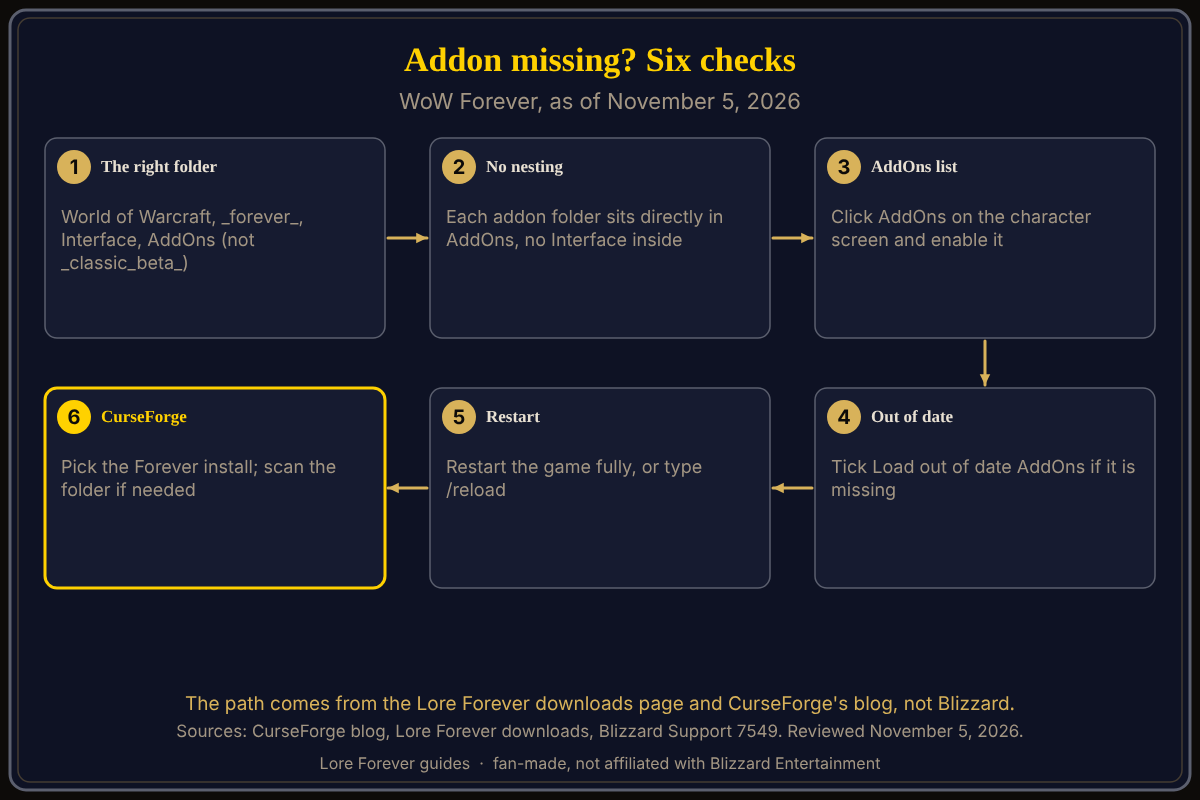
Key facts
- Windows folder:
World of Warcraft\_forever_\Interface\AddOns(Lore Forever downloads page, CurseForge blog) - Mac folder:
/Applications/World of Warcraft/_forever_/Interface/AddOns(Lore Forever downloads page) - Beta folder:
_classic_beta_, a different folder (CurseForge blog) - Out-of-date switch: AddOns button on the character screen, "Load out of date AddOns" (Lore Forever downloads page)
- Version check: CurseForge addon pages list a Forever flavor (CurseForge, November 5)
Why are my addons not showing in WoW Forever?
Four causes appear in the sources. The files may be in the wrong place: CurseForge's blog names an extra nested folder such as Interface\Interface, and the Lore Forever page says each addon folder must sit next to the others, not inside one. The addon may be disabled in the AddOns list. The game may flag it out of date. Or it may be built for another game version: CurseForge's blog says copying files does not update an addon.
How do I check the folder and enable the addon?
- Close the game. In Battle.net, use the cogwheel next to Play, then Show in Explorer or Reveal in Finder (Blizzard's reset article), to find your World of Warcraft folder.
- Open
_forever_\Interface\AddOnsand confirm each addon folder (for exampleLoreForever) is directly inside it. - Start the game, click AddOns on the character screen, tick the addon, and tick "Load out of date AddOns" if it is missing.
- Restart the game fully or type /reload, then recheck the AddOns menu.
Why does CurseForge not find WoW Forever or my addons?
The Lore Forever page says to open World of Warcraft in the CurseForge app, pick your Forever install, and add your _forever_ folder if it is not listed. CurseForge's migration post says to choose your Forever live installation, and that if the app does not recognize your addons you should manually scan the addons folder. It does not say where the scan option is, and I could not open a CurseForge support page about Forever. If you copied addons from the beta, it warns that pasting can overwrite files and that the beta account folder under WTF\Account must be renamed to your account name. See how to install addons.
Does an addon need a Forever version?
Yes, in practice. CurseForge's Questie page lists a "WoW Forever" file (v12.6.1, November 5) and RestedXP lists one (v4.11.32, November 4). TimeSaver says Classic Era files will not load. Blizzard's reset steps name the folders of the modern, Classic Era and Classic clients, not _forever_.
What if nothing works?
Blizzard Support's reset article says to exit the game, uninstall addon managers so they do not re-add files, then rename Cache, Interface and WTF to CacheOld, InterfaceOld and WTFOld and relaunch. The page does not say what you lose, so keep the old folders. Then add addons back one at a time. See how to install the Lore Forever add-on and best addons.
What is not confirmed yet
- A Blizzard page naming the
_forever_addon path; none found. - The CurseForge app's auto-detection behavior for Forever, and other managers' support.
How can the Lore Forever add-on and Willo help with this?
The free Lore Forever add-on offers a Windows Setup, a ZIP and CurseForge, and once it shows up it tells the story behind quests and zones; it has no internet access. Willo can answer "how do I install an addon?" by voice, free to start with 50 answers a day, but she can be wrong; the folder checks above come first. Willo is a separate companion app: her page lists a Windows 10 or 11 download and an Apple Silicon Mac download (macOS 12 or later), and the Lore Forever FAQ says Windows and Mac, though CurseForge still calls her a Windows app. Both are fan-made, not Blizzard's.
Frequently asked questions
Where is the WoW Forever AddOns folder?
World of Warcraft\_forever_\Interface\AddOns on Windows, per the Lore Forever downloads page; on a Mac /Applications/World of Warcraft/_forever_/Interface/AddOns.
Why is my addon not in the AddOns list?
The folder may be misplaced or nested, or the addon may not be for Forever.
What does "Load out of date AddOns" do?
The Lore Forever page says to tick it on the character screen if an addon is not showing.
Does CurseForge work with WoW Forever?
Yes. CurseForge's blog describes picking a Forever live installation, its launch post says the app supports WoW Forever, and its addon pages list a Forever flavor.
Do my beta addons work in the live game?
Only with a Forever version; CurseForge says to check for updates after copying.
Sources
Reviewed November 5, 2026. Lore Forever and Willo are fan-made and are not affiliated with Blizzard Entertainment.
- Blizzard Support: Resetting the WoW User Interface
- CurseForge: How to Migrate WoW Forever Addons from Beta to Live, Questie, RestedXP Guide
- Lore Forever downloads, TimeSaver, Willo