Guide ·
WoW Forever: Move Target Frame and Personal Resource Display
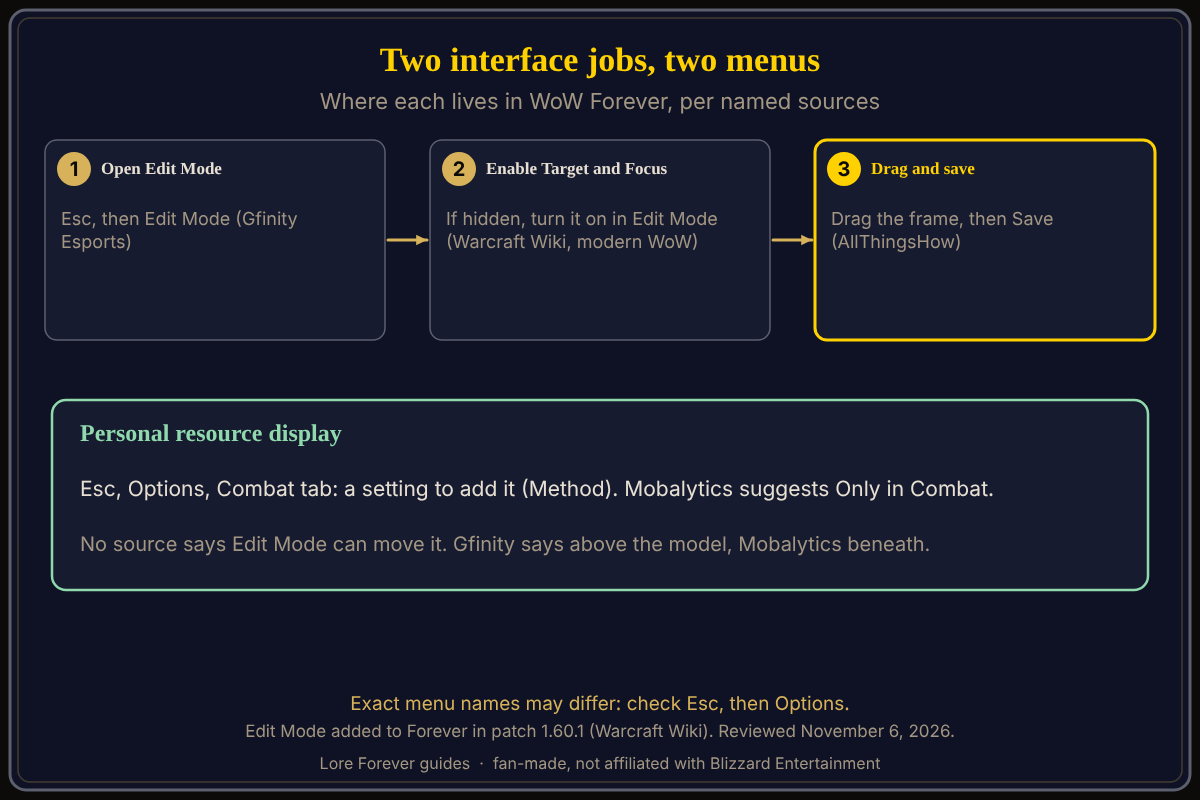
In World of Warcraft: Forever (WoW Forever) you move the target frame with Edit Mode: press Esc, choose Edit Mode, and drag the frame, according to Gfinity Esports; the personal resource display, the health and resource bar near your character, is switched on in the Combat tab of Options, according to Method. The Warcraft Wiki lists Edit Mode as added to Forever in patch 1.60.1 on November 4, 2026. No source I opened says the personal resource display can be dragged.
Quick answer: Esc, Edit Mode, drag the target frame, then save. For the personal resource display, open Esc > Options > Combat and look for the personal resource display setting; Mobalytics suggests "Only in Combat." The exact menu names may differ, so check Esc > Options.
For the full Edit Mode walkthrough, see Edit Mode setup.
Key facts
- Open Edit Mode: Esc, then Edit Mode (Gfinity Esports, September 24, 2026)
- Target frame in the wiki's list: Target and Focus is among the elements you must enable from the main Edit Mode screen before moving them (Warcraft Wiki, modern WoW page)
- Personal resource display: the Combat tab of Options has a setting to add it (Method)
- Setting value: "Only in Combat" (Mobalytics, November 3, 2026)
- Forever support: Edit Mode added in patch 1.60.1 (Warcraft Wiki, 2026-11-04)
How do I move the target frame in WoW Forever?
Gfinity Esports says to press Esc and select Edit Mode, which opens a HUD Edit Mode box where you can drag, resize and snap elements, including the Player and Target frames. The Warcraft Wiki's Edit Mode page, written for modern WoW, lists "Target and Focus" among the frames you must enable from the main Edit Mode screen before moving them, so check that it is enabled if the frame is missing. AllThingsHow says nothing is saved until you click Save. Our Edit Mode setup guide has more.
How do I turn on or move the personal resource display?
Method's UI guide says the Combat tab in Options has a setting to add a personal resource display, but does not name the exact toggle. Mobalytics says setting it to "Only in Combat" places your health and resource bar directly beneath your character model. Gfinity Esports describes the bar as above your model during combat. The two outlets disagree on above or below, so look in game. The Warcraft Wiki's Edit Mode lists for modern WoW do not include it, so I cannot say it is draggable. For nameplates see nameplates and target settings.
What if the frame will not move?
Mobalytics advises typing /reload in chat if an interface change gets stuck so your changes are saved. The Warcraft Wiki says Edit Mode is usually disabled before level 10 in Exile's Reach in modern WoW; it has no Forever-specific note.
What is not confirmed yet
- Menu names: the exact names of the Combat option and the Edit Mode buttons in the Forever client; check Esc > Options
- Personal resource display position: above (Gfinity) or beneath (Mobalytics) the model, and whether Edit Mode moves it
- Wiki lists and save step: the Warcraft Wiki page is for modern WoW; the Save step is from AllThingsHow only
Can the Lore Forever add-on and Willo help with this?
When a menu is confusing, ask Willo out loud, for example "where do I move my target frame". She can be wrong and does not change settings; the in-game menu is the source of truth. She is a separate companion app for Windows 10 or 11 and Apple Silicon Macs (macOS 12 or later), per her page; her FAQ and the Lore Forever FAQ say Windows and Mac, though CurseForge still calls her a Windows app. She is free to start with 50 answers a day. The free Lore Forever add-on adds quest stories and narration that uses generated voices, and it has no internet access. Both are fan-made and not affiliated with Blizzard. More settings: interface settings guide.
Frequently asked questions
How do I move the target frame in WoW Forever?
Press Esc, choose Edit Mode and drag it, per Gfinity Esports; the Warcraft Wiki says to enable Target and Focus in Edit Mode if it is hidden.
Where is the personal resource display setting?
In the Combat tab of Options, according to Method; Mobalytics recommends "Only in Combat."
Can I move the personal resource display?
No source I opened says you can. The Warcraft Wiki's Edit Mode lists for modern WoW do not include it.
Does WoW Forever have Edit Mode?
Yes. The Warcraft Wiki's patch history lists it as added in patch 1.60.1 on November 4, 2026, and Gfinity Esports describes using it.
Why is my target frame missing?
Check that Target and Focus is enabled in Edit Mode (Warcraft Wiki, modern WoW), and try /reload, which Mobalytics suggests when interface changes get stuck.
Sources
Reviewed November 6, 2026. Lore Forever and Willo are fan-made and are not affiliated with Blizzard Entertainment.