Guide ·
Classic or Enhanced Preset in WoW Forever: Which to Pick
The first time you log in to World of Warcraft: Forever (WoW Forever), Blizzard asks you to choose an Experience Preset, Classic or Enhanced, and its starter guide says that if you are not sure, you should start with Enhanced. The choice is a starting point, not a lock: Blizzard says you can change the individual settings later under Game Menu > Options, as of November 12, 2026.
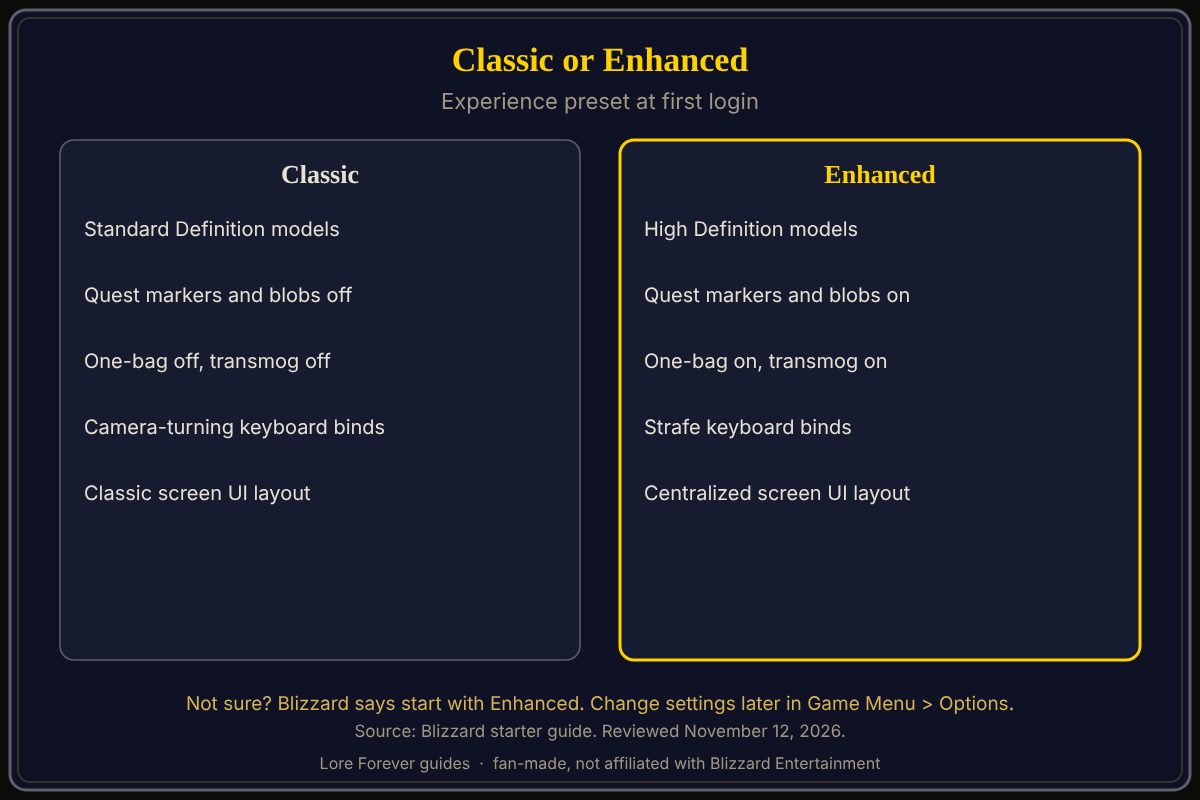
Quick answer: Classic starts you with standard definition models, quest markers off, one-bag off, transmog off, camera-turning keys and the Classic screen layout. Enhanced starts with high definition models, quest markers on, one-bag on, transmog on, strafing keys and the centralized layout. Pick Enhanced if unsure; nothing is permanent.
Key facts
- When you choose: the first time you log in, before you pick a ruleset (Blizzard)
- Default advice: if you are unsure, start with Enhanced (Blizzard)
- Can you change it: each setting, yes, under Game Menu > Options (Blizzard)
- Seen again: Blizzard says you will no longer see the preset screen after your first log in
What does the Classic preset set?
Blizzard describes Classic as a more traditional presentation with simpler visuals, standard character models and fewer modern interface features on by default, for a cleaner, original-style experience with less automatic guidance. Its starting settings are:
- Standard Definition character models
- Quest points of interest and objective blobs off
- One-bag off
- Transmog off
- Camera-turning keyboard binds as the default
- The Classic screen UI layout
What does the Enhanced preset set?
Blizzard describes Enhanced as an updated presentation with higher visual fidelity and extra interface features on by default. Its starting settings are:
- High Definition character models
- Quest points of interest and objective blobs on
- One-bag on
- Transmog on
- Strafe movement as the default for keyboard binds
- The centralized screen UI layout
Which preset should a new player pick?
Blizzard's advice is Enhanced when you are unsure, and Blizzard says the preset is a convenient starting point rather than a lock on your choices. Beyond that, the page gives no further recommendation, and this page does not add one. If you like the idea of finding quests with less on-screen guidance, Blizzard's description of Classic says that is what it offers: less automatic guidance. The quest markers are what the second line of each list controls, and the map and minimap guide explains how to read them.
Blizzard says Classic defaults to camera-turning keyboard binds and Enhanced defaults to strafe binds. Our default keybindings page covers the keys, and the first settings to change page lists what to look at next.
Can you change the preset later?
You can change the individual settings. Blizzard says to use Game Menu > Options, and elsewhere in its guide it describes Escape opening the Game Menu, then Options, where controls and key bindings, action bars, nameplates, chat, audio, graphics and accessibility live. See the interface settings guide.
Two of the preset lines have their own Blizzard notes. Character models can be changed per character, in the Options menu or at a Barbershop. A character-specific choice of high or standard definition affects only appearance, not abilities or progression. The add-on side is separate: the free Lore Forever add-on narrates the story of the zones, quests and NPCs around you, and it is not a setting in either preset.
What is not confirmed yet
- Exact option names: the labels for each setting under Options may differ from the guide's wording; check in game
- A one-click switch: Blizzard does not describe one, and says the preset screen is not shown again after the first log in
- What the layouts look like: Blizzard names the Classic and centralized layouts but does not describe them further
Frequently asked questions
What is the difference between the Classic and Enhanced presets?
Six starting settings: model definition, quest markers, one-bag, transmog, movement keys and screen layout, as listed above.
Which preset does Blizzard recommend?
Enhanced, if you are not sure.
Can I change my preset after my first login?
Not as one choice, per Blizzard, which says you will not see the screen again. You can change the individual settings under Game Menu > Options.
Does the preset change my class or progress?
Blizzard describes only presentation and interface settings; none of the listed items change abilities or progression.
Do I need add-ons with either preset?
No source says so. See do you need add-ons to play.
Sources
Reviewed November 12, 2026. Lore Forever is fan-made and is not affiliated with Blizzard Entertainment.
- Blizzard: New Player's Starter Guide, Welcome to World of Warcraft: Forever (October 28, 2026)
- Lore Forever FAQ
Related guides: what to do first, beginners guide, character creation.