Guide ·
Built-In Text-to-Speech for WoW Forever Quests: Free Options
To have WoW Forever quests read aloud for free, one add-on uses the game's own text-to-speech voices: Forever TTS. Its CurseForge page says it needs no voice packs, API keys, subscriptions or companion apps, but it also carries a platform limit you should read first.
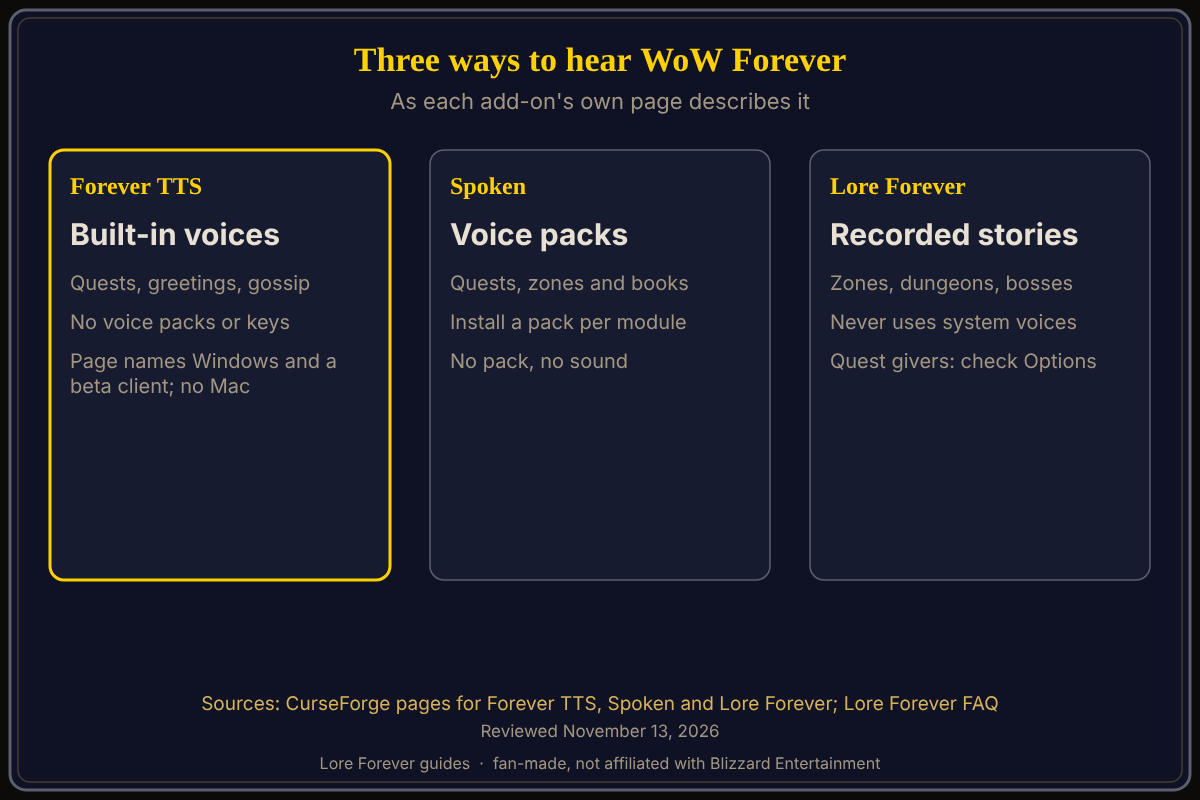
Quick answer: Forever TTS's page says it reads quest descriptions, progress and completion text, and NPC greetings and gossip, with the voices your system already provides. Its page names Windows and a beta client, and says macOS is not currently supported. Spoken uses downloadable voice packs instead, and Lore Forever narrates lore stories with recorded voices. As of November 13, 2026.
Key facts
- Forever TTS: uses the game's built-in text-to-speech; MIT license; file dated September 17, 2026 (CurseForge)
- Platform note: targets WoW Forever beta 1.60.1 on Windows; other client versions and macOS not currently supported (its page)
- Spoken: voices not included; install a voice pack for each module you want (its page)
- Lore Forever: recorded narration, so it never needs your system's text-to-speech voices (Lore Forever FAQ)
How does Forever TTS work?
Per its CurseForge page, it reads quest descriptions, progress dialogue and completion text, narrates NPC greetings and gossip with configurable repeat behavior, and lets you choose a voice, speed and volume. It shows an animated NPC portrait with a queue of upcoming dialogue, supports pause, resume, skip and clear, and can replay a quest from your quest log.
Its page gives these commands:
- /ftts test plays a sample.
- /ftts options sets your voice and narration.
- /ftts read reads or stops the selected quest-log quest.
- /ftts pause, /ftts play, /ftts skip and /ftts clear control the queue.
Quest and NPC narration starts automatically by default, the page says. If no voices appear, it points you to the game's Accessibility / Text to Speech settings and your installed Windows speech voices.
What are the limits of built-in text-to-speech?
The page lists them itself. Long dialogue is split into sections, and resuming restarts the current section. Stopping narration can interrupt other features that use the game's shared text-to-speech system. Voice availability and quality depend on the voices your client has.
The platform note matters most. The page says it targets WoW Forever beta 1.60.1, build 69893, on Windows, with other client versions and macOS not currently supported. The file on the page is dated September 17, 2026, and I did not test it on the live game, so treat compatibility as unconfirmed.
How is a voice pack add-on different?
Spoken's page describes pre-recorded voices for quests, zone stories and books, split into three modules. It says the voices are not included: you install the voice pack for each module you want, or the add-on stays silent. It adds that the game does not let add-ons control playback speed, and that pausing restarts a line.
The trade-off: built-in text-to-speech needs no voice downloads but uses whatever voices your system has. I do not rank them. Our quest voice add-ons guide compares more options.
Where does Lore Forever fit?
It narrates lore stories rather than every quest line, and its FAQ says the narration is all recordings, so it never uses your system's text-to-speech voices. The FAQ also says it runs alongside other add-ons, and that if Spoken, Chatty Little NPC or another add-on already reads your quests, Lore Forever leaves quest voices to it. I did not test it beside Forever TTS.
Quest dialogue in Lore Forever is its own optional setting. What's new says quest givers now speak by default in the starting zones, and one FAQ answer says the main download carries those voices, while another FAQ answer and the CurseForge page describe quest dialogue as a separate pack that starts off. Because its pages disagree, check Options > Speak quest dialogue.
How do I avoid hearing quests twice?
Pick one source for quest voices. If you use Forever TTS, untick Speak quest dialogue in Lore Forever's Options; per the FAQ, that turns off its quest voices.
What is not confirmed yet
- Whether Forever TTS works on the current live client; its page names a beta build.
- Whether it runs on Mac; its page says not currently.
- How it behaves next to Lore Forever, which neither page tests.
Frequently asked questions
Does WoW Forever read quests aloud by itself?
None of the pages I opened says it does. Add-ons such as Forever TTS add it, using the game's text-to-speech.
Is Forever TTS free?
Its CurseForge page lists it under the MIT license and says it needs no subscriptions or API keys.
Does Forever TTS work on Mac?
Its page says macOS is not currently supported.
What is the difference between Forever TTS and Spoken?
Forever TTS uses system voices with no packs; Spoken needs voice packs per module, per their pages.
Can I use Lore Forever with a quest voice add-on?
Per its FAQ, yes: it leaves quest voices to another add-on that already reads your quests.
Related guides: best add-on for voice, Lore Forever vs Spoken and using both together.
Sources
Reviewed November 13, 2026. Lore Forever and Willo are fan-made and are not affiliated with Blizzard Entertainment.