Guide ·
Lore Forever language: change it and install language packs
Lore Forever follows your WoW client's language by default ("Automatic"). To change it, open Options > Language or type /lore lang, pick a language and type /reload. I checked the live pages on November 9, 2026 and the project code; I did not test each language in game.
Quick answer: English comes with the add-on. For another language, install that language's files from the downloads page, then choose it in Options > Language (or /lore lang <code>) and type /reload. A story with no recording in your language shows as text unless you tick "Let English narration fill in".
Key facts
- Default: Automatic, which follows the WoW client's language
- Change it: Options > Language, or /lore lang followed by a code; /lore lang alone lists what you can choose
- Apply it: type /reload; a "Reload now" button also appears in Options
- Ten languages besides English on the Downloads page; four say narration is "in English for now"
- No recording: shows as text by default
Which languages does Lore Forever have?
Press "Change" beside "Your language and narrator" on the downloads page. "Storytelling language" offers English, Deutsch, Español (Spain), Français, Português (Brazil), Italiano and Українська; under "Stories in English for now" it lists Русский, Română, Svenska and 简体中文. You also pick a narrator (male or female) and Windows or Mac. Romanian and Swedish arrived on October 27 (What's new). Translators work through the site's translate page, which the add-on's Options also link as "Get more languages".
How do I change the language?
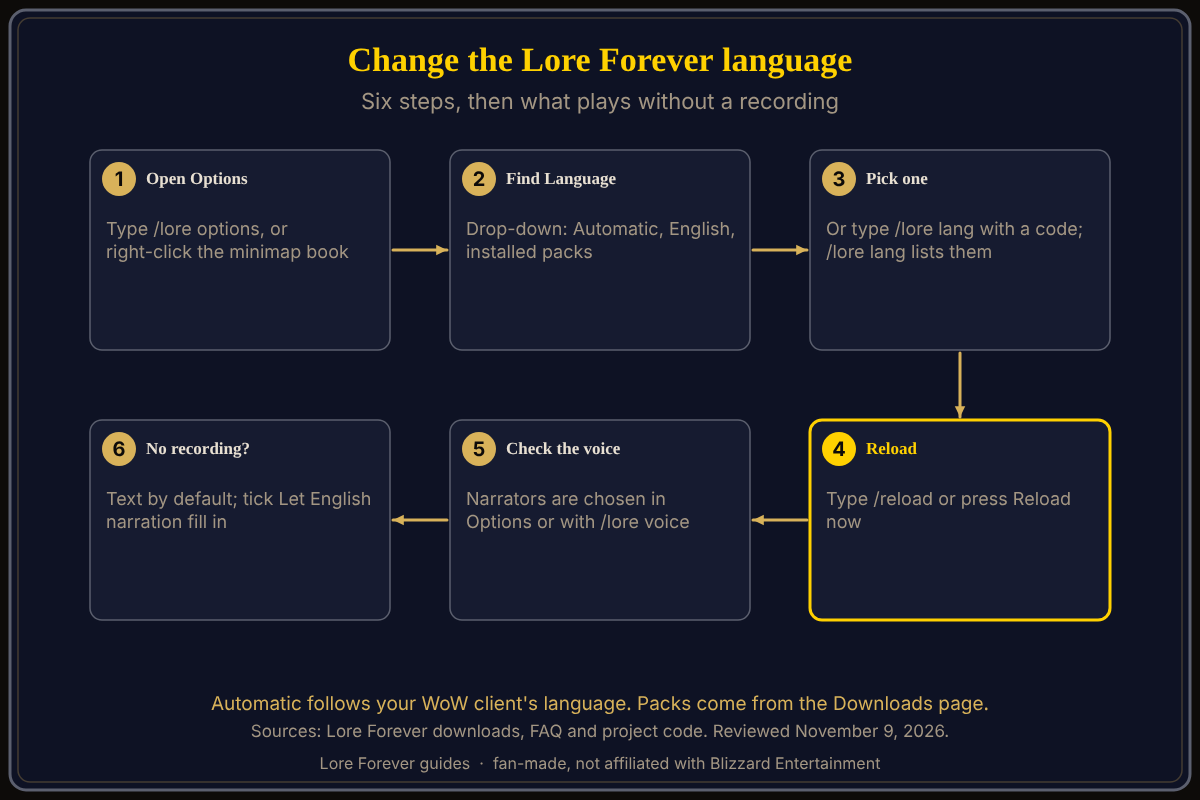
- Open Lore Forever Options: type /lore options, or right-click the minimap book and choose Options.
- Find the Language section. Its drop-down offers Automatic, English and each installed language pack.
- Pick a language. The note under it says Automatic follows your WoW client's language and that you must reload.
- Type /reload, or press the Reload now button that appears.
- Or skip the menu: type /lore lang en for English, or /lore lang with another code from the list it prints.
If Automatic picked a non-English client language, the add-on says so once in chat.
What plays when a story has no recording?
By default it shows as text. Options has a tick, "Let English narration fill in", whose note says that with Lore Forever in another language a story with no recording plays in English instead of showing as text. The code sets it off by default. Separately, the FAQ says a voice that has not recorded a story hands it to the next voice in your order; you set that order in Options or with /lore voice. Spanish stories show fully in Spanish, never with English filled in, per the November 3 What's new entry.
Where do I get the language packs?
On the downloads page: press Change, pick language, narrator and computer, and the cards update. The German add-on card says "Every lore entry in German"; the Russian one says narration is "in English for now". Cards link to CurseForge or to ZIPs; the bigger bundles are ZIP sets to unzip into your AddOns folder (the FAQ gives World of Warcraft\_forever_\Interface\AddOns). The FAQ adds that the Setup.exe installer is for Windows; on a Mac you take the ZIP or use CurseForge. The install guide has the steps.
What is not confirmed yet
- Whether every lore entry is translated in each language; the translate page shows progress per language.
- Whether Spanish and Portuguese are narrated: the Downloads cards show a narrator without "in English for now", but CurseForge's page says they are text for now, and the two disagree.
- The codes for Svenska, Română, Italiano, Українська and 简体中文: I saw only deDE (on CurseForge) and en; /lore lang prints the rest.
- The current Options layout: I read project code dated October 22, and later releases changed the book. The translate page names the path Options > AddOns > Lore Forever > Language.
Can Willo or Lore Forever help with this?
Ask Willo out loud, for example "how do I switch Lore Forever to German". She can be wrong and is not official, so in-game Options and the Downloads page are the source of truth. Willo is free to start (50 answers a day) and is a separate companion app for Windows 10 or 11 and Apple Silicon Macs (macOS 12 or later), per her page. The free Lore Forever add-on is fan-made, not affiliated with Blizzard, has no internet access, and its narration uses generated voices.
Frequently asked questions
Does Lore Forever change language on its own?
Yes, Automatic follows your WoW client's language; a note appears once in chat.
Do I need to restart the game after switching?
Type /reload; the add-on cannot reload the interface itself.
Can I read in German but hear English?
Tick "Let English narration fill in".
Is Russian narrated?
The Downloads page says Russian stories are read in English for now, with every lore entry in Russian text.
Do language packs cost anything?
No. The Downloads page says "Free forever" and Willo's page says the add-on is always free.
Sources
Reviewed November 9, 2026. Lore Forever and Willo are fan-made and are not affiliated with Blizzard Entertainment.
- Lore Forever downloads, FAQ, What's new and translate
- Add-on project code, dated October 22, 2026
- CurseForge: Lore Forever
- See also Lore Forever add-on guide, narrator voices explained and slash commands