Guide ·
How to Report and Block a Player in WoW Forever
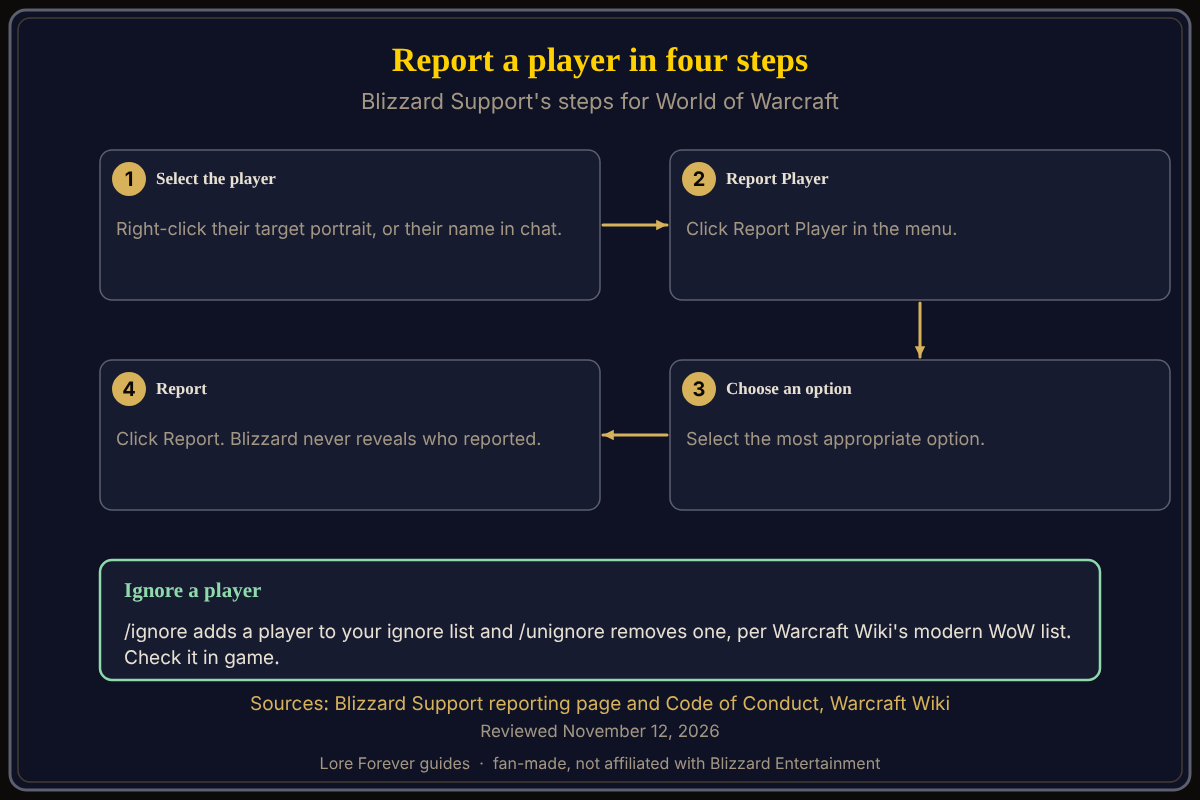
To report a player in World of Warcraft: Forever (WoW Forever), right-click their character portrait or their name in chat, click Report Player, choose the most appropriate option and click Report. Those are Blizzard Support's steps for World of Warcraft in general, not a Forever-specific page, so the exact menu wording in Forever may differ.
Quick answer: Report: right-click the portrait or chat name, Report Player, pick an option, Report. Block: the /ignore command adds a player to your ignore list, per Warcraft Wiki, which describes modern WoW, so check it in game. Blizzard says it never reveals who reported a player.
Key facts
- Report steps: four, from Blizzard Support's reporting page
- Privacy: Blizzard says it may tell a player they were reported and why, but never who reported them
- False reports: Blizzard's Code of Conduct says reporting someone only to restrict their play is penalized
- Ignore: /ignore and /unignore are listed on Warcraft Wiki's modern WoW command page
How do you report a player?
Blizzard Support's page "Reporting Code of Conduct Violation" gives four steps for World of Warcraft:
- Select the player's character and right-click the target portrait, or right-click the player's name in chat.
- Click Report Player.
- Select the most appropriate option.
- Click Report.
The page says Blizzard may notify players that they were reported, along with the reason, but will never reveal the identity of the player who reported them.
What can you report?
Blizzard's In-Game Code of Conduct lists these areas:
- Communication: offensive or vulgar language, hate speech, discriminatory language, threats and harassment, in chat, voice communication or group finder
- Naming: player names, BattleTags and guild names must be appropriate, and the page notes that role-playing servers may have distinct standards
- Cheating: using third-party programs to automate any facet of the game, exploiting bugs, or gaining an unfair advantage, plus scamming and account sharing
- Behavior: griefing, throwing, feeding and other behavior that intentionally detracts from others' enjoyment
That page's header read Updated: 3 years ago when I opened it on November 12, 2026, so it is general Blizzard policy rather than Forever guidance. It also says that falsely reporting someone only to restrict their gameplay is unacceptable and results in penalties to your account.
How do you block or ignore a player?
Warcraft Wiki's macro commands page, which describes modern WoW, lists /ignore as adding a player to your ignore list and /unignore as removing one, plus /friend for the Friends list. I did not confirm these in WoW Forever or whether a right-click Ignore option exists in its menus, so try the command in game. Blizzard's own pages I opened do not describe blocking, and I did not find a Forever-specific page for it.
Ignoring and reporting are separate steps: a report goes to Blizzard, while /ignore is a command that adds a player to your ignore list.
What about rulesets and naming rules?
Blizzard's starter guide says the Roleplay and Roleplay-PvP rulesets come with naming and behavior rules. The Code of Conduct's naming section separately says role-playing servers may have distinct standards. See the RP ruleset and character name rules.
How can the Lore Forever add-on and Willo help with reporting?
Not directly, and that is worth saying plainly. The free, fan-made Lore Forever add-on does not moderate chat or report anyone. Its /lore report command is for flagging a wrong lore answer, and /lore stop stops narration if you would rather play in silence. Willo, a separate companion app, can answer how-to questions out loud or typed, but she can be wrong, so follow Blizzard's pages for reports. Get the Lore Forever add-on or read about Willo.
What is not confirmed yet
- Forever menu wording: Blizzard's steps are generic to WoW
- Right-click Ignore: not confirmed in Forever
- Blocking in chat and voice: I found no Blizzard page for it
Frequently asked questions
How do I report someone in WoW Forever?
Right-click their portrait or chat name, click Report Player, choose an option, click Report.
Will the player know I reported them?
Blizzard says it may tell them they were reported and why, but never who reported them.
How do I ignore a player?
Warcraft Wiki lists /ignore for modern WoW; test it in Forever.
Can I report for any reason?
No. Blizzard says false reports meant to restrict someone's play are penalized.
Does Lore Forever have a report player feature?
No. Its /lore report is for wrong lore answers.
Related guides: chat settings, chat channels and are add-ons allowed and safe.
Sources
Reviewed November 12, 2026. Lore Forever and Willo are fan-made and are not affiliated with Blizzard Entertainment.