Guide ·
CurseForge Not Showing WoW Forever? Fix the App Step by Step
If WoW Forever does not show up in the CurseForge app, CurseForge's own Known Issues page says to restart the app so it can install any available updates. If that does not help, it tells you to contact its support.
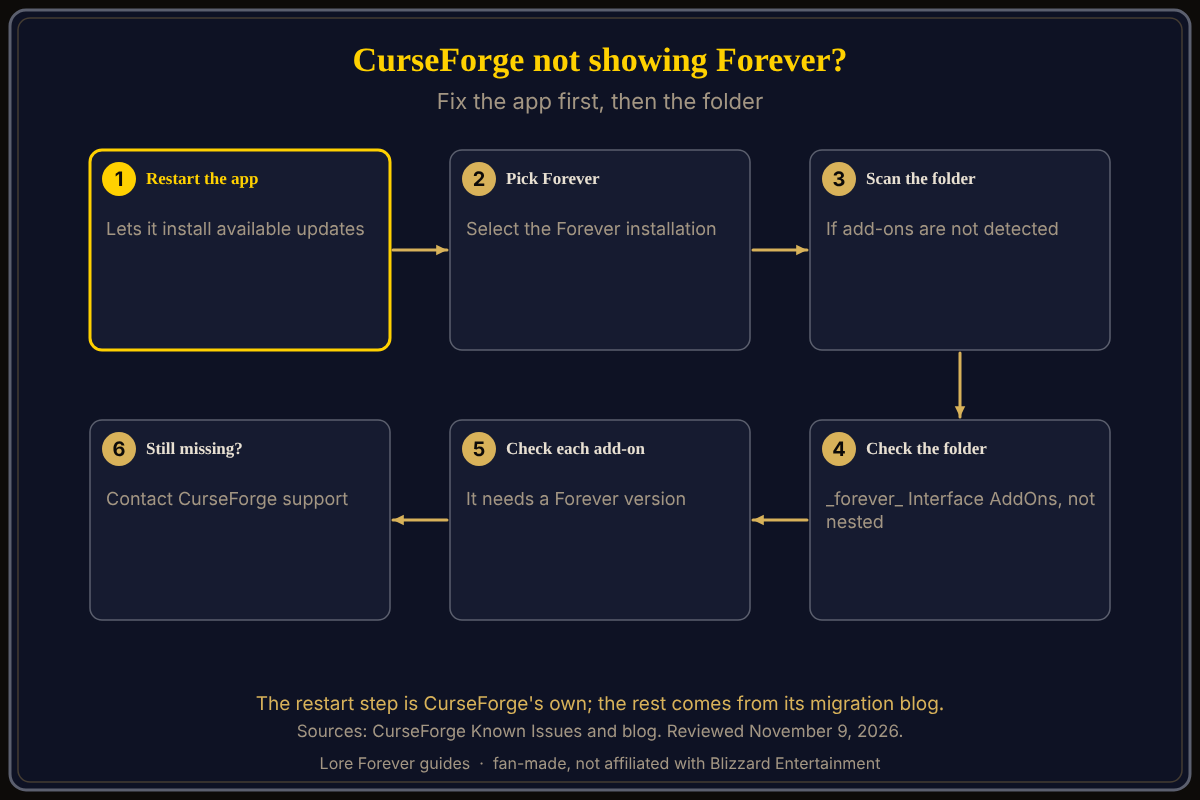
Quick answer: Restart the app to let it update, pick your Forever installation, scan the add-ons folder if nothing is detected, and check that each add-on has a Forever version. If Forever is still missing, contact CurseForge support.
Key facts
- CurseForge's fix: restart the app to initiate available updates, then contact CurseForge if it persists (Known Issues)
- Latest app release I found: 1.326, posted November 8, 2026 (CurseForge blog)
- Folder:
_forever_\Interface\AddOnson Windows, not a nestedInterface\Interface(CurseForge blog) - Beta folder:
_classic_beta_is separate from_forever_
How do I fix "WoW Forever won't show up in the app"?
That is the heading CurseForge uses. Its Known Issues page, read on November 9, lists one fix:
- Restart the CurseForge app. CurseForge says this initiates available updates.
- If Forever still does not show, contact CurseForge, which invites you to reach out for further help.
The newest CurseForge app release notes I saw are for version 1.326, posted November 8; it does not say which version first shows Forever, so I give no minimum version.
This page is about the app. For folders and in-game checks, see add-ons not showing up.
What if the app is current but add-ons are missing?
CurseForge's blog on moving add-ons from beta to live says to choose your Forever live installation and check for add-on updates because beta versions may need updating. A tip in it says that if the app does not auto-recognize the add-ons, you should manually scan the add-ons folder. It also says missing add-ons should sit in _forever_\Interface\AddOns, not in a nested folder like Interface\Interface, followed by a full game restart and a look at the in-game AddOns menu.
The third-party site WoWForeverAddons says that if Forever is not listed you can add it under the World of Warcraft settings and point the app at your Forever folder, and that add-ons installed while the app was set to another version will not show in game. It cites no Blizzard or CurseForge page for these steps and says the folder name is "reported" until confirmed, so treat them as unverified. Where the scan or add-folder option sits in the app is not described in any page I read.
Why does an add-on not appear for Forever?
CurseForge's blog says compatibility depends on each add-on's version and suggests disabling problem add-ons until a Forever-compatible update is released. WoWForeverAddons says the author may not have tagged a Forever file. On CurseForge's side, its Known Issues page tells authors that a project must have a Release file, not be Experimental, and be tagged for a game version. If you copied add-ons from beta, the blog warns that pasting can overwrite files and that the beta account folder under WTF\Account must be renamed to your Battle.net account name.
What is not confirmed yet
- Mac folder: no CurseForge page I read gives the Mac path.
- Cause: CurseForge does not say why Forever fails to appear, only to restart the app.
- Version: no CurseForge page I opened gives a minimum app version for Forever.
- Other managers: I did not verify any non-CurseForge manager.
Can the Lore Forever add-on or Willo help?
The free Lore Forever add-on can be installed from CurseForge, or as a ZIP if the app is giving you trouble; see how to install the Lore Forever add-on. It has no internet access and tells the story behind quests once it loads. Willo is a separate companion app for Windows 10 or 11 and Apple Silicon Macs (macOS 12 or later), per her page; her FAQ and the Lore Forever FAQ say Windows and Mac, though CurseForge still calls her a Windows app. Ask her out loud what a step means; she is free to start with 50 answers a day, can be wrong and is not official, so follow CurseForge's pages first. Both are fan-made and not affiliated with Blizzard.
Frequently asked questions
Why is CurseForge not showing WoW Forever?
CurseForge does not give a cause. Its Known Issues page says to restart the app to initiate available updates and to contact it if that fails.
Is there a minimum CurseForge app version for Forever?
I found none. The newest CurseForge app release notes I saw are for 1.326, posted November 8.
Do I need to uninstall CurseForge to update?
CurseForge's page does not say to uninstall; it says to restart the app.
Where do WoW Forever add-ons go?
_forever_\Interface\AddOns inside your World of Warcraft folder, per CurseForge's blog. See how to install add-ons.
Do my beta add-ons work?
Only after copying Interface and WTF into _forever_ and updating; CurseForge says beta versions may need updates.
Sources
Reviewed November 9, 2026. Lore Forever and Willo are fan-made and are not affiliated with Blizzard Entertainment.